
9 Reasons Your Website Isn’t Showing on Google (And How to Fix It Fast)
If you’re wondering why isn’t my site showing up on Google, you’re not alone. Many business owners face this issue without clear answers. This guide explains the real causes and gives practical steps to help your website get indexed, ranked, and discovered faster.

Deepak Sharma
SEO Consultant
May 06, 2026 | 6 min. read

Table of the content
- Introduction
- Reason #1 – Your Website Is New (And Google Hasn’t Indexed It Yet)
- Reason #2 – Something Is Blocking Google from Crawling Your Site
- Reason #3 – Your Content Isn’t Strong Enough to Show Up
- Reason #4 – Technical Issues Are Holding Your Site Back
- Reason #5 – You’re Targeting the Wrong Keywords (Or the Wrong Intent)
- Reason #6 – Your Website Has No Authority Yet
- Reason #7 – Your Website Has Been Penalized by Google
- Reason #8 – Duplicate Content Is Confusing Google
- Reason #9 – A Recent Google Update Has Changed the Game
- Frequently Asked Questions
Introduction
If you’ve ever searched your own domain and found nothing, it’s frustrating. I’ve had business owners come to me thinking their website is broken, when in reality, it’s just not visible yet.
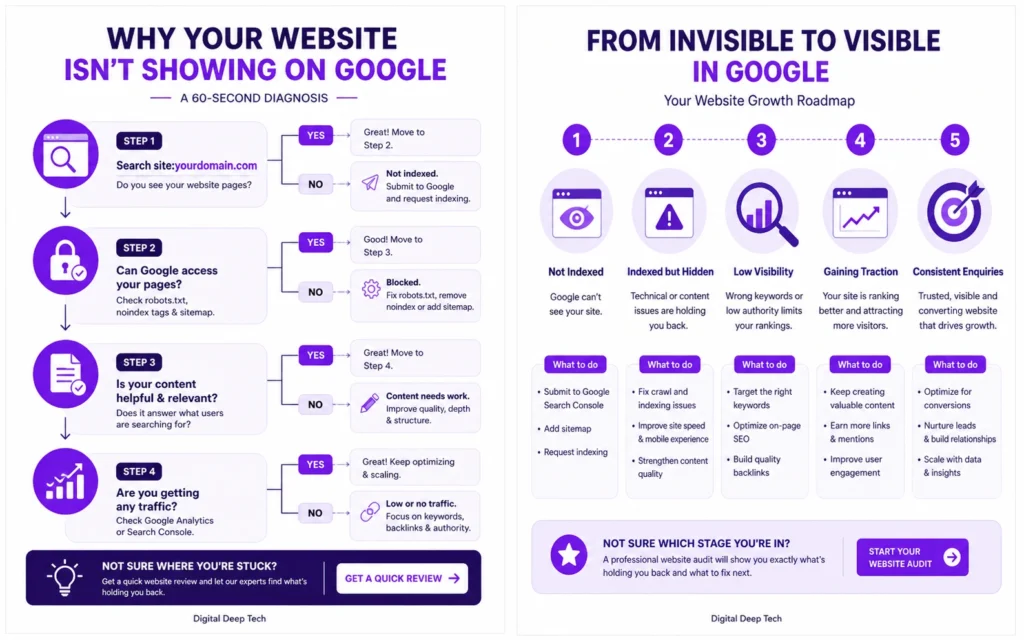
In most cases, when a website not showing up on Google becomes a concern, it comes down to a few core issues. Either Google hasn’t indexed the site yet, or it’s struggling to properly access and understand the pages.
A quick way to check this is by searching:
site:yourdomain.com
If nothing shows up, your site not indexed by Google is likely the starting point.
From working with different small businesses, I’ve seen this happen more often than you’d expect, especially with new websites or recently redesigned ones. The site is live, but from Google’s point of view, it barely exists.
Most articles you’ll find cover a few common reasons like blocked pages or penalties. That’s useful, but it’s usually not enough to actually fix the problem. In real situations, it’s rarely just one issue. It’s often a mix of content gaps, technical setup, and lack of authority.
In this guide, I’ll walk you through the real reasons your website isn’t appearing in Google search, based on what I see regularly when reviewing client sites. More importantly, I’ll show you how to fix each one in a practical way, without overcomplicating things.
Let’s start with the most common reason I see.
Reason #1 – Your Website Is New (And Google Hasn’t Indexed It Yet)
If your website has just gone live, there’s a good chance nothing is actually “wrong.” It simply hasn’t been picked up by Google yet.
I’ve seen this a lot with new business owners. The site looks great, everything works, but when they search for it, there’s nothing. Naturally, they assume something is broken.
That’s where SEO for hotels starts to change things.
In reality, a new website not showing on Google is often just waiting to be discovered. Google doesn’t automatically know your site exists the moment you publish it. It needs time to find, crawl, and store your pages in its index.
In my experience, this can take anywhere from a few days to a few weeks. Sometimes longer if there are no signals pointing to your site.
Why this happens
Google finds websites through links and submissions. If your site has no links pointing to it and hasn’t been submitted anywhere, it’s basically invisible.
That’s when you end up in a situation where your site not indexed by Google becomes the root issue.
How to fix it
The good news is this is one of the easiest things to fix.
Start by setting up Google Search Console if you haven’t already. Once that’s done:
- Submit your sitemap (usually found at yourdomain.com/sitemap.xml)
- Use the URL inspection tool and request indexing for your main pages
- Make sure your key pages are internally linked properly
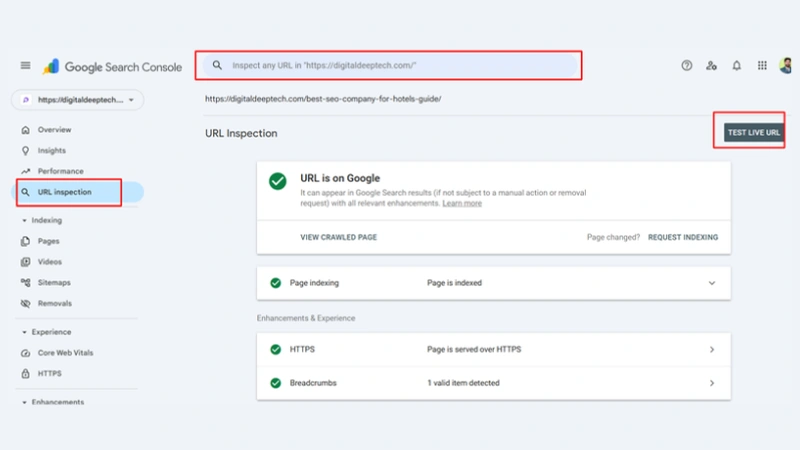
I usually also suggest adding a few simple signals to help Google discover the site faster. For example, linking your website from your social media profiles or business listings. Tools make this easier by scheduling consistent content across every major platform from one dashboard.
From working with different businesses, I’ve noticed that once you submit site to Google and give it a few clear signals, indexing tends to happen much quicker.
If you check using site:yourdomain.com and still see nothing after a couple of weeks, then it’s worth looking at the next issue, because something else might be holding your site back.
Reason #2 – Something Is Blocking Google from Crawling Your Site
Sometimes your website is live, Google knows it exists, but it still doesn’t show up. This is where things get a bit more technical, but the issue is often simpler than it sounds.
I’ve reviewed sites where everything looked fine on the surface, but a small setting was quietly blocking Google completely. No errors, no warnings, just zero visibility.
This usually comes down to crawling and indexing restrictions.
Why this happens
There are two common culprits here.
The first is your robots.txt file. This file tells search engines what they can and can’t access. If it’s set up incorrectly, it can block your entire website without you realising it.
I’ve seen cases where a single line like “Disallow: /” was added during development and never removed. That one line tells Google to stay away from every page.
The second issue is the noindex tag. This is a small piece of code added to a page that tells Google not to include it in search results. It’s useful in some cases, but if it’s on important pages like your homepage, your site won’t appear at all.
How to fix it
Start with your robots.txt file. You can check it by visiting:
yourdomain.com/robots.txt
Look for anything that might be blocking access to key pages.
Next, open Google Search Console and check your pages using the URL inspection tool. It will tell you clearly if a page is being blocked or marked as noindex.
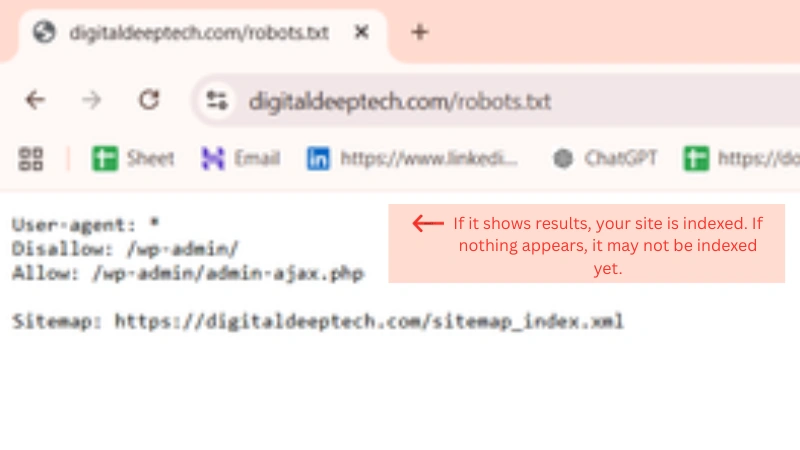
In my experience, this is one of the fastest ways to fix website not showing on Google issues. Once the block is removed, Google can crawl your site properly again.
After making changes, request indexing again for your main pages. That usually speeds things up.
If everything looks fine here and your site is still not visible, then the problem is likely not about access. It’s more about what Google sees when it actually reaches your pages, which we’ll look at next.
Reason #3 – Your Content Isn’t Strong Enough to Show Up
| Website Factor | Healthy Benchmark | Warning Sign (What Most Sites Have) | Why It Matters |
|---|---|---|---|
| Conversion Rate | 2% – 5% average (top sites 10%+) | Below 2% or no enquiries | Low conversions mean your site isn’t turning visitors into leads. |
| Bounce Rate | 30% – 55% | 60%+ visitors leave quickly | High bounce rate means people don’t find what they need. |
| Page Speed | Under 3 seconds load time | Slow loading, especially on mobile | Slow sites lose visitors before they even engage. |
| Content Quality | Clear, helpful, and detailed | Thin or generic content | Weak content reduces visibility and trust. |
| Call to Action (CTA) | Clear next step on every page | Missing or unclear CTA | Without direction, visitors won’t take action. |
| User Experience | Simple navigation, mobile-friendly | Confusing layout or poor mobile design | Bad experience increases bounce and lowers trust. |
This is one of the most overlooked reasons. The website is technically fine, pages are indexed, but nothing shows up when you search.
At that point, the issue usually comes down to content quality.
I’ve seen websites where every page exists, but there’s very little on them. A few lines on the homepage, a short service description, maybe copied text from somewhere else. From a business point of view, it might feel enough. From Google’s point of view, it’s not.
Why this happens
Google is trying to show useful results. If your pages don’t give enough information, or they look similar to dozens of others, they’re easy to ignore.
This is what’s often called thin content. It’s not always about word count. It’s more about depth and usefulness.
For example, I once reviewed a service page that had just two short paragraphs. It explained what the service was, but didn’t answer any real questions. No details, no examples, nothing that would help someone decide.
That page was indexed, but it never ranked for anything meaningful.
How to fix it
Start by looking at your key pages as if you were the customer.
Ask yourself:
Would this page actually help someone make a decision?
If not, it needs more depth.
In my experience, improving content doesn’t mean adding fluff. It means adding clarity. Explain what you do, who it’s for, how it works, and what makes it different. Answer the questions people are likely to have.
A good starting point is:
- Expand your service pages with real details
- Add examples or simple use cases
- Make your content easier to read and understand
If you have pages that say almost the same thing, it’s better to combine them into one stronger page instead of splitting value across multiple weak ones.
From working with different businesses, I’ve seen that once content becomes genuinely useful, website visibility improves naturally. Not overnight, but steadily.
If your content is already strong and you’re still not seeing results, then the issue may not be what you’re saying, but how your site is performing behind the scenes.
Reason #4 – Technical Issues Are Holding Your Site Back
Sometimes everything looks fine on the surface. Your pages are live, content is decent, and nothing seems broken. But behind the scenes, small technical problems can quietly affect your website ranking.
I’ve seen this quite often. A site looks good to the owner, but when you test it properly, it’s slow, hard to use on mobile, or full of small errors that add up.
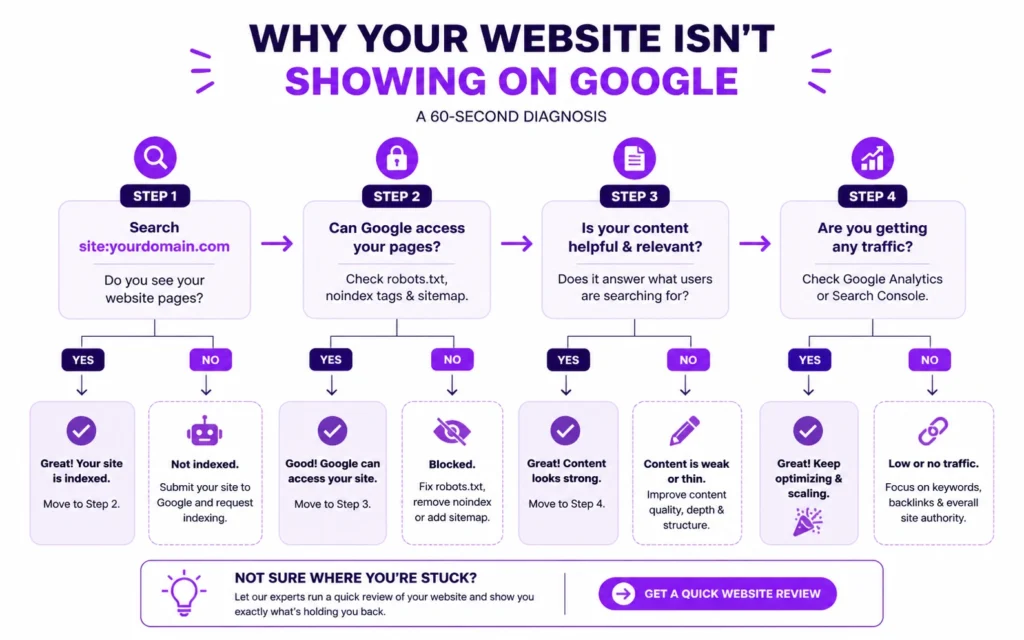
Why this happens
Google doesn’t just look at what your website says. It also looks at how it performs.
If your pages take too long to load, people leave. If your site doesn’t work properly on mobile, it creates a poor experience. And since most searches now happen on phones, mobile usability matters more than ever.
📊 53% of mobile users abandon a website that takes longer than 3 seconds to load.
Why it matters:
If your site is slow, visitors leave before they even read your content or see your offer. This directly impacts enquiries, especially for small businesses relying on first impressions.
Source: Google (Think with Google)
There are also structural issues that can cause confusion. Things like having both http and https versions of your site live at the same time, or multiple versions of the same page. These can split signals and make it harder for Google to understand which version to show.
From working with different businesses, I’ve noticed that these technical SEO issues often go unnoticed until someone actually checks them properly.
How to fix it
Start with the basics.
Test your site speed using tools like PageSpeed Insights. If your site feels slow, it usually is. Large images, unnecessary plugins, or poor hosting are common reasons.
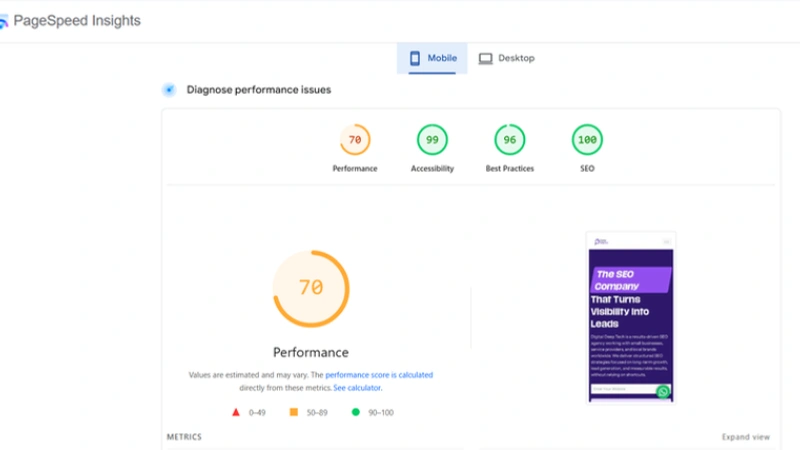
Then check your site on mobile. Open it on your phone and go through it like a customer would. If something feels off, it probably needs fixing.
A few practical things that make a real difference:
- Compress and properly size images
- Make sure your site is mobile-friendly and responsive
- Ensure your site runs on HTTPS only
- Fix broken links and clean up unnecessary redirects
Also pay attention to navigation. If users can’t find what they’re looking for quickly, they leave. That sends the wrong signal.
In my experience, improving these areas doesn’t just help rankings. It makes your website actually work better for real visitors.
If your technical SEO setup is solid and things still aren’t improving, the next place to look is your targeting, because sometimes the issue isn’t visibility, it’s relevance.
Reason #5 – You’re Targeting the Wrong Keywords (Or the Wrong Intent)
This is where things get a bit more strategic.
I’ve worked with businesses that had well-built websites, decent content, and no major technical issues. Still, they weren’t getting any visibility. The problem wasn’t the site, it was what they were trying to rank for.
📊 The average website conversion rate is only 2.35%, while top-performing sites reach 11% or higher.
Why it matters:
Most websites don’t fail because of traffic, they fail because they don’t convert visitors into leads. This highlights the gap between a basic website and one that’s properly optimised for enquiries.
Source: WordStream
They were simply targeting wrong keywords.
Why this happens
It’s easy to assume what people search for. But in reality, what you think your customers type into Google and what they actually search can be very different.
Another common issue is misunderstanding search intent.
For example, if someone searches for “how to choose a web designer,” they’re looking for guidance. If your page is a direct sales pitch, it won’t match what they want. Google can see that mismatch and won’t show your page.
I’ve seen service pages trying to rank for broad or highly competitive terms, while completely missing simpler, more specific searches that would actually bring enquiries.
How to fix it
Start by stepping back and looking at your pages one by one.
Ask:
What is this page trying to rank for, and does it actually match what someone would search?
In my experience, focusing on more specific, realistic terms works much better. Instead of going after broad phrases, look at how your customers describe their problems.
A practical way to do this:
- Search your target keyword on Google and study the top results
- Notice the type of content showing up
- Adjust your page to match that format and intent
You can also look at the “People also ask” section on Google. It gives you a clear idea of what people are really trying to understand.
From working with different businesses, I’ve seen that once content aligns with what people actually want, it starts to show up more consistently in search.
So if your site is technically fine but still not visible, there’s a good chance it’s not about fixing the site, it’s about fixing the direction.
Reason #6 – Your Website Has No Authority Yet
Even with good content and a solid setup, your site might still struggle to appear on Google. This is usually down to one thing, trust.
Google needs signals to decide whether your website is worth showing. One of the biggest signals is links from other websites.I’ve seen hotels invest in SEO, not get results, and assume it doesn’t work. In reality, it usually comes down to choosing the wrong agency or a strategy that wasn’t aligned with bookings.
If you have little to no backlinks, Google has very little to go on.
Why this happens
Think of backlinks as recommendations. When another website links to you, it’s a sign that your content is worth referencing.
I’ve seen many small business websites that are technically sound and well-written, but they’ve never been promoted beyond their own domain. No mentions, no links, nothing pointing back to them.
In that situation, your domain authority stays low. And without that trust, even good pages can struggle to show up.
How to fix it
You don’t need hundreds of links to get started. A few relevant ones can make a noticeable difference.
From my experience, the simplest starting points are:
- Getting listed on trusted business directories
- Partnering with related businesses and exchanging mentions
- Writing guest articles for industry blogs
- Sharing your content where your audience already spends time
Also, don’t ignore internal linking. Linking your own pages together properly helps Google understand what matters most on your site.
For example, if you have a key service page, make sure it’s linked from your homepage and other relevant pages. This strengthens its importance.
I’ve seen sites go from barely visible to consistently appearing in search just by improving their link profile over time.
It doesn’t happen overnight, but once Google starts seeing those signals, it becomes much easier to improve Google rankings and maintain them.
If your authority is building and things still aren’t moving, then it’s worth checking if something more serious is holding your site back.
Reason #7 – Your Website Has Been Penalized by Google
This one doesn’t happen as often, but when it does, the impact is serious.
If your site was showing on Google before and suddenly disappeared, or dropped significantly, there’s a chance it’s been hit by a Google penalty.
I’ve seen cases where businesses didn’t realize anything was wrong until their enquiries stopped. Then we checked, and the site had lost most of its visibility overnight.
Why this happens
Google has strict guidelines about what’s acceptable. If a site crosses those lines, it can be pushed down or removed completely.
Common reasons include:
- Low-quality or spammy backlinks
- Duplicate or thin content across multiple pages
- Trying to manipulate rankings in unnatural ways
Sometimes this is due to past work done on the site. I’ve worked with businesses who hired someone years ago, and only later found out those shortcuts caused problems.
There are two types to be aware of.
The first is manual actions, where someone at Google has reviewed your site and flagged it. The second is algorithm-related, where your site is affected by updates without a direct warning.
How to fix it
Start by checking your Google Search Console account.
There’s a section specifically for manual actions. If there’s an issue, it will usually tell you what needs fixing.
From there, the process is about cleaning things up:
- Remove or disavow harmful backlinks
- Improve or remove low-quality pages
- Fix anything that doesn’t follow guidelines
Once that’s done, you can request a review.
In my experience, this part requires patience. Even after fixing the issue, it can take time for your website visibility to recover.
If there’s no manual action showing, but you’ve noticed a sudden drop, it’s still worth doing a basic SEO auditing of your site. Look for anything that might be seen as low quality or outdated.
If penalties aren’t the problem, then the next thing to check is whether your own pages are competing against each other without you realizing it.
Reason #8 – Duplicate Content Is Confusing Google
This is one of those issues that often goes unnoticed, especially on growing websites.
Everything seems fine. Pages are live, content looks good, but rankings don’t improve. In some cases, pages don’t show up at all. When I dig into it, the problem is usually duplicate content.
Why this happens
Google tries to avoid showing the same content multiple times in search results. So when it finds similar or identical pages on your site, it has to choose one and ignore the rest.
I’ve seen this happen with service pages that are slightly rewritten versions of each other, or blogs published under different URLs. From a business perspective, it feels like you’re covering more ground. From Google’s side, it creates confusion.
Another common issue is having multiple versions of the same page. For example:
- http and https versions both accessible
- www and non-www versions live
- Same page accessible through different URLs
Without clear direction, Google doesn’t know which version to prioritise. That splits your signals and affects website visibility.
How to fix it
The goal here is to make things clear and consistent.
First, identify pages that are too similar. If two pages are covering almost the same topic, it’s usually better to combine them into one stronger page.
Next, make sure you’re using canonical tags correctly. These tell Google which version of a page should be treated as the main one.
Also check that:
- Your sitemap only includes the correct URLs
- Internal links point to the preferred version of each page
- Redirects are set up properly where needed
In my experience, once duplication is cleaned up, you often see a clearer improvement. Not because you added more content, but because you removed confusion.
If your content structure is clean and still not performing, the final piece to look at is something you can’t fully control, but you can definitely adapt to.
Reason #9 – A Recent Google Update Has Changed the Game
Sometimes nothing is technically wrong with your website, but your rankings still drop or disappear. When that happens, it’s often linked to algorithm updates.
I’ve had clients come in saying, “Everything was fine last month, and now we’re nowhere.” In many of those cases, the timing lines up exactly with a Google update.
From working with different businesses, I’ve seen that agencies with hotel experience tend to structure things better around that behaviour. It saves time and avoids unnecessary trial and error.
Why this happens
Google regularly updates how it decides which websites to show. Some updates are small, others are more noticeable and can shift search engine ranking results quite a bit.
These updates usually focus on improving quality. That could mean:
- Prioritizing more helpful, in-depth content
- Filtering out low-value or outdated pages
- Improving how user experience is measured
So even if your site hasn’t changed, the way Google evaluates it might have.
From what I’ve seen, websites that rely on older tactics or thin content tend to feel the impact more.
How to fix it
The first step is to look at timing. If your traffic or visibility dropped suddenly, check if it matches a recent update.
After that, it’s less about quick fixes and more about overall improvement.
Focus on:
- Making your content genuinely useful and up to date
- Improving user experience across your site
- Keeping things technically clean and consistent
In my experience, reacting calmly works better than trying to chase every change. Sites that steadily improve tend to recover over time.
It also helps to stay updated with Google changes, not to follow every detail, but to understand the direction things are moving in.
There’s no guaranteed shortcut here, but if your website is built on solid foundations, it becomes much easier to handle these shifts without losing visibility completely.
Next Steps – Fix It and Move Forward
By this point, you’ve probably recognized one or two areas where your site might be falling short.
In most cases, it’s not just one issue. It’s a combination. Maybe your pages aren’t indexed properly, your content is a bit thin, and there’s very little authority behind the site.
The key is to work through things step by step.
If I were reviewing your site, this is exactly how I’d approach it:
- First, check if your pages are indexed
- Then make sure nothing is blocking Google from accessing them
- Improve the quality of your key pages
- Fix any obvious technical issues
- Align your pages with what people are actually searching
- Start building some authority through links
From my experience, when you go through this process properly, you don’t just fix visibility. You start to improve Google rankings in a way that lasts.
When to get help
That said, I know not everyone has the time or patience to go through all of this.
I’ve worked with business owners who tried to fix things themselves for months, but couldn’t quite figure out what was holding the site back. In those cases, getting a second pair of eyes can save a lot of time.
A proper website SEO audit usually uncovers issues that aren’t obvious at first. Things that quietly affect performance without showing clear errors.
If you feel stuck or want to move faster, it might be worth deciding to hire SEO expert support. Not because you can’t do it yourself, but because it can speed things up and avoid trial and error.
For small businesses especially, the goal isn’t just traffic. It’s getting the right visibility that leads to enquiries.
And once your site is in a position where Google can find it, understand it, and trust it, everything else becomes much easier.
Now, before we wrap up, let’s go through a few common questions I get asked around this.
Local SEO Is Where Small Hotels Have an Edge
Find Out Why Your Website Isn’t Showing
Get a quick review to identify issues blocking your website visibility
Frequently Asked Questions
Why isn’t my site showing up on Google even after publishing?
In most cases, it’s because Google hasn’t indexed your site yet or can’t properly access it. From what I’ve seen, this usually comes down to indexing delays, blocked pages, or weak signals pointing to your site. Google itself confirms that new pages often take time to appear and must first be crawled and indexed before showing in search.
If your site is live but invisible, start by checking indexing status and crawl access.
How long does it take for a website to show up on Google?
There’s no fixed timeline, but realistically, it can take anywhere from a few days to a few weeks.
In my experience, most small business websites take longer because they don’t have strong signals like backlinks or traffic early on. Even Google mentions that indexing depends on multiple factors and can’t be guaranteed quickly.
If it’s been a few weeks with no visibility, it’s worth checking for deeper issues.
My website is indexed but not ranking, what should I do?
This is where most people get stuck.
If your pages are indexed but not showing in search results, the issue usually shifts from indexing to relevance and quality. I’ve seen this happen when content doesn’t match what people are searching for, or when the site lacks authority.
Google may have your page in its system, but it simply doesn’t see it as the best result for that search.
At that point, focus on improving content, targeting better keywords, and building trust signals.
Do I need SEO to get my website on Google?
Technically, no. Your site can appear on Google without doing anything.
But in reality, without some level of SEO optimization, it’s very unlikely to show up for the searches that actually bring enquiries.
From working with different businesses, I’ve seen that websites without proper structure, content, or direction rarely get meaningful traffic. SEO isn’t about tricks, it’s about helping Google understand and trust your site
What’s the fastest way to get my website on Google?
There’s no instant shortcut, but there are a few things that consistently speed things up.
Submit your site through Search Console, add a sitemap, and request indexing for key pages. These are the basics that help Google discover your site faster.
After that, focus on improving content and getting a few relevant links. In my experience, that combination makes the biggest difference early on.
Can I fix my website visibility issues myself?
Yes, in many cases you can.
If the issue is basic, like indexing, blocked pages, or missing content, it’s often manageable once you know what to look for. I’ve seen business owners fix these things on their own with the right guidance.
But if the problem is more complex or you’ve already tried multiple fixes without results, it might be worth getting help. Sometimes a fresh perspective quickly spots what you’ve been missing.
Deepak Sharma is an SEO consultant with over 10 years of experience helping small businesses fix websites that aren’t bringing enquiries. He focuses on practical, real-world improvements that make websites easier to find, easier to trust, and more likely to convert visitors into leads.