
Why Your Website Isn’t Generating Leads and How to Fix It
Most websites get traffic but few leads because visitors aren’t guided clearly. Small issues with messaging, structure, and calls to action quietly block enquiries. Simple, practical fixes can turn clicks into relevant, consistent conversations with potential clients.

Deepak Sharma
SEO & Website Consultant
Jan 05, 2026 | 6 min. read

“Most people ask this after thinking, ‘Why is my website not getting leads when it looks fine?’” If you’re reading this, there’s a good chance your website looks fine on the surface.
The design is clean.
You’re getting some traffic.
People are landing on the pages.
But the inbox stays quiet.
No enquiries. No calls. No real signs that the website is doing its job.
This is something I see all the time, especially with service businesses in the US and UK. And in most cases, it’s not because the website is bad or broken. It’s usually because a few small things aren’t working together the way they should.
On their own, those issues don’t feel serious. But stacked together, they quietly stop visitors from taking the next step.
Let’s look at why this happens in the first place.
Why this problem happens
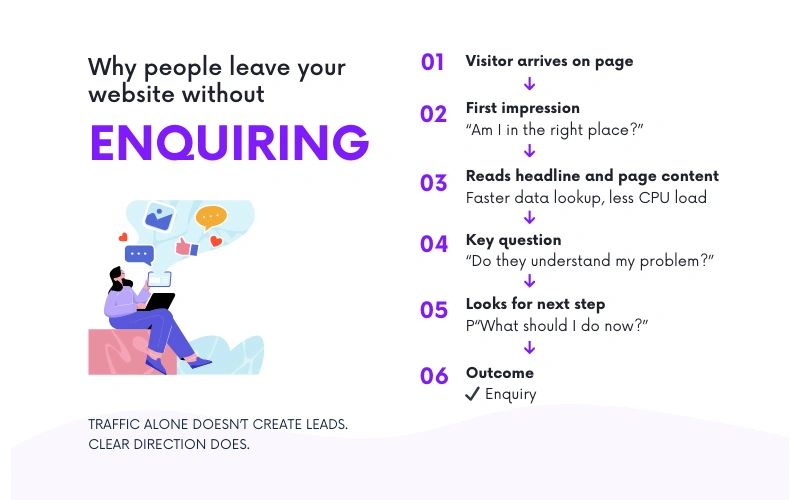
Most websites don’t fail because no one is visiting them. They fail because visitors don’t know what to do next.
Someone lands on your site, scrolls a bit, maybe reads a headline or two, and then leaves. Not because they weren’t interested, but because nothing clearly guided them forward. No obvious next step. No clear reason to get in touch right now.
This is where a lot of business owners get stuck. They see rankings improving or traffic numbers going up and expect enquiries to follow. But Google rankings don’t equal trust, and traffic doesn’t automatically turn into conversations. A search result can bring someone to your site, but the site still has to do the work.
Visitors make quick decisions. In the first few seconds, they’re asking themselves simple questions. Am I in the right place? Do they understand my problem? What should I do next? If those answers aren’t clear, they move on.
This isn’t really a design issue, and it’s not just a traffic issue either. It’s a strategy problem. The website isn’t leading visitors anywhere. It’s just presenting information and hoping people figure it out on their own.
And most of the time, that’s where things quietly break down.
The average website conversion rate is about 2.35%
Across industries, only roughly 2 or 3 out of every 100 visitors take a desired action like filling out a form or contacting a business.
Source: Conversion Rate Optimization Statistics 2025 — market.biz (2025)
Common mistakes business owners make
Most of these issues don’t come from bad decisions. They usually come from being busy and assuming the website is “good enough” once it’s live.
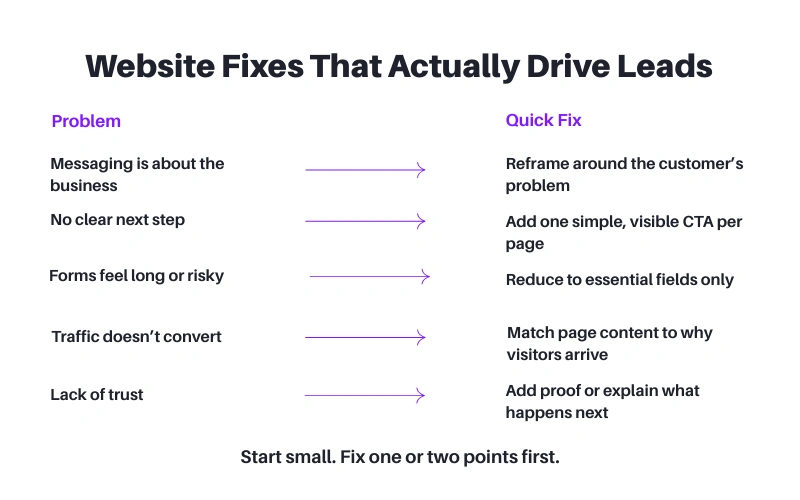
One common mistake is messaging that talks too much about the business and not enough about the customer. Pages often lead with years of experience, services offered, or background details. That information matters, but not before a visitor understands whether you can help with their specific problem.
Another issue is the lack of a clear next step. Key pages don’t guide people anywhere. There might be a contact page, but nothing encouraging or reassuring someone to actually use it. Visitors are left to decide on their own, and most won’t.
Forms can also quietly stop enquiries. Long forms, too many required fields, or vague labels make people hesitate. If a form feels like effort or risk, they’ll close the page instead of filling it out.
Then there’s traffic that looks good on paper but isn’t relevant. People land on the site, but they’re not the right fit, or they’re looking for something slightly different. That kind of traffic rarely turns into enquiries, no matter how good the site looks.
Finally, many websites are built once and left alone. The business evolves, but the site stays the same. What worked two or three years ago often doesn’t match how customers search or decide today.
These are small things on their own. Together, they explain why a website can look professional and still struggle to bring in real enquiries.
Nearly 68% of visitors abandon web forms before completing them
This shows how large the drop-off can be when people reach a lead form but don’t complete it. If your forms are long or confusing, most visitors leave before submitting.
Source: Best Multi-Step Form Abandonment Stats 2025 — Amra and Elma (2025)
What actually works (practical steps)
The fix usually isn’t a full redesign or starting from scratch. It’s about making the website easier to understand and easier to use.
Start with the first screen people see. It should be clear who the site is for and what you help with, without making visitors work it out. If someone has to scroll or read too much just to understand whether you’re relevant, you’ll lose them.
Each page also needs one main purpose. Too many pages try to do everything at once. Explain the service, tell your story, show testimonials, and push five different actions. When everything feels important, nothing stands out. Decide what you want someone to do on that page and support that one action.
Calls to action don’t need to be clever. They need to be visible and easy to understand. If a visitor is interested, they shouldn’t have to hunt for how to get in touch or what happens next.
Pages also work better when they’re built around what people are actually searching for, not just what the business wants to say. When the page matches the reason someone arrived there, it feels natural to keep reading and take the next step.
Trust matters most at moments of hesitation. That’s where simple proof helps. A short testimonial near a form. A clear explanation of what happens after someone contacts you. Small details that reduce doubt.
Finally, stop guessing. Look at what people are doing on the site. Where they drop off. Which pages get attention and which don’t. You don’t need perfect data, just enough to make informed changes.
This isn’t about getting everything right in one go. It’s about making steady improvements that remove friction and make it easier for the right visitors to reach out.
Why traffic alone doesn’t bring enquiries
I see this pattern a lot when reviewing service business websites.
The site is getting traffic, but enquiries aren’t coming in. When we look closer, the issue usually isn’t volume. It’s relevance and structure. People are landing on blog posts or service subpages, not the homepage. Those pages were never set up to guide visitors properly, so the traffic goes nowhere.
In one case, the content itself was fine, but it wasn’t written with the visitor’s journey in mind. The messaging didn’t clearly speak to the problem people were trying to solve. Pages didn’t explain what to do next. Calls to action were either missing or placed where no one was ready to act.
We didn’t overhaul the site. We adjusted how key pages spoke to the reader, clarified the purpose of each page, and added simple, clear next steps where people were already spending time. We also made sure those pages matched why visitors were landing there in the first place.
The result wasn’t a flood of traffic. In fact, overall visits dipped slightly. But the enquiries that came through were more relevant, more consistent, and easier to convert into real conversations.
That’s usually how it works. When a website starts guiding the right people instead of just attracting clicks, the quality of leads improves naturally.
Get a fresh look at your website
Quick, honest feedback on what’s helping or blocking enquiries.
If you’re still unsure why your website isn’t bringing enquiries, the fastest way to get clarity is to have someone look at it with fresh eyes.
If you want, I can take a quick look at your site and point out what’s getting in the way. No pitch. Just clear feedback on what’s working, what isn’t, and where small changes could make a difference. In some cases, a short video walkthrough is easier, so you can see exactly what I’m referring to.
This isn’t about selling anything or committing to a big project. It’s simply about understanding what’s happening on your site right now and why visitors aren’t taking the next step.
Once you have that clarity, you can decide what to fix and how far you want to take it.
Recent Blogs
Why Your Website Isn’t Generating Leads and How to Fix It Read More »