
Common WordPress Mistakes That Stop You Getting Leads
Many small businesses struggle with WordPress lead generation problems without knowing why their site isn’t converting visitors into real enquiries. This guide breaks down the most common mistakes and shows how to fix the issues quietly costing you leads and sales.

Shabnam Sharma
Social Media Manager
Feb 12, 2026 | 6 min. read
Table of the content
- What causes WordPress lead generation problems
- Common WordPress mistakes hurting your leads
- Why your WordPress website is not showing in Google
- Why your WordPress website is not capturing enquiries
- How to fix low leads on WordPress
- Real example: fixing WordPress conversion issues
- Get expert help to fix your WordPress lead problems
- FAQs
This is one of the most common emails I get:
“People are visiting my site, but nobody is getting in touch. What’s wrong?”
Most of the time, it isn’t one big thing. It’s a handful of small WordPress lead generation problems quietly stacking up. On their own they seem harmless. Together, they stop real people from taking the next step.
You might have traffic from Google, ads, or social media. But traffic on its own doesn’t pay the bills. If visitors don’t understand what you do, don’t trust the site, or don’t see a clear way to contact you, they leave. No form filled. No call made. No email sent.
Recently I worked with a client who was searching for an SEO agency for law firms. Their site was getting visits, but the phone wasn’t ringing — for the exact same reasons you’re reading about here.
📊 Visitor-to-Lead Conversion Is Generally Very Low
Only around 2.4% of website visitors become leads on average, with even strong lead pages often only reaching about 4% conversion. That means the vast majority of people who visit your site never take action like filling a form or booking a call.
Why it matters:
This shows why many WordPress sites feel like they’re full of traffic but empty of enquiries — most visitors leave without converting, especially if the site isn’t set up to guide them.
That’s usually when people start saying, “I don’t know why my site isn’t working” or “Why is my site not converting traffic?”
In reality, the site is working, just not in the way you need. It’s showing pages, but it’s not guiding visitors toward becoming enquiries. That gap between interest and action is where most WordPress websites fall down.
In this blog, I don’t want to discuss SEO tips or strategies. I just share a general perspective of the visitors on your website, what they feel, what they realize, their behavior, and what they think before deciding to make contact. Your website is the bridge between you and your audience. Once you see where that gap is, the fixes are often simpler than you expect.
In the next section, I’ll explain what usually causes these problems in the first place.
What causes WordPress lead generation problems
Most WordPress sites don’t fail because the business is bad or the service is weak. They fail because the site was put together in a way that doesn’t support how real people behave online.
A lot of common WordPress issues are invisible until you look at things through a customer’s eyes. Pages load slowly. Buttons are hard to spot. Forms feel awkward. On mobile, things shift around or get cut off. None of this feels dramatic, but every small friction point makes it easier for someone to leave than to get in touch.
Bad setup plays a big role here. I often see sites built with too many plugins, clashing themes, or page builders stacked on top of each other. The site might look fine at first glance, but behind the scenes it’s heavy, messy, and fragile. That’s where WordPress conversion issues start to creep in — pages take longer to load, forms fail, and important messages don’t show when they should.
And then there’s the design side of it. Many WordPress websites are built to impress the owner, not to help a visitor make a decision. Big images, clever layouts, and fancy effects can look great, but if the page doesn’t clearly say what you do, who it’s for, and what to do next, people get stuck.
So you end up with a site that looks professional, but doesn’t actually move anyone toward a call, a form, or a sale.
If you see this issue through an SEO expert’s eyes, website design matters in helping visitors make a decision, but content also plays a huge role. What you write, what you show on the website, such as images and videos, and how your CTA performs all matter. Does the content only show your business, or does it solve the visitor’s problem? Is the website optimized for both search engines as well as the target audience?
You cannot say that only one factor is responsible for your website not converting leads. When I review client websites, I see multiple points that distract visitors. These points often exist even on good-looking, professional websites.
In the next part, I’ll walk through the specific mistakes I see business owners making again and again.
Common WordPress mistakes hurting your leads
This is where things usually go wrong. Not in a dramatic, broken-site way — but in quiet ways that slowly drain enquiries.
One of the biggest ones is a WordPress website not converting. People land on a page, read a bit, and then… nothing. There’s no clear next step. No gentle nudge to get in touch. No obvious way to move from “just looking” to “let’s talk.”
That usually comes down to poor call-to-action placement. Buttons are buried at the bottom of the page, hidden in the menu, or written in vague language like “Learn more.” Real visitors don’t hunt for what to do. If it’s not obvious, they leave.
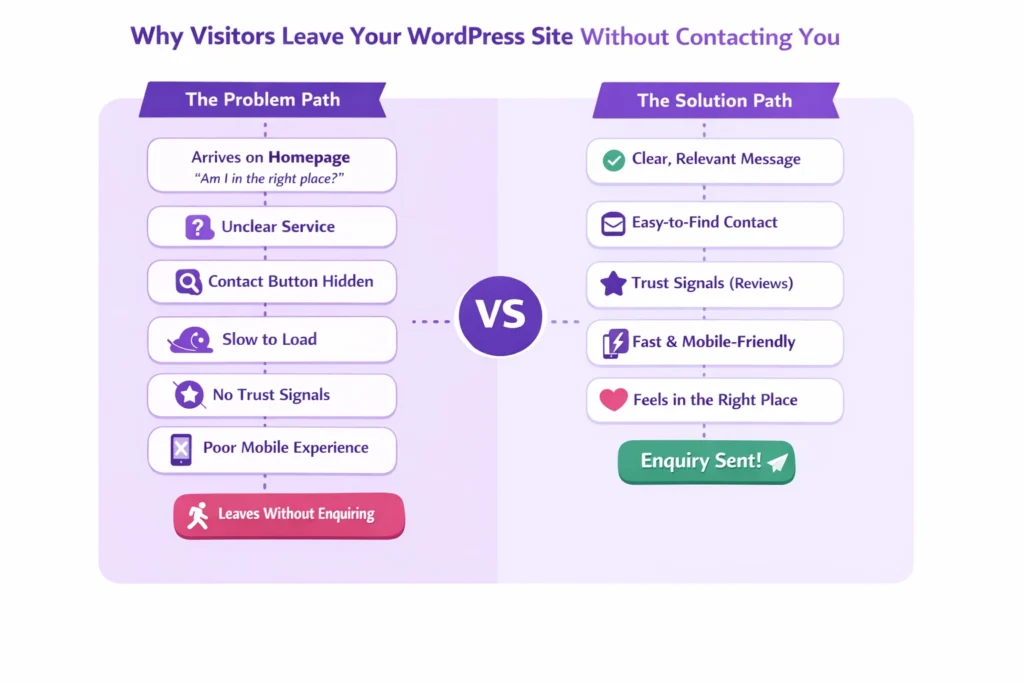
Another common gap is having nothing worth signing up for. No simple guide, no checklist, no helpful download. Without some kind of lead magnet, there’s no low-pressure way for someone to raise their hand and say, “I’m interested.” They might like what they see, but not enough to fill out a long form.
Then there are the quiet WordPress SEO mistakes. Not the technical kind people argue about online, but the basic ones — pages that don’t explain what the business actually does, titles that don’t match what people search for, or important pages that Google barely sees. That leads to fewer of the right visitors showing up in the first place.
Mobile is another big one. A WordPress website not working on mobile doesn’t always mean it’s broken. It might just be awkward. Buttons too small. Text too tight. Forms hard to fill in. Most people are on their phones now, and if the site feels like work, they move on.
And finally, trust. Or the lack of it. Missing trust signals for websites — things like real testimonials, clear contact details, or even a proper About page — makes people hesitate. If they’re not sure who’s behind the site, they won’t send their details.
All of these things seem small. But together, they explain why so many WordPress sites get visits and still feel invisible when it comes to leads.
There’s one thing I want to talk about here: Google’s EEAT guidelines (experience, expertise, authority, and trustworthiness). When your website clearly shows these, it becomes easier to rank and attract genuine organic leads.
Next, we’ll look at what it means when your site isn’t even being seen in the first place.
Why your WordPress website is not showing in Google
A lot of business owners find themselves typing their own company name into Google and feeling a sinking feeling when nothing useful comes up. The site is live, you know it exists, but it feels invisible.
When a WordPress website isn’t showing up in Google search, it’s usually not because something is “wrong” in a dramatic sense. It’s more that Google doesn’t have enough clear signals to understand what the site is about or which pages matter. That often happens after a site has been rebuilt, moved, or added to over time without much structure.
I also see this when a WordPress website isn’t appearing in Google search because key pages aren’t properly linked, or important content is buried where both people and search engines struggle to find it. Sometimes the site is technically there, but it’s not being presented in a way that earns it a place near the top.
From the outside, it looks like Google is ignoring you. In reality, it’s just unsure what to do with what it’s been given.
In the next section, we’ll look at what happens when people do find your site, try to get in touch, and nothing comes through.
Why your WordPress website is not capturing enquiries
Sometimes the problem isn’t getting people to your site — it’s what happens after they try to reach you.
I’ve seen plenty of businesses lose good leads because their contact forms look fine but don’t actually work the way they should. Simple contact form best practices like clear labels, short forms, and obvious confirmation messages are often missing. When people aren’t sure if their message went through, they don’t try again.
Another quiet issue is a WordPress website not sending emails properly. A form gets filled in, but nothing ever arrives in your inbox. From the visitor’s side, it feels like they contacted you. From your side, it feels like nobody is interested. Those lost messages add up more than most people realise.
Even when enquiries do come through, they can slip through the cracks if there’s no simple way to keep track of them. Without some form of CRM integration for lead follow-up, replies get delayed, forgotten, or lost in personal inboxes. That’s not a people problem — it’s a system problem.
I also hear from business owners running ads who say their Google Ads aren’t showing on my WordPress website the way they should. Pages don’t load, tracking breaks, or the landing page doesn’t match what the ad promised. That gap makes paid visitors disappear just as fast as they arrive.
When these things are fixed, you don’t just get more enquiries — you actually start seeing the ones you were missing all along.
Next, we’ll look at the practical changes that usually make the biggest difference.
How to fix low leads on WordPress
Once you’ve seen where things are breaking down, the next step isn’t to rebuild everything. It’s to make a few focused changes that help real people move forward instead of drifting away.
Good lead capture optimisation starts with making it easy to raise a hand. That means clear forms, simple questions, and a reason to get in touch. When someone has to work to contact you, they usually won’t.
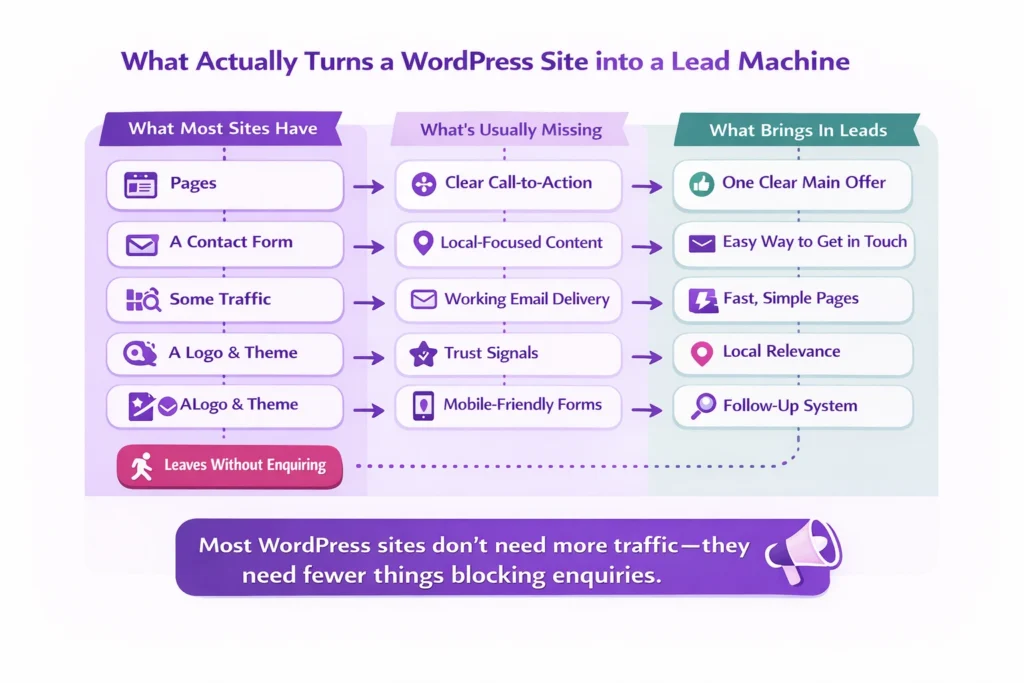
A lot of conversion rate fixes are really just common sense. Put the main message where people actually look. Make buttons easy to spot. Say clearly who the service is for and what happens next. When visitors don’t have to guess, more of them act.
Then there’s the experience of using the site. Small user experience improvements — like cleaner pages, easier navigation, and fewer distractions — help people stay long enough to understand what you offer. Confused visitors don’t become customers.
Speed matters too. Slow pages quietly hurt site speed and conversions because people won’t wait. Even a few extra seconds is often enough for someone to back out and try a competitor instead.
📊 Slow Load Times Kill Conversions
A 1-second delay in page load time can reduce conversions by up to 7%, and mobile users are especially likely to leave if a page takes longer than three seconds to load.
Why it matters:
WordPress sites with heavy themes or lots of plugins can easily become slow. If your visitors get frustrated waiting for pages to load, they’re far less likely to turn into leads — and more likely to hit the back button instead.
And finally, everything has to work well on phones. Mobile-friendly site leads come from pages that load fast, buttons that are easy to tap, and forms that don’t fight back. If it’s awkward on mobile, most people simply won’t bother.
Finally, look closely at your wording. Good copy answers the unspoken questions behind why customers leave without buying. It reassures, explains, and makes the next step feel safe and straightforward.
Put these pieces together and your WordPress site starts doing what it was meant to do — turning interest into real conversations.
Next, I’ll show you what this looks like in a real-world example.
Real example: fixing WordPress conversion issues
Not long ago, I worked with a client who was looking for solo law firm marketing. The owner asked me something you might be thinking right now: “Why does my website look fine, but nobody is calling?”
The site had been online for more than five years and was meant to serve a local audience in Windsor. On the surface it seemed okay, but once I spent some time with it, the problems were clear.
First, the layout felt dated. It didn’t speak to the audience (30 to 65 years old) the firm actually served, so it never really connected with them. Second, the content was written as if the clinic was trying to reach the whole of the UK. Nothing on the pages made it feel like a local, trusted place in Windsor.
The service pages were another issue. They read more like blog posts than pages designed to help someone decide to book an appointment. There was plenty of text, but very little guidance on what to do next. On top of that, the blog hadn’t been updated in years, so there was nothing fresh or relevant for the people they wanted to attract.
We didn’t fix just one thing. We worked through the site step by step, cleaning up technical issues, reshaping the content so it spoke directly to the local audience, and making the service pages clearer and more focused as part of a stronger local SEO approach. New blog posts were written for that same audience, not for everyone.
Over time, the WordPress lead generation problems started to fade. After about six months of steady work, the change was obvious. Before, the clinic was getting around 20 calls a month. That grew to more than 40, without changing what they offered — just how the website supported it.
That’s what happens when you fix the common WordPress mistakes together, instead of chasing one quick tweak. Small, consistent improvements add up to real business results.
Next, I’ll show you what you can do if you want help finding and fixing these issues on your own site.
Get expert help to fix your WordPress lead problems
If you’ve made it this far, you probably recognise a few of these issues on your own site. A WordPress website not converting isn’t a sign that your business is failing — it’s usually a sign that the website hasn’t been set up to do the job it’s meant to do.
This is the point where having someone look at the site properly makes a big difference. When you work with people who deal with WordPress sites every day — including leading WordPress AI optimisation experts — patterns show up quickly. Things you’ve been staring at for months suddenly make sense.
Find Out Why Your Website Isn’t Converting
A quick review to spot what’s quietly blocking your enquiries.
It’s not about pushing new tools or chasing trends. It’s about seeing where visitors get stuck, where enquiries drop off, and what’s quietly holding the site back. Once those things are clear, the fixes are usually far more practical than you expect.
If your site feels busy but your inbox is quiet, it’s worth having someone walk through it with fresh eyes. That alone can uncover the reasons your leads aren’t coming through — and what to do about it.
FAQs
Why isn’t my WordPress site generating leads?
In most cases, it’s not because people aren’t interested. It’s because the site isn’t guiding them clearly. Visitors might not understand what you offer, where to click, or how to get in touch. Small issues like slow pages, confusing layouts, or hidden contact forms quietly stop people from taking action.
Why is my WordPress website not showing in Google?
This usually happens when Google can’t easily understand or trust the site. Pages might not be well connected, the content may be thin or outdated, or the site could be slow and hard to use on mobile. When that happens, Google shows other sites instead.
Why is my WordPress website not sending emails from contact forms?
WordPress doesn’t send emails the same way normal inboxes do. If it isn’t set up properly, messages can go missing or land in spam without you ever knowing. Many businesses think no one is contacting them, when in reality the enquiries just aren’t reaching their inbox.
What are the most common WordPress mistakes that hurt leads?
The biggest ones are unclear calls to action, pages that don’t explain the service properly, slow loading times, and sites that don’t work well on phones. Add missing trust signals and broken forms to the mix, and leads disappear fast.
Why does my WordPress website get traffic but no enquiries?
Getting visitors is only half the job. If the page doesn’t make it obvious what to do next, people will read, scroll, and leave. A site needs to guide visitors toward calling, booking, or filling out a form. Without that, traffic doesn’t turn into business.
How do I know if my WordPress site is set up to convert?
Try using it like a customer. Can you quickly see what the business does? Is it easy to contact someone? Does it feel trustworthy? If any of those answers are no, the site probably isn’t set up to turn visitors into leads.
Can an old WordPress website still generate leads?
Yes, but only if it’s updated to match how people browse today. Older sites often look fine but don’t work well on mobile, load slowly, or speak to the wrong audience. Fixing those gaps can make a big difference without needing a full rebuild.
What’s the first thing I should fix if my WordPress site isn’t working?
Start with the basics: make sure your main pages clearly explain what you offer and how to get in touch. Then check that forms, emails, and mobile pages all work properly. Those small checks usually reveal where leads are being lost.