
Google Business Profile Mistakes Losing You Leads
Many businesses set up a profile but still struggle with a Google Business Profile not getting leads. This guide explains the common mistakes that reduce visibility, why enquiries slow down, and the simple changes that help turn searches, views, and visits into real customer calls.

Deepak Sharma
SEO Consultant
March 02, 2026 | 7 min. read
Table of the content
- Google Business Profile Not Getting Leads? You’re Not Alone
- Why Your Google Business Profile Is Not Showing or Bringing Enquiries
- Common Google Business Profile Mistakes That Cost You Calls
- How to Improve Your Google Business Profile and Get More Enquiries
- From Views but No Calls to Regular Enquiries
- Need Help Fixing a Google Business Profile That Isn’t Working?
- Google Business Profile FAQs
Google Business Profile Not Getting Leads? You’re Not Alone
I hear this quite often from business owners,“We’re showing up on Google, people are viewing the listing, but hardly anyone is contacting us.”
If your Google Business Profile is not getting leads, it can feel confusing. You can see activity, impressions going up, maybe even regular views, yet the phone stays quiet. In many cases, the Google listing is getting views but no enquiries, which usually tells us something important in your local SEO isn’t connecting with potential customers.
Most of the time, this doesn’t mean your business is the problem. It usually means small details inside the profile, or how it appears in search, are stopping people from taking the next step. I’ve reviewed many profiles at Digital Deep Tech where owners assumed Google simply wasn’t working, when in reality a few overlooked issues were holding enquiries back.
Before fixing anything, it helps to understand why customers aren’t finding your business or choosing to contact you in the first place, because the reason is often simpler than expected.
📊 Visitor Conversion Reality
The average website conversion rate is only 2–3%, meaning over 95% of visitors leave without becoming leads or customers.
Why it matters:
This clearly shows that most websites don’t have a traffic problem — they have a conversion problem. Small businesses often get visitors but lose them due to unclear messaging, weak CTAs, or poor user experience.
Why Your Google Business Profile Is Not Showing or Bringing Enquiries
When enquiries slow down, most business owners assume something has gone wrong with Google itself. The question I usually hear is, “Why is my business profile not showing up on Google?” or sometimes “Why is my Google Business Profile not publicly visible?”
In reality, Google is constantly deciding which businesses to show in local search results, and that decision comes down to clarity and trust. If the information on a profile looks incomplete, inconsistent, or outdated, visibility quietly drops — even though the profile technically still exists.
In simple words, not only Google Business Profile optimization works; when your profile builds trust, authority, expertise, and clarity for users as well as Google, then it shows results.
A common issue is business information accuracy. Small things matter more than people expect: opening hours not updated, services unclear, categories slightly off, or contact details differing from what appears elsewhere online. These signals affect how confident Google feels about recommending a business.
Another factor is whether your listing looks like an active Google listing. Profiles that are updated, reviewed regularly, and clearly maintained tend to have stronger profile visibility, especially when customers are searching nearby or browsing businesses already showing on Google Maps.
From a business owner’s perspective, it can feel random. But from Google’s side, it’s simply trying to show listings that look reliable and useful to customers.
Once you understand this, the next step becomes clearer, looking at the common mistakes that quietly stop profiles from turning visibility into real enquiries.
Common Google Business Profile Mistakes That Cost You Calls
Google Business Profile takes time to optimize, not just fill in the important information and put some main images and then leave it for customer reviews; that’s not enough.
After reviewing quite a few listings with business owners, I’ve noticed something consistent, most problems come from small things that don’t look serious at first glance. These are common Google Business Profile mistakes, and many businesses don’t realise they’re affecting enquiries until calls start slowing down.
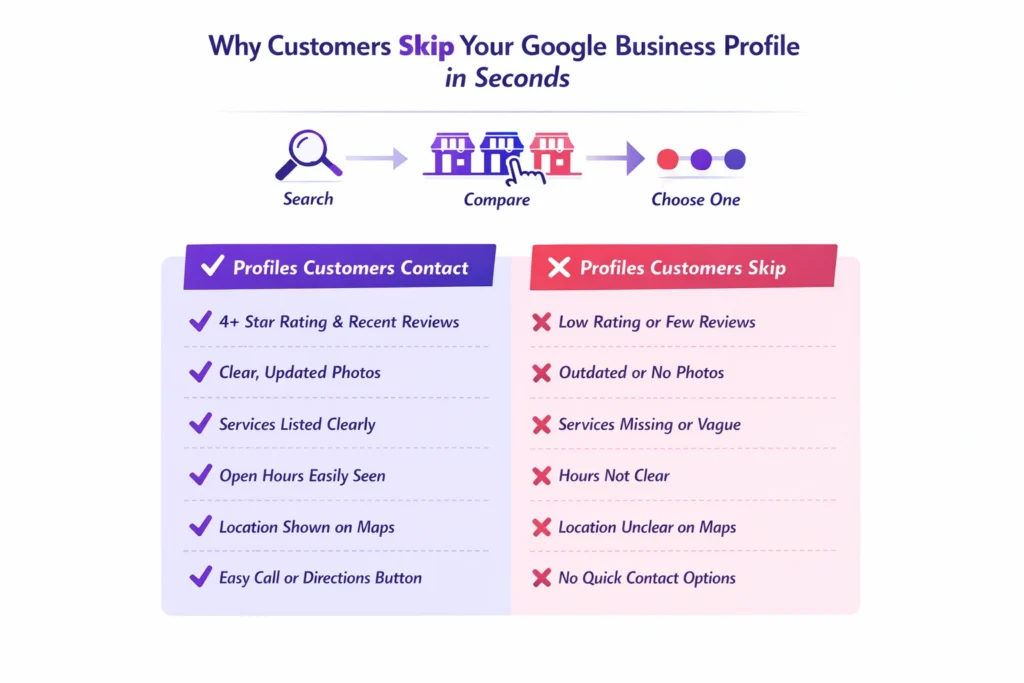
One of the biggest issues is choosing the wrong or overly broad business category. Google relies heavily on this to understand what you actually do. If the category doesn’t clearly match the service people are searching for, your business may appear less often, or show up for the wrong searches altogether.
Another area that gets overlooked is Google reviews and ratings. It’s not just about having reviews; it’s about consistency and recent activity. When potential customers compare options, an inactive profile with old reviews can quickly lose attention, even if the business itself is excellent.
Then there’s the visual side. Many profiles either have very few or outdated photos on Google Business Profile. Customers often decide within seconds whether a business feels trustworthy. No photos, or poor ones, quietly reduce confidence, which is one reason a Google Business Profile may not be bringing customers despite getting visibility.
I’m also often asked, “Why is my Google Business Profile not getting calls?” In many cases, the profile hasn’t been properly maintained or reviewed since it was first created. Business details change, services evolve, but the listing stays the same.
The goal isn’t to constantly manage it like a marketing project. It’s simply to optimise your Google listing so it clearly reflects your business today — making it easy for both Google and potential customers to understand what you offer.
Once these common issues are addressed, the focus shifts from fixing mistakes to doing the few things that actually help generate enquiries consistently.
How to Improve Your Google Business Profile and Get More Enquiries
Once the common issues are cleared up, the good news is that improving results usually doesn’t require complicated changes. When a Google Business Profile is not generating leads, the solution is often about making the listing clearer, more active, and easier for customers to trust.
Here are the practical steps I normally walk clients through.
Start with accurate business details
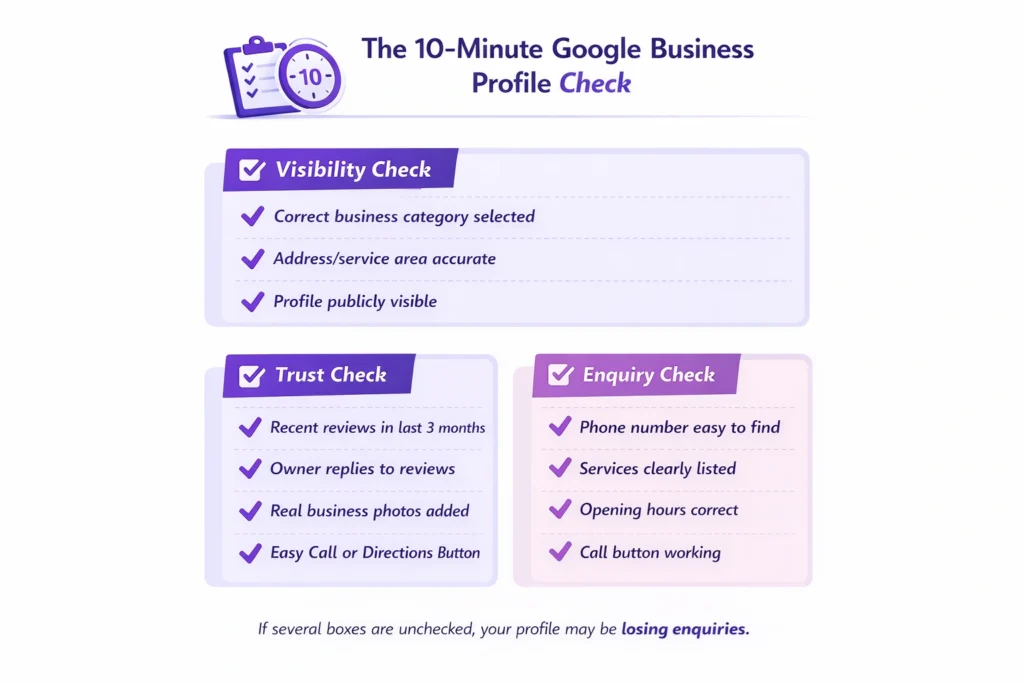
Check your contact information, services, opening hours, and service areas carefully. Strong business information accuracy helps Google feel confident showing your profile to the right people, which directly helps improve local visibility.
NAP details (Name, Address, and Phone Number) must be accurate. If you have a website, then add a “Book an Appointment” link that helps improve the conversion rate.
Make sure the profile looks active
An active Google listing signals that the business is operating and engaged. Updating photos occasionally, responding to reviews, or posting small updates shows both Google and customers that the business is current.
You should post your business updates such as new services, business milestones, office updates, important announcements, offers and promotions, events, products, customer testimonials, behind-the-scenes photos, and educational tips. Weekly 2–3 posts are perfect to keep your profile active.
Show customers exactly what you do
Many profiles describe services too broadly. Clear service descriptions help people quickly understand whether you’re the right choice, which plays a big role in turning views into calls.
Here are the key things to focus on:
1. Clearly explain what your business does
2. Add your primary services
3. Include location or service areas
4. Add trust and experience
5. Use keywords naturally
6. Keep it within 750 characters
7. Do not add links or promotions
Focus on trust, not tricks
Encouraging genuine reviews, adding recent photos, and keeping information updated often does more than anything else when it comes to getting more customer enquiries. These are simple signals customers rely on before deciding to contact a business.
Analyze your competitors in your area who already rank in the top 3 pack listings. Check their profiles and make those changes to your profile. Regular improvements make your profile trustworthy and help you get local enquiries.
When these basics are done well, businesses often notice something shift, fewer empty views and more real conversations starting. That’s usually the point where a profile begins to get more calls from Google rather than just appearing in searches.
To make this clearer, let me show you a simple example of how this plays out in a real business situation.
📊 Forms Create Major Lead Loss
Around 41% of users abandon online forms because they are too long or ask for too much information.
Why it matters:
Many small business websites unknowingly block leads at the final step. Complex contact or quote forms create friction right when visitors are ready to convert.
Here I recommend some free websites and tools that help local businesses analyze their Google Business Profile:
- ai
- LocalHQ
- Growmefy GBP Audit Tool
- RankONE GBP Audit Tool
- Google Business Profile Insights
You can search these tools online and analyze important metrics that give clear stats.
From Views but No Calls to Regular Enquiries
A good example of this was a local service business I spoke with recently — a skin care salon that felt stuck. The owner told me their Google listing was getting views but no enquiries, even though they appeared regularly when searching their main service.
On the surface, everything looked fine. The business was showing in local search results, reviews were decent, and the profile existed. But when we looked closer, a few small gaps explained why the Google Business Profile was not getting more than 20 calls per month.
The services weren’t clearly listed, photos were several years old, and important information customers usually check first wasn’t easy to find. As a result, competitors with clearer profiles were getting the enquiries instead.
After updating the service descriptions, improving images (before and after results), and tightening up the profile details, something interesting happened. The business didn’t suddenly jump everywhere in rankings but profile visibility improved enough that people started choosing them more often.
Within a few weeks, the owner noticed the difference. Same area, similar search traffic, but the Google Business Profile started bringing enquiries instead of just views. I had double inquiries within three months of optimization.
I am sharing a PDF document, “How I Ranked #1 in Google 3-Pack (Local SEO Case Study).” You can see the result here.
This is why small adjustments matter. Often, it’s not about getting more visibility — it’s about making the visibility you already have work properly.
And when that starts happening, the next question most business owners ask is whether they should fix this themselves or get some help doing it right.
Need Help Fixing a Google Business Profile That Isn’t Working?
If your Google Business Profile is not working the way you expected, you’re definitely not the only one dealing with this. Many business owners set up their listing once and assume it should automatically bring enquiries over time. In reality, profiles often need a careful review to understand what’s quietly holding them back.
Fix Your Google Business Profile Visibility Issues
Get clear insights on what’s stopping enquiries from your listing.
Some businesses prefer to work through the improvements themselves, and that’s completely fine. But if you’ve already tried updating things and still aren’t seeing results, it can help to have someone look at the profile from an outside perspective, the same way you’d ask an expert to review accounts, operations, or your website.
The goal isn’t complicated changes. It’s simply to optimise your Google listing so it clearly represents your business, builds trust quickly, and helps improve local visibility where potential customers are already searching.
If you’d like a straightforward review of what may be stopping enquiries, and what could help you get more calls from Google, you can reach out for a practical assessment of your profile and what to fix next.
Next, let’s answer a few common questions business owners usually have about their Google Business Profile.
Google Business Profile FAQs
Why is my Google Business Profile not publicly visible?
If your profile is not publicly visible, it usually means Google hasn’t fully verified the business yet, or some required details are missing. Sometimes profiles are temporarily limited after edits or policy checks. When business information is incomplete or inconsistent, Google may reduce visibility until everything looks reliable. Checking verification status, business details, and categories is normally the first step when asking why is my Google Business Profile not publicly visible.
Why is my business profile not showing up on Google Maps?
A business profile can exist but still struggle with showing on Google Maps. This often happens when competition nearby is strong or the profile lacks clear relevance for certain searches. If you’re wondering why is my business profile not showing up on Google, review your category selection, service areas, and location details. Profiles with accurate information and regular activity tend to appear more consistently on Maps over time.
Why do I get views but no enquiries from my Google listing?
Many owners notice their Google listing getting views but no enquiries, which usually means customers are seeing the business but not feeling confident enough to contact it. Missing photos, unclear services, weak descriptions, or outdated information can all affect decisions. The focus should be on turning views into calls by making the profile clear, trustworthy, and easy for customers to act on quickly.
How do I get more calls from my Google Business Profile?
To get more calls from Google, start by making sure customers immediately understand what you offer and how to contact you. Updated photos, accurate services, strong reviews, and correct opening hours all help build trust. Businesses that keep their profiles active generally see steady improvement in getting more customer enquiries because customers feel confident reaching out.
How long does it take for a Google Business Profile to start bringing enquiries?
There isn’t a fixed timeline. Some improvements can make a difference within a few weeks, especially after correcting information or improving the profile presentation. Google needs time to recognise updates and adjust visibility in local searches. Consistency usually matters more than quick changes.
Does updating my Google Business Profile really improve visibility?
Yes — but mostly because updates signal that the business is active and reliable. Regularly maintaining details, responding to reviews, and adding current photos helps Google trust the listing. This often improves how frequently the profile appears when nearby customers search for related services.
Can reviews affect whether customers contact my business?
Absolutely. Customers often compare several businesses before calling anyone. Recent Google reviews and ratings help people feel reassured that the business is active and trustworthy. Even replying to reviews can make a noticeable difference because it shows engagement and professionalism.
What is the most common reason businesses stop getting enquiries from Google?
In most cases, nothing dramatic has happened. Profiles simply become outdated over time while competitors keep theirs updated. Small issues, incorrect details, limited photos, or unclear services, gradually reduce performance. Regularly reviewing the profile helps prevent enquiries from slowing without you noticing.
Recent Blogs
- Why My Business Isn’t Ranking Locally — Even With Great Reviews?
- Common WordPress Mistakes That Stop You Getting Leads
- Why a Good-Looking Website Doesn’t Convert
- Does SEO still work for small businesses in 2026?
- Why Your Website Isn’t Generating Leads and How to Fix It
- Why SEO traffic doesn’t turn into enquiries
- How Long Does SEO Take for a Small Business?