Business

Good-looking website illustration showing why visitors don’t convert into enquiries

Why a Good-Looking Website Doesn’t Convert

A good-looking website doesn’t always mean better results. Many business owners ask why isn’t my website converting visitors even when the design looks professional. This blog explains what’s really stopping customers, the common mistakes websites make, and how small changes can turn visitors into enquiries and sales.

Deepak Sharma - SEO consultant

Deepak Sharma

SEO consultant

Feb 08, 2026  |  6 min. read

3D website conversion icon representing visitors, actions, and enquiries

Your website looks professional.
It loads properly. It feels modern. People even tell you it looks great.

But enquiries are low. Sales are slow.
And you’re left wondering why isn’t my website converting visitors, even though nothing looks obviously wrong.

This is something I hear all the time from small business owners. A site can look polished and still struggle to bring in customers. In many cases, the problem isn’t the design at all.

If you’ve ever thought my website looks good but doesn’t convert, or quietly asked yourself why a website that looks good still doesn’t sell, you’re not alone. This is a common issue — and it’s usually fixable once you understand what’s actually going on.

Why a Website That Looks Good Still Doesn’t Convert

A good-looking website doesn’t automatically mean a website that sells.
Design helps first impressions, but it doesn’t do the job on its own.

Most sites are built to look nice, not to guide visitors toward a decision. They focus on layout, colours, and images, but forget to answer the basic questions running through a visitor’s head: Is this for me? Can you help me? What should I do next? When that clarity and value proposition are missing, people hesitate — and hesitation usually means leaving.

This is one of the most common reasons a website doesn’t convert. Visitors aren’t confused because the site looks bad. They leave because they’re unsure, unconvinced, or don’t feel confident enough to take the next step. That’s why customers often leave without buying, even on websites that look polished and professional.

Before doing SEO, my main focus is to optimize the website content according to the target audience and search engines. The website must follow EEAT (Experience, Expertise, Authoritativeness, Trustworthiness) guidelines, which Google prefers. Design may attract visitors, but content builds trust, shows experience, and encourages visitors to take action. Simply put, most traffic is wasted if the website is not optimized for users.

Once you understand this, it becomes easier to spot where things start going wrong, and that’s where most websites begin to lose potential customers.

📊 Most websites convert very few visitors

On average, websites convert only about 2.35% of visitors into a meaningful action like a lead or signup, meaning roughly 97 out of every 100 people leave without converting. That’s the reality for most sites today.

Why it matters:

This shows that even if your design looks great, most sites don’t turn browsers into leads — and you need to focus on conversion factors, not just aesthetics.

Common Website Conversion Mistakes Business Owners Make

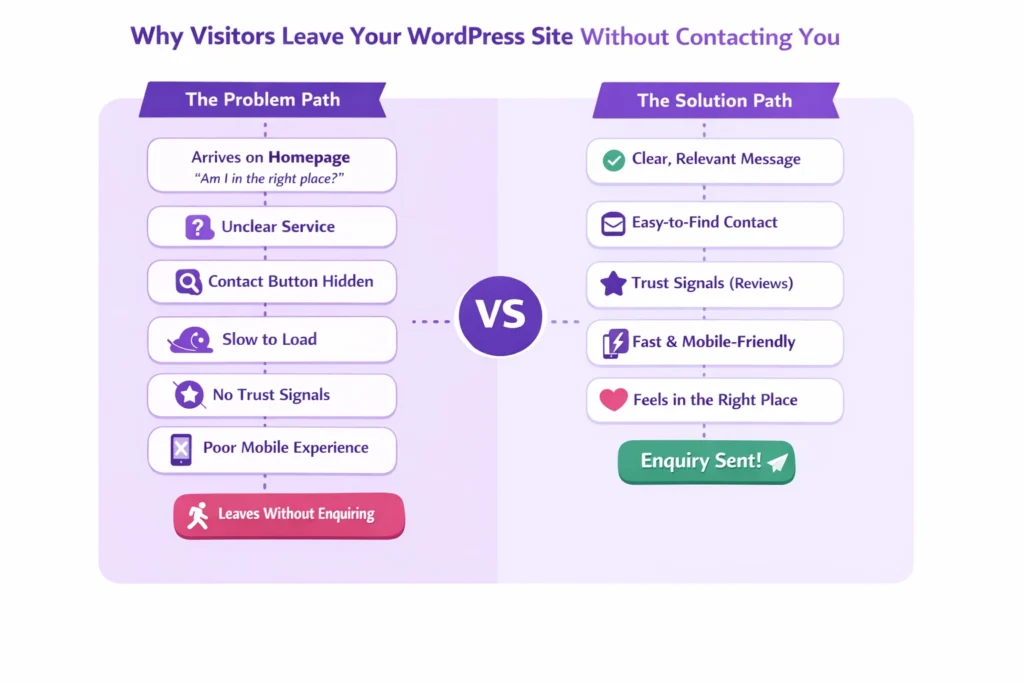
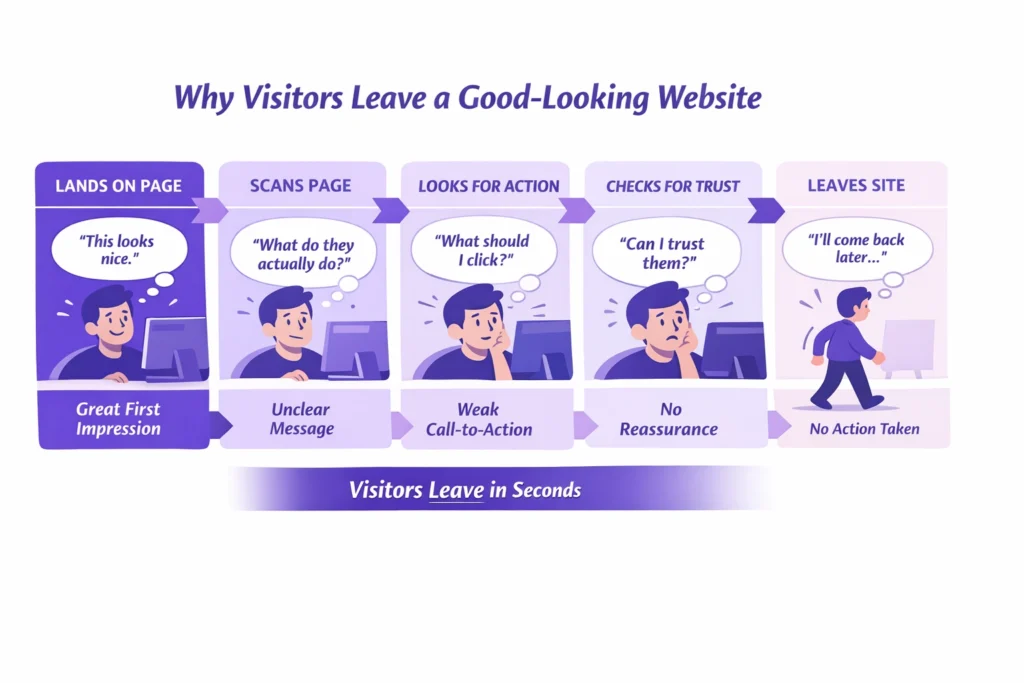
Infographic showing why visitors leave a good-looking website without taking action

After reviewing a lot of small business websites, the same issues come up again and again. They’re easy to miss when you’re close to your own site, but they’re usually clear to visitors.

Design over clarity

The site looks polished, but it’s not obvious who it’s for or how it helps. Without a clear message, visitors don’t feel confident enough to act.

In my 10 years of career, before designing a website, I have learned that it is important to understand the business goals, the target audience, their problems, and the right solutions. Only after that do I create the content accordingly. The most important part is understanding the user journey and building content section by section. CTAs should be used properly so users can easily make the required booking.

Assuming visitors know what to do next

Many websites expect people to figure it out on their own. When there’s no clear direction, visitors hesitate — and hesitation often means leaving.

Mostly, I see website designers focus on building beautiful websites without understanding the content. Business owners often make the same mistake. They see a good-looking website and feel satisfied, but the real value lies in whether the website content is fully optimized and targets the right audience.

Weak call-to-action problems

Buttons are vague, hidden, or trying to do too many things at once. If the next step isn’t obvious, people won’t take it.

For example, suppose you are walking in a beautiful garden. You see trees, then a few steps ahead you see flowers, fountains, and benches to sit and rest. After that, you walk through beautiful paths with flower-covered roofs and again find benches to sit. On a website, those benches are CTAs, where visitors pause, rest, and fill out a form or make an enquiry. That’s why understanding the user journey is so important.

Ignoring user experience and conversion issues

Small frustrations add up. Cluttered pages, confusing layouts, or too much text can quietly push visitors away.

A common mistake many business owners make is focusing on showing their business and explaining their services, instead of clearly offering solutions to users. They often do not show case studies, client reviews, past work, or results that build trust with first-time visitors. Another mistake is making the design too complex, especially during form submission. Filling out a form should take no more than two or three clicks. Complex and confusing layouts frustrate users, causing them to leave the website.

Slow pages and heavy visuals

This is a big one. Website speed hurting sales is real. If pages take too long to load, people leave before they even see what you offer.

Lastly, when I worked on a coaching website project, it looked good with great animations and visuals. However, when I audited it, I found that it was slow on both mobile and desktop, taking 5 to 7 seconds to load. You know that visitors wait an average of only 3 seconds before leaving a site. I explained this mobile website optimization issue to the client and then fixed it.

Missing trust signals for website customers

No reviews, no proof, no reassurance. When visitors don’t feel safe or confident, they won’t get in touch.

How is trust built on a website? A good-looking design is not enough. When you add real business images, videos, client reviews, case studies, and show real results to visitors, trust is built. A good-looking website is like a book with a beautiful cover. When you add trustworthy content inside it, users stay longer and feel confident that this is the right business to solve their problem.

These are all clear signs your website isn’t converting — not because your business isn’t good, but because the site isn’t doing enough to support it.

Once these mistakes are fixed, many websites start performing very differently, even without a full redesign.

📊 Slow loading loses more than half of visitors

Research finds that 53% of mobile visitors will leave a website if it takes longer than 3 seconds to load, and sites that load slower tend to have much higher bounce and abandonment rates.

Why it matters:

This directly ties into why customers leave without buying — performance issues like slow pages can stop visitors before they even see a clear offer or call to action.

How to Fix a Website That Isn’t Converting

If you’re trying to work out how to fix a website that isn’t converting, the good news is this: it’s rarely about starting over. In most cases, a few focused changes make more difference than a full redesign.

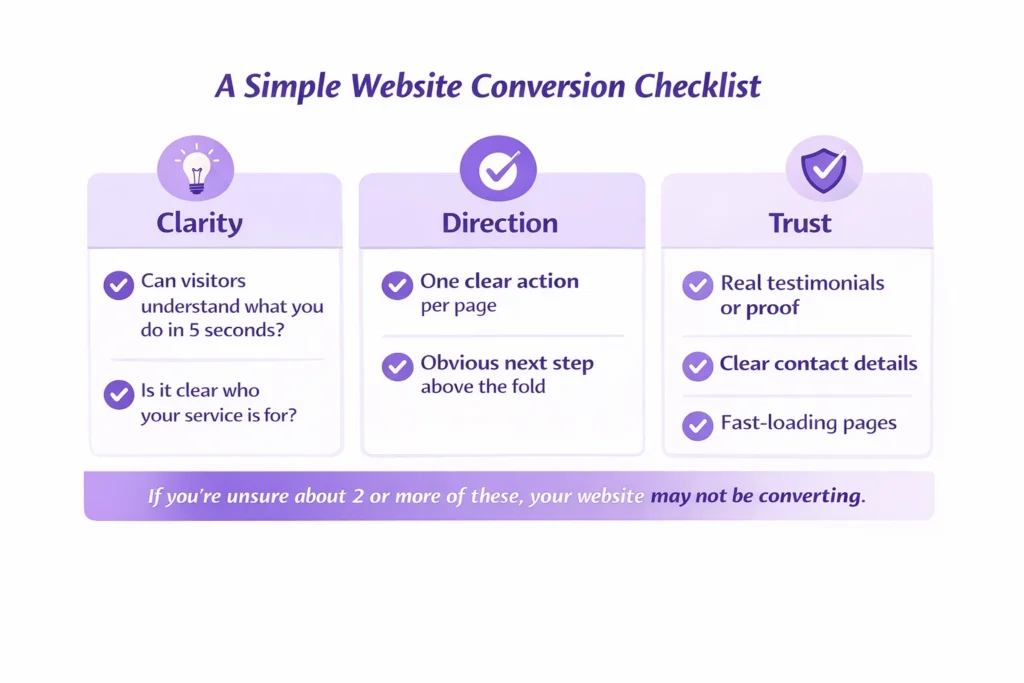
Start with your main message. A visitor should understand what you do and who you help in five seconds or less. If they have to scroll, guess, or piece things together, you’ve already lost them.

Next, be clear about who your service is for and how you help. Many websites talk around the problem instead of addressing it directly. When people recognise themselves in your message, they’re far more likely to stay and engage.

Keep each page focused on one clear action. When a page asks visitors to call, email, download, and book all at once, nothing stands out. One clear next step works far better than several competing ones.

Proof matters more than most people realise. Testimonials, short case examples, or even simple client quotes help remove doubt. This is a key part of how to improve website conversions, especially for service-based businesses.

Page speed also plays a bigger role than it seems. Heavy images, unnecessary animations, or cluttered layouts can quietly push people away. Improving load time and removing distractions often helps fix a low conversion rate without touching the design.

Finally, look closely at your wording. Good copy answers the unspoken questions behind why customers leave without buying. It reassures, explains, and makes the next step feel safe and straightforward.

These small changes might not look dramatic, but they’re often the most effective way to improve results, and they usually work better than a complete rebuild.

A Real Example: When a Good Website Still Doesn’t Sell

I worked with a coach whose website looked genuinely impressive.
Strong branding, smooth animations, polished pages, everything you’d expect from a professional build. On the surface, nothing looked wrong.

People who visited the site liked it. But they didn’t get in touch.

After a few months of work, traffic had barely moved and enquiries were still flat. The site looked good, but it wasn’t doing its job. This is exactly the situation where business owners say their website looks good but doesn’t convert, and it’s frustrating because it feels like you’ve already “done everything right”.

The real issue wasn’t the design. It was what sat underneath it. The site didn’t clearly explain the services, there wasn’t a strong offer on key pages, and there was very little content to help people understand the coach’s expertise. Visitors arrived, looked around, then left, which explains why customers leave without buying, even when a site feels polished.

We didn’t redesign the website. Instead, we clarified what was offered, added clear service pages, started publishing helpful content regularly, improved existing pages, and strengthened trust with real proof. The look stayed mostly the same, but the structure and messaging changed.

The difference showed quickly. Traffic started to grow steadily, and more importantly, enquiries followed.

That’s the real gap between a website that simply looks good and one that actually supports a business. Design helps people stay, but clarity, trust, and direction are what make them act.

Website conversion checklist helping small businesses identify why sites don’t convert

Not Sure Why Your Website Isn’t Converting?

If you’re noticing the signs your website isn’t converting — low enquiries, people dropping off, or traffic that never turns into conversations — it’s usually not one big issue. It’s a few small things working against you at the same time.

Sometimes it helps to have a second pair of eyes. A proper review can show what visitors are actually experiencing and what’s quietly getting in the way. Once those gaps are clear, it becomes much easier to see how to improve website conversions without guessing or making random changes.

See What’s Blocking Your r Enquiries

A quick, honest review of why visitors aren’t taking action.

If you want clarity on what’s holding your site back, I’m happy to take a look and point you in the right direction.

FAQs

Why does my website look good but get no customers?

A good-looking website can still fall short if it doesn’t clearly explain what you offer or what a visitor should do next. Design creates a first impression, but customers need clarity, reassurance, and a reason to take action. Without those, people browse and leave.

In most cases, visitors don’t convert because they’re unsure. The message may be too vague, the next step isn’t obvious, or there isn’t enough trust built. Even small gaps in clarity or confidence can stop someone from getting in touch.

Start by simplifying. Make your main message clear, focus each page on one action, and show proof that others trust your business. You don’t need a full redesign — small changes to wording, structure, and page flow often make the biggest difference.

Low enquiries, lots of visitors leaving quickly, or people reading pages but never contacting you are common signs. If traffic is coming in but nothing is happening after that, your website likely isn’t guiding visitors well enough.

Why a Good-Looking Website Doesn’t Convert Read More »

Banner image for why digital marketing matters for small businesses with purple theme and digital marketing illustration

Why Digital Marketing Matters for Small Businesses

Digital marketing can seem intimidating, as it presents endless opportunities. There are several strategies and platforms that can strengthen your small business and it has potential to generate a high Rate of Interest. Unlike traditional strategies, digital marketing not only drives traffic but also brings loyal customers. In this article, let’s discuss why it is essential to have digital marketing for small businesses.

Deepak Sharma - SEO consultant

Deepak Sharma

SEO consultant

Jan 30, 2026  |  6 min. read

3D digital marketing icon with website, search, target, and mobile elements representing small business online growth

Small Businesses are the backbone of the Indian economy; however, running a small business is not an easy task for sure. You have to wear multiple hats at once. The onus of strategies, managing social media platforms, website making, team management, sales management, and so forth all lies on your shoulders.

If you are making and selling specific products or services in the market at the same time, it becomes quite a daunting task for anyone to manage everything altogether. In that case, Digital Marketing becomes necessary for your business to get a good hype and boost in the market.

Here are some of the practical digital marketing benefits that say why you should prioritize digital marketing for your business growth:-

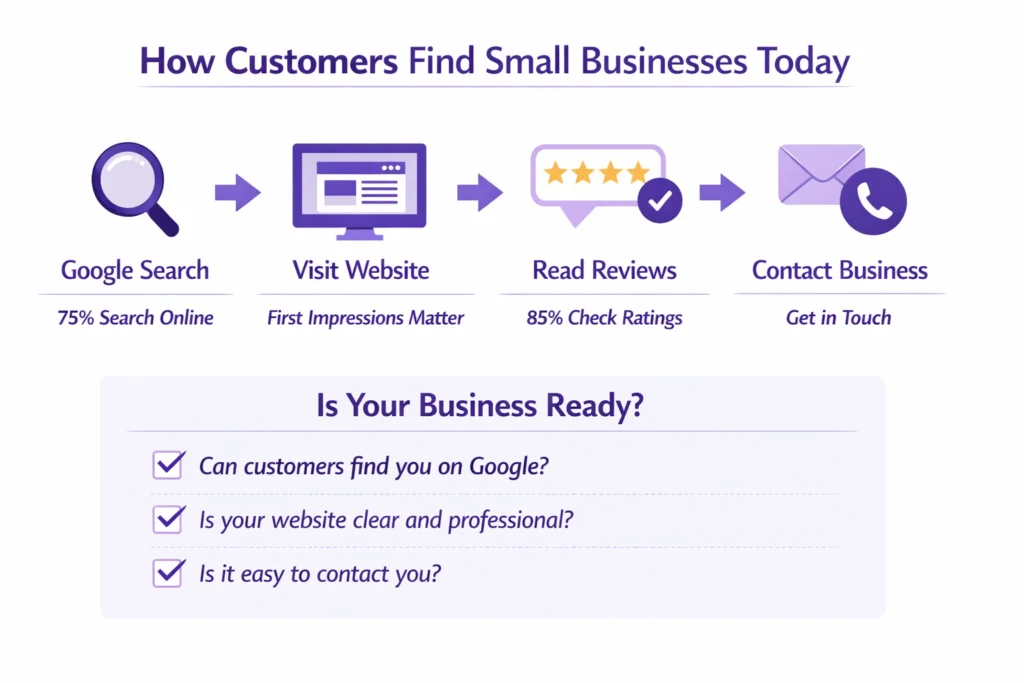
Infographic showing how customers find small businesses through Google search, websites, reviews, and contact options

Real Business Benefits of Digital Marketing

1. Understand Your Audience

The first thing one should keep in mind to stand apart from others is “KNOW YOUR AUDIENCE”. You can’t track any other person in your list who is not in demand of your product or service.

Analytics and Reporting tools not only give you valuable insights for your business but also help to track the performance of campaigns running for your business growth. You can flow with the ongoing trends to make a bridge with your customers.

2. It’s Budget Friendly!

For small businesses, “money” matters the most. If you are thinking of making use of running TV commercials, billboards, and printing advertisements, then it can put a big burden on your bank account, and it may not give you a specific pitch. 

With Digital marketing platforms like Facebook Ads, Google Ads simply know how to engage your audience, and very budget-friendly for your business. So, why spend a lot of money on one thing only, when you have a lot of options in front of you to target your audience?

3. Enhance Brand Visibility

The most important part for your small business is to have a strong online presence. Those who know Search Engine Optimization (SEO) know that it is definitely the best way to climb the ladder of success. The more organic traffic you get, the more chances there are for potential customers to come to your website and learn what your business is all about.

Apart from this, there are many more social media platforms like LinkedIn, Instagram, and Facebook, which can enhance brand visibility. We can say that, in this way, you can have loyal customers who will permanently attach to your brand for life.

4. Measurable Results in Your Hand

Gone are the days when one has to wait long to see how business is actually performing. Now, you have everything at your fingertips. With the PPC ads running, you can track your reach in real time.

Key metrics like Return on Investment (ROI), Conversion rates, and Click-through rates are your secret weapons, which help to grow your business and maximize your impact throughout the platform with ease. The long-term wait is simply over now. Just a few clicks and everything is on your screen within a second.

5. Flexible and Adaptable

Unlike conventional strategies, Digital Marketing is fast-paced, flexible, and adaptable. Once small businesses are used to digital marketing tactics, it becomes easier to make strategies, a landing page, and engage customers through social media platforms.

Since the platforms are easy, dedicated marketing efforts can lead your small business to another level. It’s all about testing and responsive techniques that work best for your audience.

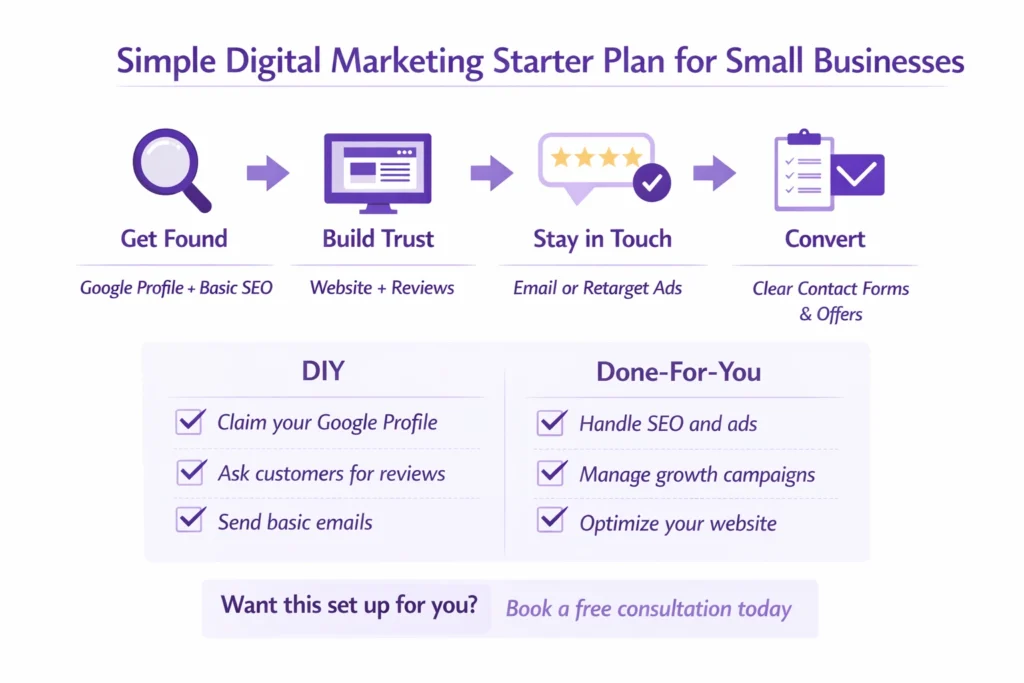
Simple digital marketing starter plan for small businesses with steps to get found, build trust, stay in touch, and convert leads

6. High Rate of Interest

High ROI is something that we ultimately look at at the end of the day. It is essential to run campaigns for your brand or make use of platforms like social media for engaging people, in order to increase your scorecard.

It would be even great if businesses are peculiar about content creation, SEO strategies, Website making and maintenance, social media strategies, etc, when everything is in sync, then high ROI is definite to come.

7. Enjoy Global Reach

Once you are successful in making your reach, it would be no surprise if global brands are ready to collaborate and take your business to another level. It will always be great to move ahead from local streets to across the globe.

Selling handcrafted clothes, shawls, clay pots, etc., can be sold over the internet, and it may give you a chance to connect with big entrepreneurs who love to give credit for quality rather than quantity.

81% of users abandon an online form after starting it.

Why it matters:

This shows most potential leads drop off before submitting their details. It explains why small businesses get traffic but no enquiries. Forms that are long, confusing, or feel unsafe kill conversions fast.

Is Digital Marketing Really Worth to do with?

Most people have a concern in their mind, whether to go for digital marketing or not.  Well, the answer is simply, “YES”. No matter whether you are running a small, medium, or big business, digital marketing suits best suited for your business at any age.

If the “GROW” word is always in your mind, and you are coming up with a big idea for your business, it will definitely be a big mistake if you are missing “digital marketing” from your list. So, we will surely suggest to dealt with the ongoing trends and making the utmost use of digital marketing to make your audience into loyal and trustworthy customers.

Users decide whether to stay or leave a website within about 10 seconds.

Why it matters:

This explains high bounce rates and why many websites fail to convert. If visitors do not instantly understand what you offer and what to do next, they leave without contacting you.

The Final Verdict!

We can rightly say that “digital marketing” plays a vital role in running a long-term business, and it shouldn’t be ignored at any cost. Using digital trends, it becomes quite easier to handle everything together without any inconvenience.

Get a Quick Review of Your Website

See why visitors leave and how to turn them into leads.

So, without making any long pause, just start with digital marketing tactics and see the change in your small business. You can also opt for a digital marketing course that is specially designed to give complete details about the digital marketing world.

FAQs

Is digital marketing really necessary for a small business?

Yes, especially today. Most customers search online before they buy anything. If your business is not visible on Google or social media, people may never find you, even if your product is great. Digital marketing helps you show up where your customers already spend their time.

There is no fixed amount. Many small businesses start with a small monthly budget and increase it as they see results. The good thing about digital marketing is that you can control your spending and test what works before investing more.

For most small businesses, a website and Google presence (SEO and Google Business Profile) are the first priority. After that, social media and paid ads can help you reach more people faster. The right channel depends on your industry and where your customers are active.

Some strategies like paid ads can bring results within days. SEO and content marketing usually take a few months to show strong results. Digital marketing is not a one-time activity, it works best when done consistently.

Not necessarily. Many tools are beginner-friendly, and you can also hire an agency or consultant. However, understanding the basics helps you make better decisions and avoid wasting money on the wrong strategies.

Yes, absolutely. Local businesses like salons, restaurants, service providers, and shops benefit a lot from digital marketing. Local SEO, Google reviews, and social media can bring nearby customers directly to your business.

You can track website traffic, leads, calls, form submissions, and sales. Tools like Google Analytics and ad dashboards show real data, so you can see what is working and what needs improvement.

Both are useful, but they work differently. SEO is long-term and builds trust and organic traffic. Paid ads give quick visibility and leads. Many successful small businesses use both together.

You can start by yourself with basic strategies, but as your business grows, hiring an expert can save time and money. A professional can create a clear plan, avoid mistakes, and focus on results.

The biggest mistake is being inconsistent or expecting instant results. Digital marketing needs testing, patience, and regular updates. Another common mistake is focusing only on posting content without tracking performance or conversions.

Why Digital Marketing Matters for Small Businesses Read More »

Banner for blog about fixing slow WordPress sites to improve enquiries

Why a Slow WordPress Site Kills Your Enquiries

A slow WordPress website can quietly push visitors away before they ever contact you. When pages take too long to load, trust drops, users leave, and enquiries disappear. This blog explains why it happens and how to fix it.

Guruparshad

Guruparshad

WordPress Developer

Jan 27, 2026  |  6 min. read

3D icon representing a slow WordPress site affecting enquiries and conversions

A slow WordPress site doesn’t just feel frustrating. It quietly pushes potential customers away before they ever get a chance to contact you.

When a website takes too long to load, most people don’t wait. They click back, open another option, and move on. That’s how a slow website ends up hurting leads without you even realising it.

When I review business websites, I see that the design looks impressive, with good CTA placement and strong authority, but the speed on mobile and desktop is slow. Traffic comes but does not stay on the website. As a result, the bounce rate increases, which is bad for SEO.

I hear this question a lot: “Is your slow WordPress website costing you leads?”
Usually, the answer is yes. Not because the business is bad, but because visitors are leaving quickly when pages don’t open fast enough.

The link between page speed and enquiries is very real. The good news is this isn’t unusual, and it’s usually fixable once you understand what’s causing the delay.
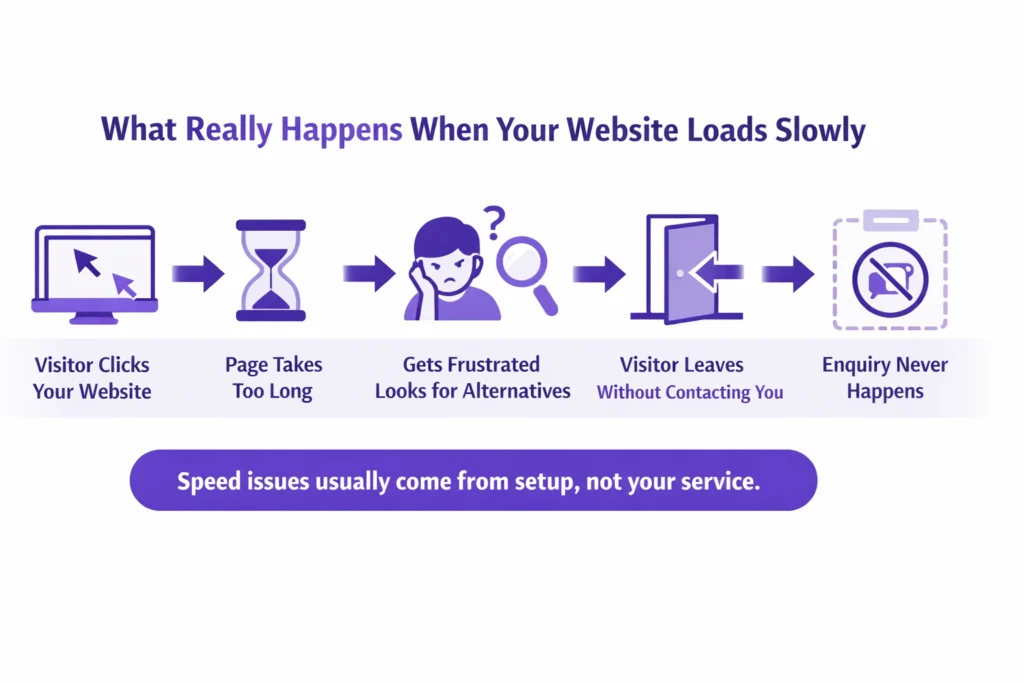
Infographic showing what happens when a slow WordPress site loses visitor enquiries

Why a WordPress Website Loads Slow (Root Causes)

One of the most common questions I hear is, “why is my WordPress site so slow?”
In most cases, it’s not one big problem. It’s a few small setup issues adding up and affecting the website loading time.

WordPress itself isn’t bad or slow by default. A WordPress website loading slow usually comes down to how it’s been built and maintained over time.

Here are the main reasons I see again and again:

Too many plugins

Plugins are helpful, but every extra one adds weight. Some are poorly built, others overlap, and together they slow the site down without you noticing.

It is true that plugins help in designing and make tasks easier for developers, but too many plugins add extra code (CSS/JavaScript) that takes time to load.

Weak or overcrowded hosting

If your hosting struggles, your website struggles. This is one of the biggest causes of WordPress performance issues, especially on shared plans. Before buying a hosting plan, I recommend checking the best options. It may be a bit costly, but it provides a better experience for visitors.

Large images and heavy page builders

Big images and complex layouts look nice, but they take longer to load. Visitors feel that delay straight away. When a website loads, images consume most of the loading time. Images with smaller file sizes load faster and more easily.

Slow mobile performance

Many sites seem “fine” on desktop but load very slowly on phones. That’s where most visitors leave. You know that most users use phones because they are reliable and easy for accessing websites. But slow mobile speed frustrates them, and they move away from the website.

No regular checks

When no one keeps an eye on speed, small issues quietly turn into bigger website speed problems. I see this problem on many websites. When my clients update content on their websites, they forget to check the speed on mobile and desktop. This hurts the performance of the website.

This is why people ask if WordPress sites are slow. They aren’t by nature — but the setup matters more than most business owners realise.

Once you understand what’s causing the slowdown, fixing it becomes much more straightforward.

53% of mobile users leave a page that takes more than 3 seconds to load.

This means more than half of your visitors give up before they even see your offer — especially on phones where most people browse.
Source: WeAreTenet website speed data (2026)

Why it matters:

It directly connects slow loading to visitor drop off, so readers instantly see how a slow WordPress site leads to fewer enquiries.

Common Mistakes That Make WordPress Sites Slow

When someone tells me, “my website is slow WordPress”, it’s usually because of a few everyday decisions that felt harmless at the time.

These are the most common ones I see, and they explain why website visitors leave quickly without enquiring.

Choosing cheap hosting and never upgrading

It works in the beginning, but as your site grows, the cracks show. Many WordPress hosting issues come from plans that simply can’t handle real traffic. So before buying hosting, you must check the best hosting plans in your area. I see that different countries have different hosting providers that work well.

Recently, I faced an issue with a USA client’s website. For some reason, the website crashed. The client had a Bluehost hosting plan, and their customer support was very good. Within two hours, I recovered the client’s website. That’s why reliable hosting with proper website backup options is important.

Installing plugins for every small feature

This is a big one. When I review sites, I see that some plugins are used for small features. By adding some CSS code, we can replace them and make the website faster. Yes, WordPress plugins do slow down websites when too many are active or poorly built. Each plugin adds load, even if it’s rarely used.

Ignoring mobile speed completely

A slow mobile website is often the biggest leak. If pages crawl on phones, people don’t wait — they leave. I see that many business owners don’t know about mobile responsiveness when designing their websites. When we design a website, there is an option to preview the design on mobile and adjust the settings and layout accordingly. Headings, text, and font sizes can be adjusted so they fit easily on the mobile screen and look good without distracting users.

Thinking speed is only a technical issue

Speed isn’t just about code. It affects how long people stay, how much they trust the site, and whether they take action. When I audit websites, I see that this issue is common. Clients often ask me how much time is needed to fix it. It depends on the size and structure of the website. If your website is small, with up to 5–10 pages, I can resolve it in 2–3 days with full client satisfaction.

Believing traffic matters more than performance

More visitors won’t help if the site can’t load quickly enough to keep them. Most clients focus on organic traffic. Yes, traffic can improve by creating new pages, publishing blogs, building case studies, and optimizing content. But in the end, they face the same problem—enquiries. Traffic increases, but sales do not. This happens when users come to the website but do not stay or explore other options.

What I see with most small business websites is that the design looks good, but it represents the business more than the client’s problems. A website doesn’t just need good content; it needs solution-based, trustworthy, and value-driven content that emotionally connects with visitors’ problems. That’s why user engagement is so important.

Most business owners don’t realise they’re making these choices. But once you spot them, it becomes clear why enquiries slow down — even when the business itself is solid.

What Actually Works to Fix a Slow WordPress Site

When clients ask me, “How do I speed up my WordPress site?”, they’re usually expecting something complicated. In reality, the fixes that matter most are practical and focused on how real people use the site.

Here’s what actually makes a difference for a slow WordPress site:

Start with reliable hosting

Good hosting isn’t about fancy features. It’s about stability and speed. If the server struggles, no amount of tweaking will fix the website loading time. The website data and files are stored on the server-side hosting. A fast CPU and SSD storage help the site load faster, especially on mobile.

Today, internet speeds like 4G and 5G are quite good, but slow hosting can still frustrate visitors. Choosing the right hosting will definitely improve website performance on both mobile and desktop.

Remove plugins that aren’t pulling their weight

If you haven’t used a plugin in months, it’s probably hurting more than helping. Cleaning these up is one of the simplest WordPress speed fixes.

When we add a plugin to a website, it installs with all its features, including extra code, CSS, and JavaScript files, even if many of those features are not used. When the website loads on mobile, the browser has to download these extra files, which creates more HTTP requests. That is one reason why the website becomes slow.

This is why it is important to audit your plugins and check which ones are truly useful. Some plugins are minor and can be replaced with a small custom CSS or JavaScript code instead.

Reduce image and page size

Large images slow pages down, especially on mobile. Simply shrinking them can noticeably improve how fast a page opens.

When I audit a site, I often see developers using PNG or JPEG images with very large file sizes in MB to keep the images clear. But these large files take more server space, and when the page loads, the browser needs more time to download them. That is why mobile speed becomes slow.

Compress your images or replace PNG and JPEG files with WebP. This can reduce image size from MB to KB and is more reliable for website performance.

Fix mobile loading first

Always check how the site behaves on a phone. A slow mobile experience is usually where enquiries are lost. Simply search for “Google Speed Insight” on Google, open the site, and enter your website URL to check performance on both mobile and desktop.

This Google tool also gives suggestions that help improve mobile speed and overall website performance.

Focus on issues visitors actually feel

Not every technical warning matters. The real concern is whether pages load smoothly for users, not whether a tool shows a perfect score.

Think like a visitor. Analyze your website design section by section and ask how you can provide real value so users stay longer. Do not focus only on selling your services. Your content should be written around your clients’ pain points and offer clear, trustworthy solutions, with proper mobile responsiveness. This helps reduce bounce rate, improve conversion rate, and build more authority for your website.

Yes, WordPress speed does affect SEO. But more importantly, it affects whether people stay long enough to contact you. If you’re unsure where to start, the first step is simply to check website speed and see where the delay really is.

Once these basics are handled, everything else becomes easier to improve.

Sites that load in one second can have conversion rates up to 3× higher than sites that take five seconds.

Visitors are far more likely to take action when pages open fast, and each extra second of delay can reduce conversions significantly.
Source: TechKV web design and conversion stats (2025)

Why it matters:

This ties site speed directly to lead generation performance, not just bounce rates — helping business owners understand the real cost of slow pages.

How Speed Impacts Leads & Enquiries

Let me give you a simple, real-world scenario I see often.

A local service business was getting steady traffic. Before mobile speed optimization, people were landing on the site, reading a bit, and clicking around. But enquiries were almost zero. On the surface, everything looked fine.

The real issue was that the client’s WordPress site took too long to load. Pages felt sluggish, especially when moving toward the contact page. Before the form even appeared, visitors were leaving.

This is how a slow website hurts leads. People don’t complain. They don’t send feedback. They just move on to the next option.

Once the website speed issues were fixed, the change was noticeable. Pages opened faster, navigation felt smoother, and visitors stayed long enough to reach the contact page. That improvement in speed and enquiries wasn’t magic, it was simply removing friction.

It’s a good example of how website speed affects conversions more than most businesses expect. The offer didn’t change. The service didn’t change. The experience did.

This is why speed is often the quiet problem behind low enquiries.
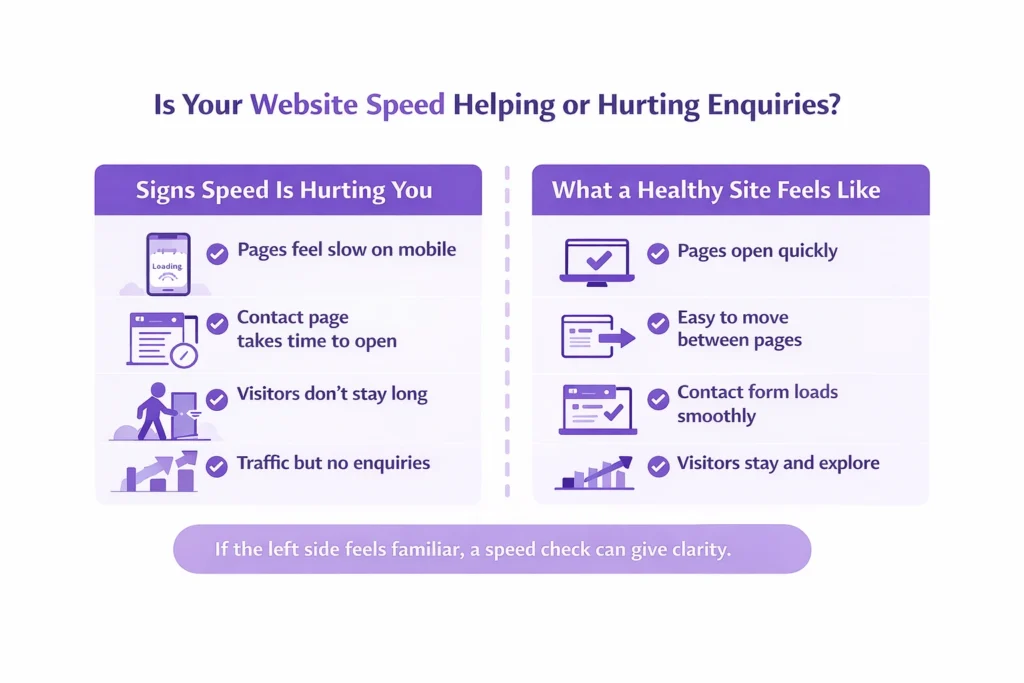
Two-column infographic comparing slow vs fast WordPress sites and visitor behaviour

If Your WordPress Site Is Slow, Your Enquiries Are Leaking

If you’re dealing with a slow WordPress site, it’s worth knowing this: in most cases, it’s a setup issue, not a sign that the whole website needs rebuilding.

A slow website hurting leads doesn’t mean your service is weak or your messaging is wrong. It usually means visitors are hitting friction before they reach the point of contacting you.

The good part is that when a site loads slowly for visitors, it can be fixed. The right WordPress speed fixes focus on removing what’s holding the site back, not adding more complexity or changing what already works.

If you’re unsure where the problem sits, a simple speed check can give clarity. Looking at the site with fresh eyes often reveals website speed problems that are easy to overlook day to day.

Check Your WordPress Site Speed Today

See why visitors leave and how fast fixes improve enquiries.

If you want help reviewing this or exploring mobile website optimization services, the next step doesn’t need to be a big commitment. Sometimes a short conversation is enough to point things in the right direction.

FAQs

Why does my WordPress site load slowly for visitors?

In most cases, it’s not one single issue. Slow loading usually comes from a mix of heavy plugins, weak hosting, large images, or poor mobile setup. When these stack up, pages take longer to open and visitors lose patience.

HTML sites are simple and lightweight, while WordPress loads themes, plugins, and database content. That doesn’t make WordPress bad. When it’s set up properly, a WordPress site can still load quickly and feel smooth to users.

Yes, it does. Slow pages make people leave sooner, which sends negative signals to search engines. More importantly, speed affects trust. If visitors don’t stay long enough to read or enquire, rankings alone won’t help.

No. WordPress itself isn’t slow. Most speed issues come from how the site is built, hosted, and maintained over time. A well-set-up WordPress website can perform just as well as any other platform.

Start with the basics. Use reliable hosting, remove unnecessary plugins, reduce large images, and focus on mobile performance. These changes usually improve loading speed without needing a full redesign.

Use a simple speed testing tool and focus on how fast pages feel, not just scores. Check the site on your phone as well. If pages hesitate or take too long to open, that’s what your visitors are experiencing too.

Why a Slow WordPress Site Kills Your Enquiries Read More »

How long SEO takes for a small business and what realistic results look like over time.

How Long Does SEO Take for a Small Business?

Wondering how long does SEO take to work for small business websites in 2026? This guide breaks down what really happens after you start SEO, what early progress looks like, and how small businesses should set realistic expectations without relying on guesswork or empty promises.

Deepak Sharma - SEO consultant

Deepak Sharma

SEO Consultant

Jan 20, 2026  |  6 min. read

SEO timeline icon representing gradual growth and long-term results for small businesses.

Most small business owners ask this question after they’ve already tried something and felt disappointed. Money was spent, time passed, and the website still isn’t bringing enquiries. At that point, frustration is completely understandable.

The problem is that small business SEO expectations are often set without any real explanation. You’re told it will “take time,” but no one explains when SEO starts working or what progress should actually look like in the early stages. Without that context, it’s easy to assume nothing is happening.

This post is here to reset that. Not with promises, but with clear, honest answers about how long SEO takes to show results and what’s normal along the way. Once you understand the process, it becomes much easier to judge whether things are moving in the right direction.

Why SEO Takes Time for Small Businesses

SEO feels slow because it’s not something you switch on and see instant movement. There’s no button to press and no quick spike the next morning. What’s really happening is quieter and takes a bit of patience, which is why many business owners feel stuck early on.

One reason why SEO takes time is that search engines need to trust your website before they show it to more people. If the site is new, that trust hasn’t been earned yet. SEO for new websites usually moves slower because there’s no history, no consistency, and often a few basics that need fixing before anything else can work properly.

Another issue is the foundation itself. Many small business sites look fine on the surface but have unclear pages, weak content, or confusing structure underneath. Sorting that out doesn’t create instant traffic, but it’s necessary. This is where real SEO progress over time begins, even if it’s not obvious right away.

In the early months, the work is mostly about putting things in the right place so growth can happen later. It may feel invisible, but it’s the stage that makes the next one possible.

What I analyse in 2026:

Local competition matters. Mostly, I see that local businesses from various industries have little SEO knowledge and often do not hire any SEO agency. There are many reasons behind this, and budget for local SEO is one of them. By targeting the right keywords with low competition but high customer demand, it takes less time to rank on Google and in AI-driven searches.

Only about 2.35% of website visitors convert into leads on average.

That means roughly 97 out of every 100 visitors leave without taking action, like filling a form or clicking to call. This shows how small the window is for turning interest into contact.
Source: Contentsquare Digital Experience Benchmark Report 2026

Common Timeline Mistakes That Slow SEO Results

One of the biggest mistakes I see is expecting ranking improvements within a few weeks. That expectation usually comes from comparing SEO to ads, where results show up fast. SEO doesn’t work that way, and treating it like a short-term fix almost always leads to disappointment.

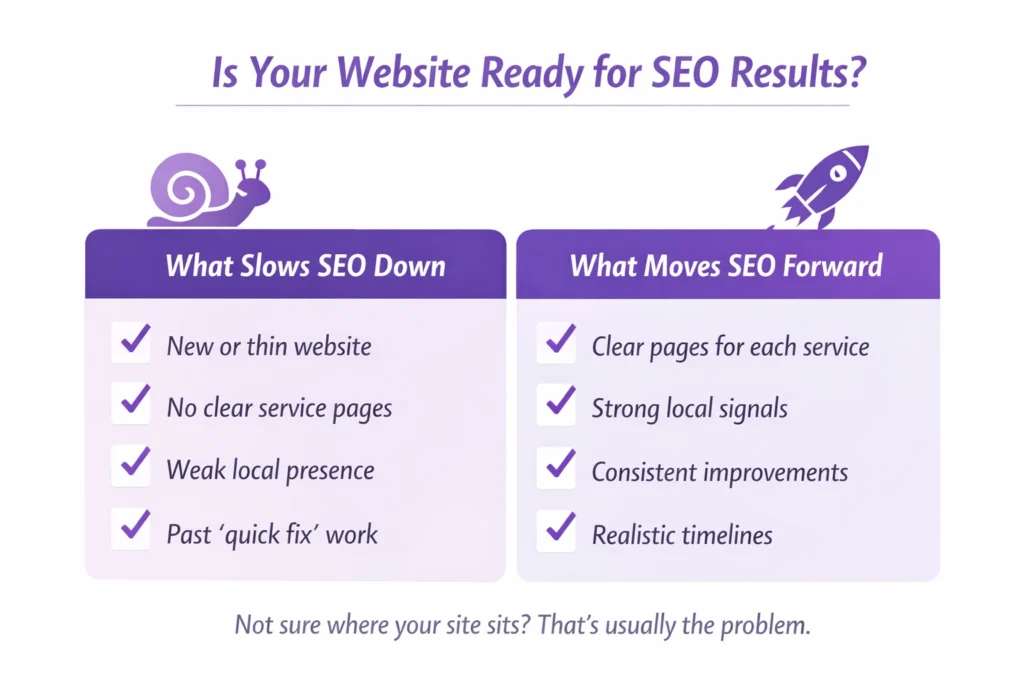
Checklist infographic helping local businesses understand if their website is ready for SEO results and what factors slow or improve rankings.

Another common issue is focusing on keywords alone. Business owners are often told that if the right words are added, traffic will follow. In reality, pages need to make sense, answer real questions, and work properly for local searches. Without that, even good keywords won’t move the needle.

Many people also stop too early. The first SEO results are rarely dramatic. They show up as small signs, a page moving up slightly, a few more impressions, better visibility in local searches. Organic traffic growth usually comes later, after those early signals stack up.

This is where short-term vs long-term SEO really matters. The early work can feel slow, but quitting at that stage often means walking away just before things start to turn.

The Right SEO Strategy That Works in 2026 for Small Businesses

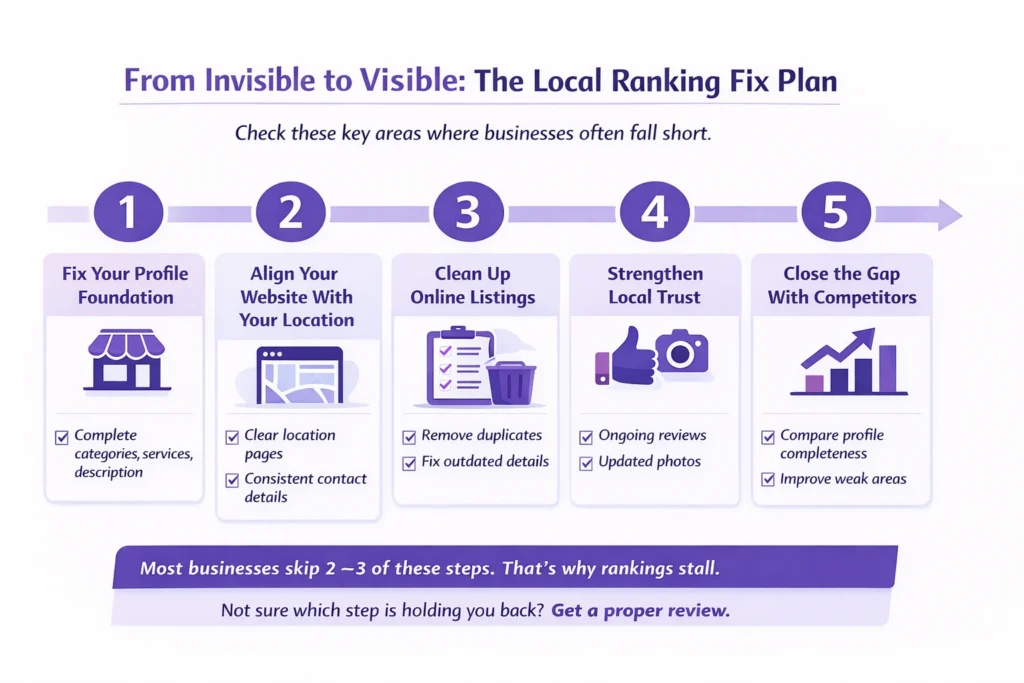
  1. Properly optimize your Google Business Profile.
  2. Optimize your website for the local audience.
  3. Publish one blog per week addressing local customers’ pain points.
  4. Create local area pages—more content means more keywords to rank.
  5. Build quality backlinks and local business listings.

I follow these five simple steps to rank local businesses in 2026 and track results in Google’s AI overview.

What a Realistic SEO Timeline Looks Like

A realistic SEO timeline for small businesses looks very different from what most people are told at the start. It’s not a straight line and it’s rarely dramatic in the early months. Progress tends to show up quietly before it shows up clearly.

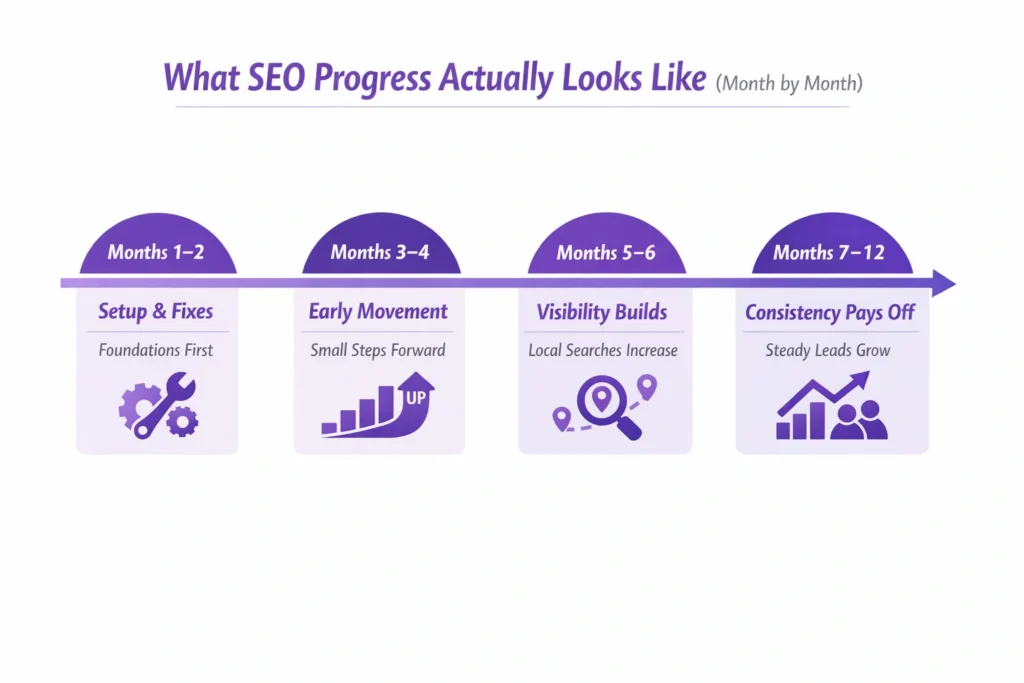
Month by month SEO timeline showing what progress looks like for a small business, from setup and fixes to consistent enquiries over 12 months.

In the beginning, the SEO results timeline is usually about getting the basics right. Pages become clearer, the site structure starts to make sense, and search engines understand what the business actually offers. You may notice small ranking movement, but not a flood of traffic yet. That’s normal.

For local businesses, things often move a bit faster. When location pages are set up properly and the Google Business Profile is in good shape, visibility can improve sooner than national or broader searches. That’s often when people start asking how long until small business SEO shows results, because early signs begin to appear.

Over time, consistency is what makes the difference. Steady improvements, useful content, and patience lead to a small business SEO timeline for results that builds on itself instead of starting over every few months.

What I have seen in the last 10 years:

SEO has not changed, or you could say it has evolved. As we discussed above, if the website is new, it normally takes 3 to 6 months to rank for local keywords. But if your website is old—up to 10 years—and has good authority, then ranking is not hard. The right SEO strategy can give the website the wings to rank in up to 3 months.

53% of mobile visitors will abandon a page if it takes longer than 3 seconds to load. Slow load times also increase bounce rates and cut conversion opportunities.

Many small business sites load slowly or aren’t mobile-friendly. When more than half of mobile visitors leave before the page finishes loading, you lose most of your potential leads before they ever see your offer.
Source: Site Qwality Website Speed Crisis Report (2025)

Example: How SEO Progress Builds Over Months

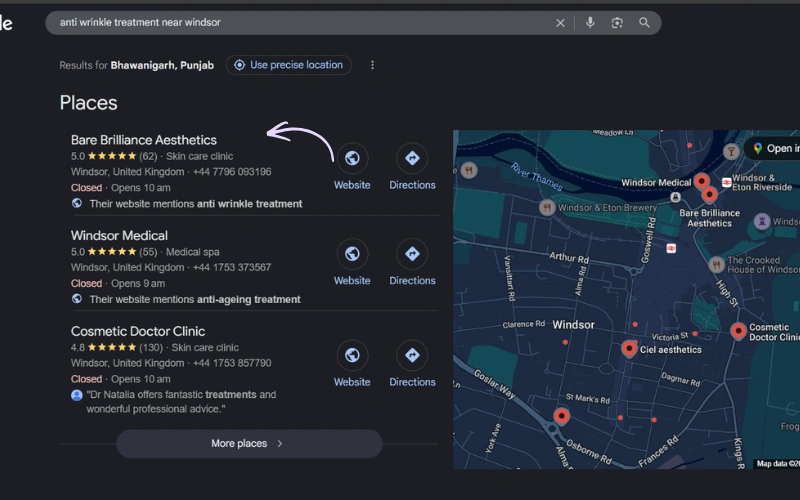
Here’s a situation I often see with a local service business called Bare Brilliance. In the first month, nothing looks different from the outside. No extra calls, no sudden jump in traffic. At this stage, many owners start wondering how long SEO take to start working for a small business like theirs does.

In the first two months, I optimized the website for local search queries, fixed technical issues, optimized the Google Business Profile, and improved UI and UX with the help of our website developer.

By around the third month, small changes begin to show. A couple of service pages move onto page first. The site starts appearing more often in local searches, even if enquiries are still limited. It’s not exciting yet, but it’s progress.

Around month six, things feel different. The business starts getting calls from local searches that weren’t there before. By the end of the year, SEO often becomes a steady source of enquiries rather than something they question every month. The client appreciated the results.

This isn’t a rare success story. It’s how SEO usually unfolds when the work is done properly and given enough time to settle.

Get clarity before you decide

If you’re still unsure whether your website is on the right path, that’s completely fair. Every business is different, and timelines can vary based on what’s already in place and what needs fixing.

Get Your SEO Timeline Explained Clearly

See what SEO progress should look like for your business and location.

If you want an honest view of how long SEO is likely to take for your business, and what progress should look like at each stage, get in touch. We can walk through your website together and set expectations that actually make sense for you.

FAQs

How long does SEO take to start working for a small business?

For most small businesses, early signs usually appear within two to three months. This doesn’t mean leads or sales yet. It’s more about visibility. Pages start getting impressions, rankings move slightly, and search engines begin to understand the site better. That early movement is often the first signal that SEO is working.

When people ask how long SEO takes to show results, they’re usually thinking about calls, enquiries, or form submissions. For many small businesses, that stage arrives around four to six months. Timing depends on competition, location, and the condition of the website when work begins.

SEO usually starts bringing leads once rankings improve and trust builds over time. This often happens after several months of steady progress. Leads don’t arrive all at once. They tend to grow gradually as more pages appear in the right searches and more people find the site naturally.

SEO takes time because search engines don’t take risks on new or unclear websites. They need to see consistent signals that a site is useful, reliable, and relevant. That trust builds slowly, especially for small businesses that are still strengthening their online presence.

Yes, SEO for new websites usually takes longer. A new site has no track record, no history, and often needs structural fixes before it can grow. Once those basics are in place, progress becomes more consistent, but patience is important early on.

SEO is a long-term approach. Short-term tactics may cause brief movement, but they rarely last. Long-term SEO builds steady growth, stronger rankings, and more reliable enquiries over time, especially for local businesses working within a defined area.

Often, yes. The local SEO results timeframe can be shorter because competition is limited to a specific area. When location pages and local profiles are set up properly, small businesses sometimes see visibility improvements sooner than with broader, non-local searches.

How Long Does SEO Take for a Small Business? Read More »