Local SEO

Banner for blog about fixing slow WordPress sites to improve enquiries

Why a Slow WordPress Site Kills Your Enquiries

A slow WordPress website can quietly push visitors away before they ever contact you. When pages take too long to load, trust drops, users leave, and enquiries disappear. This blog explains why it happens and how to fix it.

Guruparshad

Guruparshad

WordPress Developer

Jan 27, 2026  |  6 min. read

3D icon representing a slow WordPress site affecting enquiries and conversions

A slow WordPress site doesn’t just feel frustrating. It quietly pushes potential customers away before they ever get a chance to contact you.

When a website takes too long to load, most people don’t wait. They click back, open another option, and move on. That’s how a slow website ends up hurting leads without you even realising it.

When I review business websites, I often see impressive design, strong CTA placement, and solid authority signals, but the speed on both mobile and desktop is slow. This is where WordPress Speed Optimization Services become essential. Traffic may come in, but it doesn’t stay on the website. As a result, the bounce rate increases, which is not good for SEO.

I hear this question a lot: “Is your slow WordPress website costing you leads?”
Usually, the answer is yes. Not because the business is bad, but because visitors are leaving quickly when pages don’t open fast enough.

The link between page speed and enquiries is very real. The good news is this isn’t unusual, and it’s usually fixable once you understand what’s causing the delay.
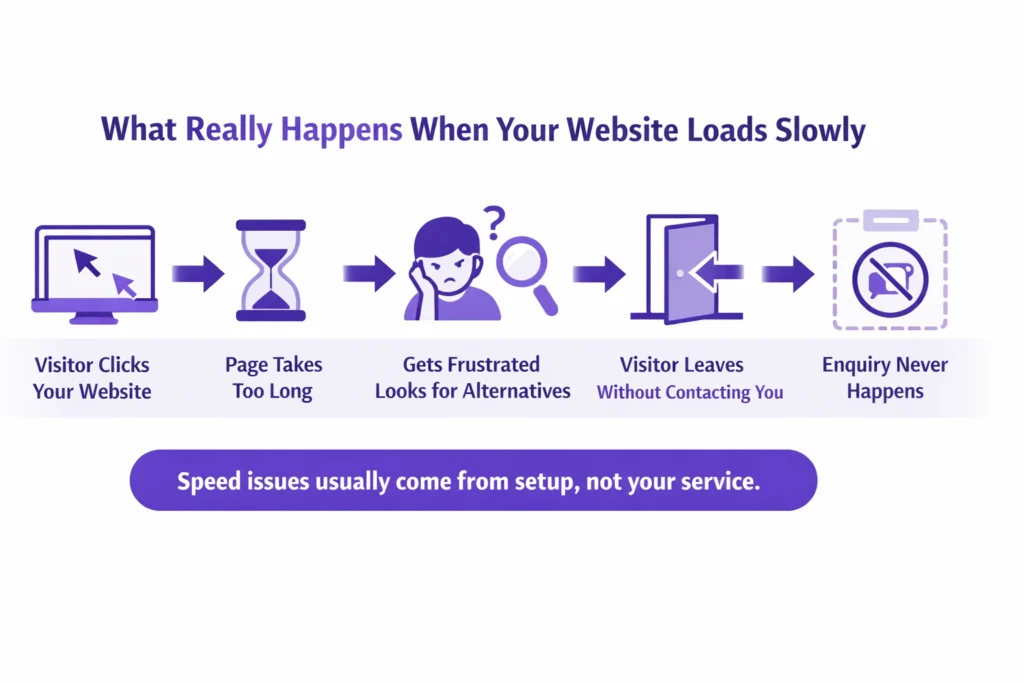
Infographic showing what happens when a slow WordPress site loses visitor enquiries

Why a WordPress Website Loads Slow (Root Causes)

One of the most common questions I hear is, “why is my WordPress site so slow?”
In most cases, it’s not one big problem. It’s a few small setup issues adding up and affecting the website loading time.

WordPress itself isn’t bad or slow by default. A WordPress website loading slow usually comes down to how it’s been built and maintained over time.

Here are the main reasons I see again and again:

Too many plugins

Plugins are helpful, but every extra one adds weight. Some are poorly built, others overlap, and together they slow the site down without you noticing.

It is true that plugins help in designing and make tasks easier for developers, but too many plugins add extra code (CSS/JavaScript) that takes time to load.

Weak or overcrowded hosting

If your hosting struggles, your website struggles. This is one of the biggest causes of WordPress performance issues, especially on shared plans. Before buying a hosting plan, I recommend checking the best options. It may be a bit costly, but it provides a better experience for visitors.

Large images and heavy page builders

Big images and complex layouts look nice, but they take longer to load. Visitors feel that delay straight away. When a website loads, images consume most of the loading time. Images with smaller file sizes load faster and more easily.

Slow mobile performance

Many sites seem “fine” on desktop but load very slowly on phones. That’s where most visitors leave. You know that most users use phones because they are reliable and easy for accessing websites. But slow mobile speed frustrates them, and they move away from the website.

No regular checks

When no one keeps an eye on speed, small issues quietly turn into bigger website speed problems. I see this problem on many websites. When my clients update content on their websites, they forget to check the speed on mobile and desktop. This hurts the performance of the website.

This is why people ask if WordPress sites are slow. They aren’t by nature — but the setup matters more than most business owners realise.

Once you understand what’s causing the slowdown, fixing it becomes much more straightforward.

53% of mobile users leave a page that takes more than 3 seconds to load.

This means more than half of your visitors give up before they even see your offer — especially on phones where most people browse.
Source: WeAreTenet website speed data (2026)

Why it matters:

It directly connects slow loading to visitor drop off, so readers instantly see how a slow WordPress site leads to fewer enquiries.

Common Mistakes That Make WordPress Sites Slow

When someone tells me, “my website is slow WordPress”, it’s usually because of a few everyday decisions that felt harmless at the time.

These are the most common ones I see, and they explain why website visitors leave quickly without enquiring.

Choosing cheap hosting and never upgrading

It works in the beginning, but as your site grows, the cracks show. Many WordPress hosting issues come from plans that simply can’t handle real traffic. So before buying hosting, you must check the best hosting plans in your area. I see that different countries have different hosting providers that work well.

Recently, I faced an issue with a USA client’s website. For some reason, the website crashed. The client had a Bluehost hosting plan, and their customer support was very good. Within two hours, I recovered the client’s website. That’s why reliable hosting with proper website backup options is important.

Installing plugins for every small feature

This is a big one. When I review sites, I see that some plugins are used for small features. By adding some CSS code, we can replace them and make the website faster. Yes, WordPress plugins do slow down websites when too many are active or poorly built. Each plugin adds load, even if it’s rarely used.

Ignoring mobile speed completely

A slow mobile website is often the biggest leak. If pages crawl on phones, people don’t wait — they leave. I see that many business owners don’t know about mobile responsiveness when designing their websites. When we design a website, there is an option to preview the design on mobile and adjust the settings and layout accordingly. Headings, text, and font sizes can be adjusted so they fit easily on the mobile screen and look good without distracting users.

Thinking speed is only a technical issue

Speed isn’t just about code. It affects how long people stay, how much they trust the site, and whether they take action. When I audit websites, I see that this issue is common. Clients often ask me how much time is needed to fix it. It depends on the size and structure of the website. If your website is small, with up to 5–10 pages, I can resolve it in 2–3 days with full client satisfaction.

Believing traffic matters more than performance

More visitors won’t help if the site can’t load quickly enough to keep them. Most clients focus on organic traffic. Yes, traffic can improve by creating new pages, publishing blogs, building case studies, and optimizing content. But in the end, they face the same problem—enquiries. Traffic increases, but sales do not. This happens when users come to the website but do not stay or explore other options.

What I see with most small business websites is that the design looks good, but it represents the business more than the client’s problems. A website doesn’t just need good content; it needs solution-based, trustworthy, and value-driven content that emotionally connects with visitors’ problems. That’s why user engagement is so important.

Most business owners don’t realise they’re making these choices. But once you spot them, it becomes clear why enquiries slow down — even when the business itself is solid.

What Actually Works to Fix a Slow WordPress Site

When clients ask me, “How do I speed up my WordPress site?”, they’re usually expecting something complicated. In reality, the fixes that matter most are practical and focused on how real people use the site.

Here’s what actually makes a difference for a slow WordPress site:

Start with reliable hosting

Good hosting isn’t about fancy features. It’s about stability and speed. If the server struggles, no amount of tweaking will fix the website loading time. The website data and files are stored on the server-side hosting. A fast CPU and SSD storage help the site load faster, especially on mobile.

Today, internet speeds like 4G and 5G are quite good, but slow hosting can still frustrate visitors. Choosing the right hosting will definitely improve website performance on both mobile and desktop.

Remove plugins that aren’t pulling their weight

If you haven’t used a plugin in months, it’s probably hurting more than helping. Cleaning these up is one of the simplest WordPress speed fixes.

When we add a plugin to a website, it installs with all its features, including extra code, CSS, and JavaScript files, even if many of those features are not used. When the website loads on mobile, the browser has to download these extra files, which creates more HTTP requests. That is one reason why the website becomes slow.

This is why it is important to audit your plugins and check which ones are truly useful. Some plugins are minor and can be replaced with a small custom CSS or JavaScript code instead.

Reduce image and page size

Large images slow pages down, especially on mobile. Simply shrinking them can noticeably improve how fast a page opens.

When I audit a site, I often see developers using PNG or JPEG images with very large file sizes in MB to keep the images clear. But these large files take more server space, and when the page loads, the browser needs more time to download them. That is why mobile speed becomes slow.

Compress your images or replace PNG and JPEG files with WebP. This can reduce image size from MB to KB and is more reliable for website performance.

Fix mobile loading first

Always check how the site behaves on a phone. A slow mobile experience is usually where enquiries are lost. Simply search for “Google Speed Insight” on Google, open the site, and enter your website URL to check performance on both mobile and desktop.

This Google tool also gives suggestions that help improve mobile speed and overall website performance.

Focus on issues visitors actually feel

Not every technical warning matters. The real concern is whether pages load smoothly for users, not whether a tool shows a perfect score.

Think like a visitor. Analyze your website design section by section and ask how you can provide real value so users stay longer. Do not focus only on selling your services. Your content should be written around your clients’ pain points and offer clear, trustworthy solutions, with proper mobile responsiveness. This helps reduce bounce rate, improve conversion rate, and build more authority for your website.

Yes, WordPress speed does affect SEO. But more importantly, it affects whether people stay long enough to contact you. If you’re unsure where to start, the first step is simply to check website speed and see where the delay really is.

Once these basics are handled, everything else becomes easier to improve.

Sites that load in one second can have conversion rates up to 3× higher than sites that take five seconds.

Visitors are far more likely to take action when pages open fast, and each extra second of delay can reduce conversions significantly.
Source: TechKV web design and conversion stats (2025)

Why it matters:

This ties site speed directly to lead generation performance, not just bounce rates — helping business owners understand the real cost of slow pages.

How Speed Impacts Leads & Enquiries

Let me give you a simple, real-world scenario I see often.

A local service business was getting steady traffic. Before mobile speed optimization, people were landing on the site, reading a bit, and clicking around. But enquiries were almost zero. On the surface, everything looked fine.

The real issue was that the client’s WordPress site took too long to load. Pages felt sluggish, especially when moving toward the contact page. Before the form even appeared, visitors were leaving.

This is how a slow website hurts leads. People don’t complain. They don’t send feedback. They just move on to the next option.

Once the website speed issues were fixed, the change was noticeable. Pages opened faster, navigation felt smoother, and visitors stayed long enough to reach the contact page. That improvement in speed and enquiries wasn’t magic, it was simply removing friction.

It’s a good example of how website speed affects conversions more than most businesses expect. The offer didn’t change. The service didn’t change. The experience did.

This is why speed is often the quiet problem behind low enquiries.
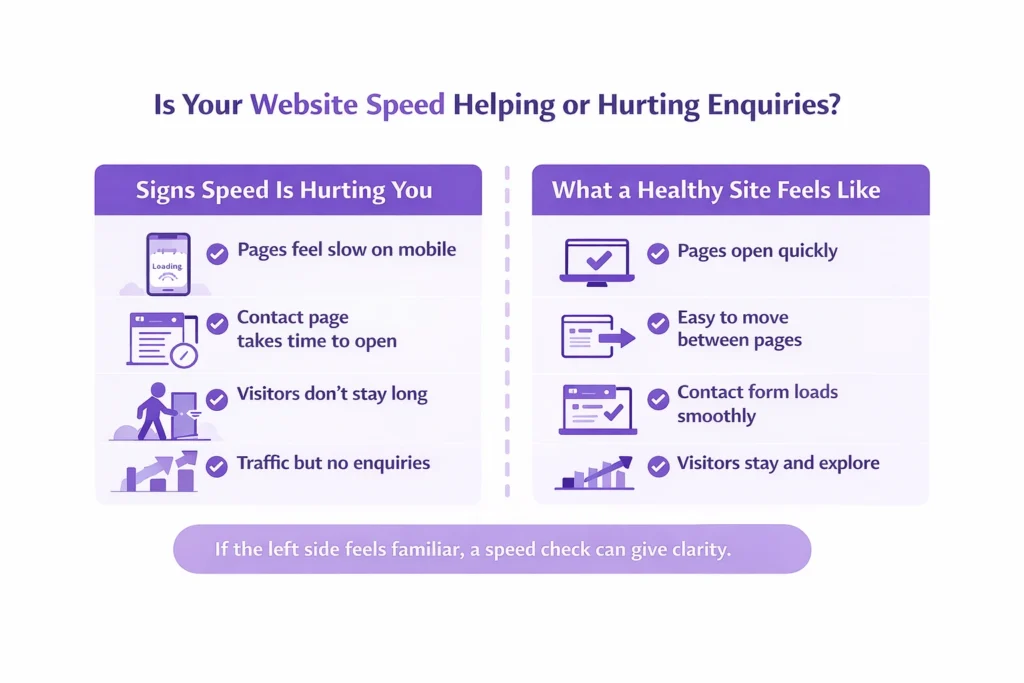
Two-column infographic comparing slow vs fast WordPress sites and visitor behaviour

If Your WordPress Site Is Slow, Your Enquiries Are Leaking

If you’re dealing with a slow WordPress site, it’s worth knowing this: in most cases, it’s a setup issue, not a sign that the whole website needs rebuilding.

A slow website hurting leads doesn’t mean your service is weak or your messaging is wrong. It usually means visitors are hitting friction before they reach the point of contacting you.

The good part is that when a site loads slowly for visitors, it can be fixed. The right WordPress speed fixes focus on removing what’s holding the site back, not adding more complexity or changing what already works.

If you’re unsure where the problem sits, a simple speed check can give clarity. Looking at the site with fresh eyes often reveals website speed problems that are easy to overlook day to day.

Check Your WordPress Site Speed Today

See why visitors leave and how fast fixes improve enquiries.

If you want help reviewing this or exploring mobile website optimization services, the next step doesn’t need to be a big commitment. Sometimes a short conversation is enough to point things in the right direction.

FAQs

Why does my WordPress site load slowly for visitors?

In most cases, it’s not one single issue. Slow loading usually comes from a mix of heavy plugins, weak hosting, large images, or poor mobile setup. When these stack up, pages take longer to open and visitors lose patience.

HTML sites are simple and lightweight, while WordPress loads themes, plugins, and database content. That doesn’t make WordPress bad. When it’s set up properly, a WordPress site can still load quickly and feel smooth to users.

Yes, it does. Slow pages make people leave sooner, which sends negative signals to search engines. More importantly, speed affects trust. If visitors don’t stay long enough to read or enquire, rankings alone won’t help.

No. WordPress itself isn’t slow. Most speed issues come from how the site is built, hosted, and maintained over time. A well-set-up WordPress website can perform just as well as any other platform.

Start with the basics. Use reliable hosting, remove unnecessary plugins, reduce large images, and focus on mobile performance. These changes usually improve loading speed without needing a full redesign.

Use a simple speed testing tool and focus on how fast pages feel, not just scores. Check the site on your phone as well. If pages hesitate or take too long to open, that’s what your visitors are experiencing too.

Why a Slow WordPress Site Kills Your Enquiries Read More »

gym-seo-lead-generation-3d-icon-digital-deep-tech

SEO for Fitness Businesses: How Gyms & Trainers Get Clients from Google

Many gyms and personal trainers struggle to attract new members online, even when people are actively searching for fitness services nearby. This guide explains how SEO for fitness businesses helps gyms, studios, and trainers appear on Google and turn searches into real clients.

Deepak Sharma - SEO consultant

Deepak Sharma

SEO Consultant

Mar 18, 2026  |  6 min. read

gym-seo-lead-generation-3d-icon-digital-deep-tech

Struggling to Get Gym Members from Google?

A gym owner recently asked me a simple question: “How can my gym get more clients from Google?”

It’s a fair question. Most gym owners I speak with are putting effort into Instagram, running occasional ads, or relying on word of mouth. But when we look at their website traffic, something important is missing.

They are barely getting any enquiries from Google.

Think about how people actually choose a gym today. Someone finishes work, opens their phone, and searches something like “best gym in my area.” Within seconds they see a list of gyms nearby. Usually they click one of the first few results and that’s where the decision starts.

If your gym doesn’t appear there, those potential members never even know you exist.

📊 “The average bounce rate across websites is around 45–46%, meaning nearly half of visitors leave after viewing only one page.”

Why it matters:

This statistic shows how quickly visitors leave websites when they don’t immediately find value, clear navigation, or a compelling call-to-action. For small business websites, this often means potential leads leave before discovering services, filling out a form, or contacting the business.

This is where SEO for fitness businesses becomes important. It simply means helping your gym show up when people are already searching for a place to train. When it’s done properly, Google starts sending a steady flow of people who are actively looking for a gym or a trainer.

Over the years working with small businesses at Digital Deep Tech, I’ve seen the same situation many times. A gym might have great trainers, solid equipment, and loyal members, but their website is practically invisible in search results.

The good news is that this is usually fixable. With the right seo for fitness businesses, gyms and personal trainers can start appearing in those searches and bring in enquiries without depending only on ads or social media.

Before we get into what works, it helps to understand what SEO for fitness businesses actually means in practical terms.

What SEO for Fitness Businesses Actually Means

When people hear the term seo for fitness, it often sounds more complicated than it really is.

In simple terms, it’s about helping your gym, studio, or personal training business show up when someone searches on Google.

Think about how people usually look for a place to work out. They open their phone and type something like:

  • gym near me
  • personal trainer near me
  • best gym in my area

At that moment, they’re not casually browsing. They are actively looking for a place to train. Google then shows a list of businesses it believes are the most relevant and trustworthy.

If your website is set up properly, your gym can appear in those results. If it isn’t, Google will show your competitors instead.

This is where seo for fitness websites comes in. It’s about making sure your website clearly tells Google what you do, where you’re located, and who you help. When that information is structured properly, Google has a much easier time recommending your business to people searching nearby.

Many fitness businesses already have a website, but the site often acts more like an online brochure. It might list classes, show photos of the gym, and include a contact page, but it doesn’t give Google enough signals to appear in search results.

Good seo for fitness gyms focuses on fixing that. The goal is simple. When someone in your area searches for a gym or trainer, your business should have a fair chance of appearing in front of them.

Once that foundation is clear, the next step is understanding why so many gyms still struggle to get visibility on Google in the first place.

Why Many Fitness Businesses Struggle to Rank on Google

One thing I notice quite often when reviewing gym websites is this. The business itself is good, but the website hasn’t been set up in a way that helps Google understand it.

Most gym owners do build a website at some point. It usually has photos of the space, a list of classes, maybe a trainer profile and a contact page. That’s a good start, but on its own it rarely helps a gym show up in search results.

Google needs a bit more structure and clarity.

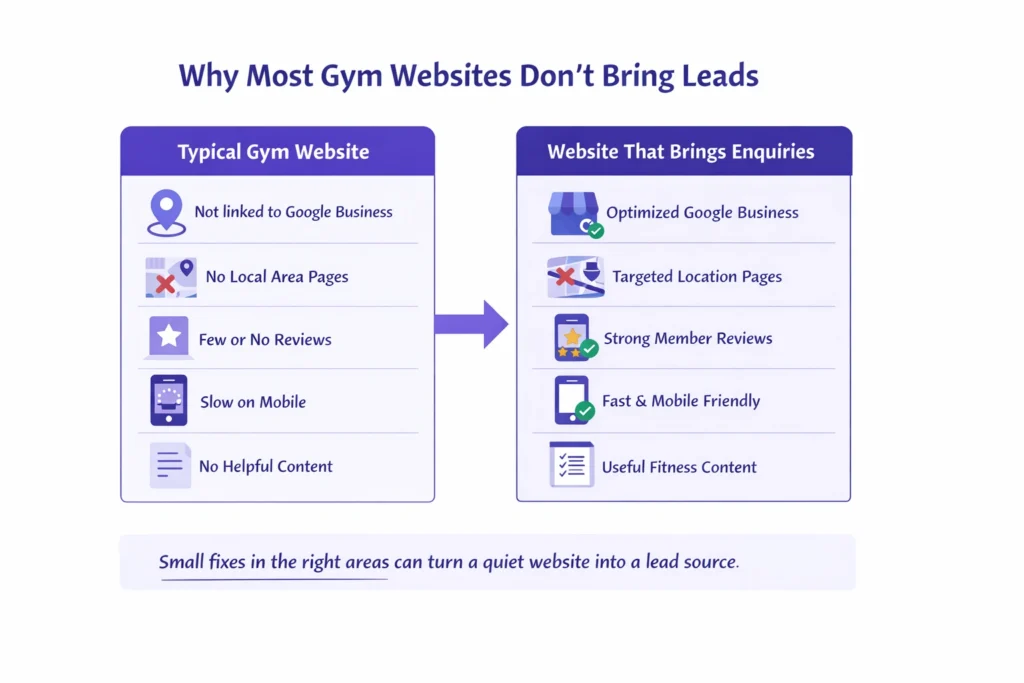
Infographic showing why most gym websites fail to generate leads and how SEO and conversion optimization help gyms attract more members.

Here are a few common gaps I see when looking at fitness websites.

No proper local setup

Many gyms never set up or properly connect their Google Business Profile to their website. That profile is often the first thing people see when searching for gyms nearby. If it’s incomplete or inactive, the business misses a big opportunity.

The website isn’t built with search in mind

Some websites look great visually, but they don’t explain clearly what the business offers or where it operates. For example, a seo for fitness center approach usually requires clear service pages, location details, and structured information that Google can easily read.

No location-specific pages

If a gym serves a specific city or area, that should be obvious on the website. Many fitness studios forget to mention neighbourhoods, cities, or nearby areas people search for. Without that context, Google struggles to match the website with local searches.

Very little useful content

A lot of gym websites stay the same for years. A few pages, basic information, and that’s it. Over time, Google tends to favour websites that are active and helpful to visitors. That’s where content can make a difference for fitness clubs trying to improve their visibility.

Weak connection between the website and local search

Sometimes the business appears on Google Maps, but the website itself doesn’t support it properly. When the website, business profile, and location information work together, it becomes much easier for Google to trust the business.

Metric Average Gym Website High-Performing Website Why It Matters
Conversion Rate 2% – 3% 8% – 12% Shows how many visitors become enquiries.
Industry Benchmark 2.35% average 5% – 10% Helps compare website performance.
Landing Page Conversions 10% – 12% 18% – 26% Optimized pages generate more sign-ups.
Traffic from Google Most users start with search SEO drives steady traffic Google visibility brings new members.
Online Fitness Demand ~30% traffic growth SEO captures this demand More people research gyms online.

Over time, adding helpful information to your website can also bring in more visitors who are searching for fitness advice or local training options.

None of these issues mean the gym is doing something wrong. In fact, most owners simply never get clear guidance on how seo for gyms actually works in practice.

The good news is that these problems are usually straightforward to fix once you know what to look for. But before we talk about what works, it’s worth looking at a few common mistakes gym owners unknowingly make when trying to improve their visibility online.

Common SEO Mistakes Gym Owners and Trainers Make

After reviewing quite a few gym websites over the years, I’ve noticed something interesting. Most visibility problems don’t come from a lack of effort. They usually come from small decisions that seemed reasonable at the time but end up limiting how the website performs on Google.

These mistakes are very common across gyms, trainers, and studios.

Ignoring local search

Many gym owners focus on social media but forget that most people start their search on Google. When someone types “best gym in my area”, Google shows businesses it believes are nearby and relevant.

If the website and business profile are not clearly connected to a location, the gym simply won’t appear. This is a common issue I see when looking at websites for a fitness club that relies mainly on word of mouth.

Using a generic website

A lot of fitness websites are built using templates. They look clean and professional, but the pages are often very general.

For example, a homepage might say “Welcome to our fitness studio” without clearly explaining the services, training style, or location. From Google’s perspective, that makes it harder to understand what the business actually offers.

Not targeting the right audience

A gym, a personal trainer, and a boutique studio all attract slightly different clients. But many websites treat them the same.

For example, fitness instructors offering personal training often need different pages and content compared to a full gym facility. When the website doesn’t reflect the real services offered, it becomes harder for the right people to find it.

Hiring agencies that don’t understand gyms

Another mistake I see occasionally is when a business hires an agency offering broad seo services for fitness companies, but the approach is very generic.

Gyms are local businesses. Their visibility depends heavily on location searches, reviews, and clear service pages. If the strategy ignores those basics, the website might get updates but still struggle to bring in enquiries.

The tricky part is that none of these issues look like obvious problems at first glance. The website might look good and the business might already have loyal members.

But when you step back and look at it through the lens of search, you start to see why Google isn’t sending many visitors.

The next step is understanding what actually works for gyms and trainers who want to start attracting clients through Google.

SEO Strategies That Actually Work for Fitness Businesses

Once the basics are understood, the next question most owners ask is simple. What should we actually do to start getting enquiries from Google?

In my experience, the answer is rarely complicated. Most gyms don’t need dozens of tactics. They just need to focus on a few things that genuinely help people find them online.

These are the areas that usually make the biggest difference for seo for fitness businesses.

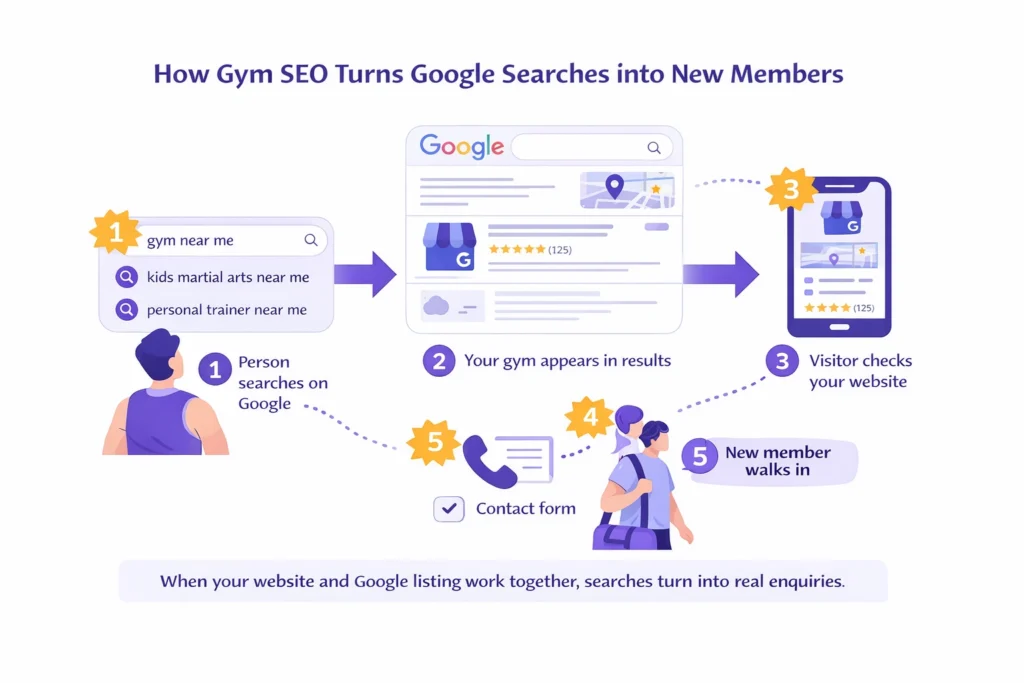
Visual infographic explaining how gym SEO works to turn Google searches into gym membership leads step by step.

Keep your Google Business Profile active

When someone searches for a gym nearby, the first thing they often see is the map with a list of local businesses. That listing comes from your Google Business Profile, and proper Google Business Profile optimization helps ensure your business appears in those local results and stands out to potential customers.

If the profile is complete, regularly updated, and connected to your website, Google has a much easier time recommending your gym in local searches. For many fitness gyms, this alone can bring a noticeable increase in enquiries.

Create pages that reflect where you operate

A common issue I see is when a gym serves a specific area but the website barely mentions it. If someone searches for a gym in a particular town or neighbourhood, Google looks for websites that clearly relate to that location.

Simple location pages can help solve this. They tell both visitors and Google exactly where the gym operates and who it serves.

Add useful content that answers real questions

Many gym websites stay static for years. A few service pages and that’s it.

Adding practical articles or guides can help the site appear in more searches. For example, topics related to training, beginner fitness advice, or choosing the right gym can slowly build visibility.

Over time, this kind of content strengthens seo for gym and fitness centers because Google sees the site as more helpful and active.

Make sure the website is easy to use

A fitness website doesn’t need to be complicated, but it should load quickly and work smoothly on a phone. Most people searching for gyms are doing it from their mobile.

If pages load slowly or the layout feels confusing, visitors often leave within seconds. That sends a signal to Google that the site may not be the best result.

Encourage genuine reviews from members

Reviews play a bigger role than many gym owners realise. When people compare gyms on Google, they often look at ratings before anything else.

Positive reviews help build trust and also strengthen local visibility. It’s a simple habit, but regularly asking happy members to leave feedback can support long term seo strategies for fitness and wellness companies.

None of these steps are shortcuts or quick tricks. They’re just practical improvements that help Google understand and trust your business.

When these pieces start working together, the website slowly becomes more visible. And that’s when gyms begin seeing enquiries from people who were already searching for a place to train.

📊 “The average form abandonment rate across websites is about 67%, meaning most users start a form but never complete it.”

Why it matters:

Even when visitors show interest by starting a contact or lead form, poor design, too many fields, or unclear value can stop them from finishing. This explains why many websites get traffic but still struggle to convert visitors into leads.

Key SEO Areas Every Gym and Fitness Studio Should Focus On

Once the foundation is clear, the next step is focusing on the parts of your online presence that actually influence whether people find your gym or not.

Most successful seo for fitness gyms strategies aren’t built around complicated tactics. They come from consistently getting a few important areas right.

Here are the areas I usually ask gym owners to focus on first.

Local visibility

For most gyms, the majority of potential members live within a short distance. They search for places nearby and want something convenient.

This is why local visibility matters so much for seo for fitness centers. Your business profile, location information on the website, and clear contact details all help Google understand where your gym operates.

When these details are consistent, your chances of appearing in “near me” searches improve.

Website clarity

A lot of fitness websites try to say too much at once. Classes, trainers, schedules, offers, and blog posts all sit together without much structure.

Instead, the website should guide visitors clearly. What services you offer, who they are for, and where the gym is located should be obvious within a few seconds.

For fitness studios especially, simple and clear pages often perform better than overly complicated websites.

Helpful content

Another area that makes a difference over time is content. This doesn’t mean posting every week or writing long technical articles.

It simply means answering the kinds of questions people naturally have before joining a gym. Things like beginner workout advice, choosing the right training program, or what to expect in the first week.

When done properly, this kind of content strengthens seo for fitness studios because it brings more relevant visitors to the website.

Reviews and reputation

People rarely join a gym without checking reviews first. A few genuine reviews from members can have more impact than most website changes.

Encouraging satisfied members to share their experience helps build trust with new visitors and signals to Google that the business is active and valued by customers.

Consistent business listings

Your gym’s name, address, and phone number should appear the same way everywhere online. That includes directories, local listings, and social profiles.

Small inconsistencies might not seem like a big issue, but over time they can create confusion for search engines. Keeping these details consistent supports stronger visibility for any fitness center trying to grow online.

None of these areas require complex tools or technical knowledge. They simply require a bit of attention and consistency.

When these fundamentals are handled properly, the website and local presence start working together. And that’s usually when gyms begin noticing more people finding them through Google.

Example: How a Local Gym Attracted Clients from Google

Let me share a small experience from one of the projects I worked on last year. It explains quite well how things usually work in real life.

The client was running a taekwondo academy for kids in Manchester. Their main audience was local parents looking for activities for their children after school. On the surface, things looked good. The business already had more than 50 reviews on its Google Business Profile and the ratings were strong.

But when I checked their visibility on Google, something didn’t add up.

Even with good reviews, the academy was barely appearing when people searched for martial arts classes or kids training in their area. The profile looked decent but it wasn’t really set up around their services or how parents actually search locally.

When we spoke, the owner was very clear about one thing. He said, “I don’t want to wait months. I need leads quickly.”

When we spoke, the owner was very clear about one thing. He said, “I don’t want to wait months. I need leads quickly.”

He had the budget, but not much patience for long term work. That’s quite common with small business owners who need enquiries coming in.

So instead of pushing only long term work, I suggested a simple plan. We would run Google Ads to bring in immediate enquiries while improving their local visibility at the same time. Ads would help with short term leads, and local search improvements would support long term growth.

He agreed to try it.

The first month was a bit slow. That happens sometimes while campaigns are being adjusted and the local setup is improved. But after a few weeks things started moving.

We refined the ads, improved the Google Business Profile, and added a few location focused pages on the website. Over the next couple of months we also added some useful content to the site.

By the third month the difference was noticeable. The academy started getting more calls from parents in nearby areas. In fact, enquiries from local searches nearly doubled.

After about six months, something interesting happened. The owner decided to reduce his ad spending and focus more on maintaining the website and improving his local presence.

At that point he understood the value of the website and how it supports SEO for coaches over time.

As the profile and website improved, the academy began appearing when people searched things like:

  • best gym in my area
  • fitness studio near me

This is a good example of how seo for gyms fitness often works in practice. It’s not usually one single change. It’s the combination of improving the business profile, strengthening the website, and adding useful content that slowly builds visibility.

And once that visibility grows, the enquiries tend to follow.

When Should Gyms Hire Professional SEO Services?

Many gym owners try to handle their website themselves in the beginning. That’s completely understandable. When you’re running a small business, you usually try to manage as much as possible on your own.

But there comes a point where the website should start bringing enquiries. If months go by and the site is still not generating leads, it might be worth getting a second opinion.

I often speak with owners who feel their website should be doing more, but they’re not sure what’s missing. The site might look good, the classes are clear, and the gym itself is well run. Yet Google still isn’t sending many visitors.

That’s usually when outside help becomes useful.

Professional seo services for fitness centers can help identify problems that are difficult to spot without experience. Sometimes the issue is technical. Other times the site simply isn’t structured in a way that helps Google understand the services and location.

A proper review often looks at a few key areas.

First, the website itself. Small technical SEO issues, slow pages, or confusing layouts can make it harder for search engines to understand the site.

Second, the way services and locations are described. This affects whether the site appears when someone searches locally.

Third, the content on the site. Many gyms don’t have enough helpful pages or information to support long term visibility.

For individual trainers, seo services for fitness trainers often focus more on personal branding, local visibility, and clear service pages. The needs are slightly different compared to larger gyms or studios.

The important part is working with someone who understands how local businesses operate. Some agencies offer general seo services for fitness companies, but gyms and trainers rely heavily on local searches, reviews, and location based visibility.

Hiring help doesn’t mean handing everything over and hoping for the best. The best results usually happen when the business owner stays involved and understands what is being improved on the website.

And once those improvements start working together, the website slowly begins doing what it was supposed to do from the start, bringing in enquiries from people already looking for a place to train.

Want More Gym Members from Google?

If you run a gym, studio, or personal training business, your website should be doing more than just sitting online. It should help people find you when they are actively searching for a place to train.

Every day, potential members search for things like gyms nearby, fitness classes in their area, or trainers who can help them get started. With the right local SEO services, your website and local presence can turn those searches into real enquiries.

Get a Quick Gym Website SEO Review?

See why your gym website isn’t bringing enquiries from Google.

The difference usually comes down to having a clear and practical approach. When the website, business profile, and local visibility work together, Google begins to recognise the business as a relevant option for people nearby.

Over time, this means more people discovering your gym, visiting your website, and reaching out to ask about memberships or classes.

If your website isn’t bringing enquiries yet, it may simply need the right adjustments.

And if you’d like someone experienced to review your website and point out what might be holding it back, working with an SEO consultant who understands how gyms and fitness businesses attract clients online can be a helpful next step.

FAQs

How can my gym get more clients from Google?

The first step is making sure your gym actually appears when people search locally. Most potential members start with simple searches like “gym near me” or “best gym in my area.” If your business isn’t visible there, they will likely contact another gym.

Start with the basics. Make sure your Google Business Profile is complete and connected to your website. Add clear service pages that explain what your gym offers and where you operate. Encourage happy members to leave honest reviews, because people often check ratings before choosing a gym.

Over time, adding helpful information to your website can also bring in more visitors who are searching for fitness advice or local training options.

SEO for fitness businesses simply means helping gyms, studios, and trainers appear in Google search results when people are looking for fitness services.

This includes improving your website, keeping your business profile updated, and making it clear to Google what services you offer and where your gym is located. When these pieces are in place, Google is more likely to recommend your business to people searching for a gym or personal trainer nearby.

The goal isn’t just more website visitors. It’s attracting people who are already interested in joining a gym or starting a fitness program.

Yes, and in many cases it becomes one of the most consistent ways to attract new members.

Most people research gyms online before visiting in person. They compare reviews, check class options, and look at photos before deciding where to go. If your gym appears in those searches, you naturally get more attention from potential members.

Gyms that build a strong online presence often receive steady enquiries without relying only on ads or promotions.

This depends on a few factors, including how competitive your area is and how strong your website already is.

In many cases, small improvements start appearing within a few months. For example, a better Google Business Profile or clearer website pages can improve local visibility fairly quickly.

More noticeable growth usually takes three to six months. This gives Google enough time to recognise the improvements and begin showing the website more often in search results.

Yes, it plays a big role in how local gyms appear on Google.

When someone searches for a gym nearby, the map results usually appear first. Those listings come from Google Business Profiles. If your profile is complete, has accurate information, and includes genuine reviews, it increases the chances of your gym appearing there.

For many local fitness businesses, this listing becomes one of the main ways people discover them online.

Personal trainers can benefit just as much from improving their visibility on Google.

Many people search specifically for trainers in their local area, especially when they want one-to-one guidance. If a trainer has a clear website and a well set up local profile, they have a better chance of appearing in those searches.

For independent trainers, even a simple website with clear services, location information, and a few helpful articles can make a noticeable difference over time.

A strong gym website doesn’t need to be complicated, but it should answer the main questions visitors have.

People usually want to know what services are available, what the gym environment looks like, where it is located, and how to get started. Clear class information, trainer profiles, photos of the facility, and simple contact options help visitors feel more confident about reaching out.

When these details are organized clearly, the website becomes easier for both visitors and Google to understand.

In many cases, SEO and paid ads work best together, especially at the beginning.

Ads can bring immediate visibility while your website is still building trust with Google. Over time, as the website improves and local visibility grows, the business may start receiving more enquiries from search results alone.

Some gyms eventually rely less on ads once their website and local presence are strong enough to attract consistent enquiries on their own.

Deepak Sharma - SEO consultant

Deepak has over 10 years of experience as an SEO consultant and has worked with businesses across 50+ industries worldwide. He helps companies strengthen their online presence through modern SEO, along with website design and ongoing maintenance for long-term growth. 

SEO for Fitness Businesses: How Gyms & Trainers Get Clients from Google Read More »

Blog feature image about improving lead generation and SEO performance for small business websites

Google Business Profile Mistakes Losing You Leads

Many businesses set up a profile but still struggle with a Google Business Profile not getting leads. This guide explains the common mistakes that reduce visibility, why enquiries slow down, and the simple changes that help turn searches, views, and visits into real customer calls.

Deepak Sharma - SEO consultant

Deepak Sharma

SEO Consultant

March 02, 2026  |  7 min. read

3D illustration representing SEO and lead generation strategy for small business websites

Google Business Profile Not Getting Leads? You’re Not Alone

I hear this quite often from business owners,“We’re showing up on Google, people are viewing the listing, but hardly anyone is contacting us.”

If your Google Business Profile is not getting leads, it can feel confusing. You can see activity, impressions going up, maybe even regular views, yet the phone stays quiet. In many cases, the Google listing is getting views but no enquiries, which usually tells us something important in your local SEO isn’t connecting with potential customers.

Most of the time, this doesn’t mean your business is the problem. It usually means small details inside the profile, or how it appears in search, are stopping people from taking the next step. I’ve reviewed many profiles at Digital Deep Tech where owners assumed Google simply wasn’t working, when in reality a few overlooked issues were holding enquiries back.

Before fixing anything, it helps to understand why customers aren’t finding your business or choosing to contact you in the first place, because the reason is often simpler than expected.

📊 Visitor Conversion Reality

The average website conversion rate is only 2–3%, meaning over 95% of visitors leave without becoming leads or customers.

Why it matters:

This clearly shows that most websites don’t have a traffic problem — they have a conversion problem. Small businesses often get visitors but lose them due to unclear messaging, weak CTAs, or poor user experience.

Why Your Google Business Profile Is Not Showing or Bringing Enquiries

When enquiries slow down, most business owners assume something has gone wrong with Google itself. The question I usually hear is, “Why is my business profile not showing up on Google?” or sometimes “Why is my Google Business Profile not publicly visible?”

In reality, Google is constantly deciding which businesses to show in local search results, and that decision comes down to clarity and trust. If the information on a profile looks incomplete, inconsistent, or outdated, visibility quietly drops — even though the profile technically still exists.

In simple words, not only Google Business Profile optimization works; when your profile builds trust, authority, expertise, and clarity for users as well as Google, then it shows results.

A common issue is business information accuracy. Small things matter more than people expect: opening hours not updated, services unclear, categories slightly off, or contact details differing from what appears elsewhere online. These signals affect how confident Google feels about recommending a business.

Another factor is whether your listing looks like an active Google listing. Profiles that are updated, reviewed regularly, and clearly maintained tend to have stronger profile visibility, especially when customers are searching nearby or browsing businesses already showing on Google Maps.

From a business owner’s perspective, it can feel random. But from Google’s side, it’s simply trying to show listings that look reliable and useful to customers.

Once you understand this, the next step becomes clearer, looking at the common mistakes that quietly stop profiles from turning visibility into real enquiries.

Why potential customers leave small business websites before converting into leads infographic

Common Google Business Profile Mistakes That Cost You Calls

Google Business Profile takes time to optimize, not just fill in the important information and put some main images and then leave it for customer reviews; that’s not enough.

After reviewing quite a few listings with business owners, I’ve noticed something consistent, most problems come from small things that don’t look serious at first glance. These are common Google Business Profile mistakes, and many businesses don’t realise they’re affecting enquiries until calls start slowing down.

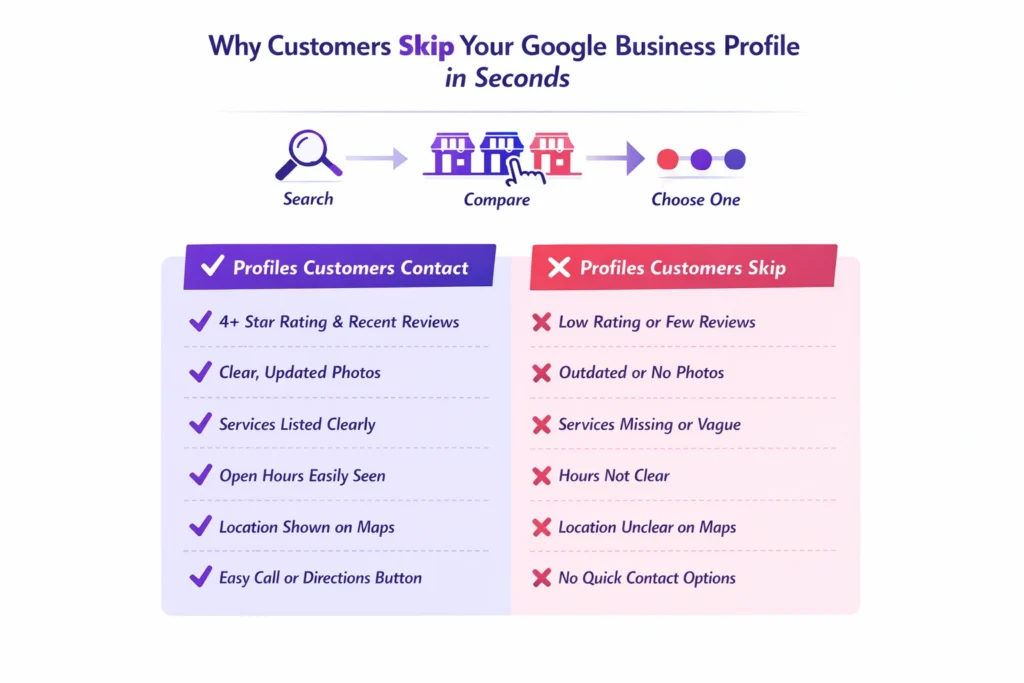
One of the biggest issues is choosing the wrong or overly broad business category. Google relies heavily on this to understand what you actually do. If the category doesn’t clearly match the service people are searching for, your business may appear less often, or show up for the wrong searches altogether.

Another area that gets overlooked is Google reviews and ratings. It’s not just about having reviews; it’s about consistency and recent activity. When potential customers compare options, an inactive profile with old reviews can quickly lose attention, even if the business itself is excellent.

Then there’s the visual side. Many profiles either have very few or outdated photos on Google Business Profile. Customers often decide within seconds whether a business feels trustworthy. No photos, or poor ones, quietly reduce confidence, which is one reason a Google Business Profile may not be bringing customers despite getting visibility.

I’m also often asked, “Why is my Google Business Profile not getting calls?” In many cases, the profile hasn’t been properly maintained or reviewed since it was first created. Business details change, services evolve, but the listing stays the same.

The goal isn’t to constantly manage it like a marketing project. It’s simply to optimise your Google listing so it clearly reflects your business today — making it easy for both Google and potential customers to understand what you offer.

Once these common issues are addressed, the focus shifts from fixing mistakes to doing the few things that actually help generate enquiries consistently.

How to Improve Your Google Business Profile and Get More Enquiries

Lead generation optimization checklist showing steps to improve website conversions for small businesses

Once the common issues are cleared up, the good news is that improving results usually doesn’t require complicated changes. When a Google Business Profile is not generating leads, the solution is often about making the listing clearer, more active, and easier for customers to trust.

Here are the practical steps I normally walk clients through.

Start with accurate business details

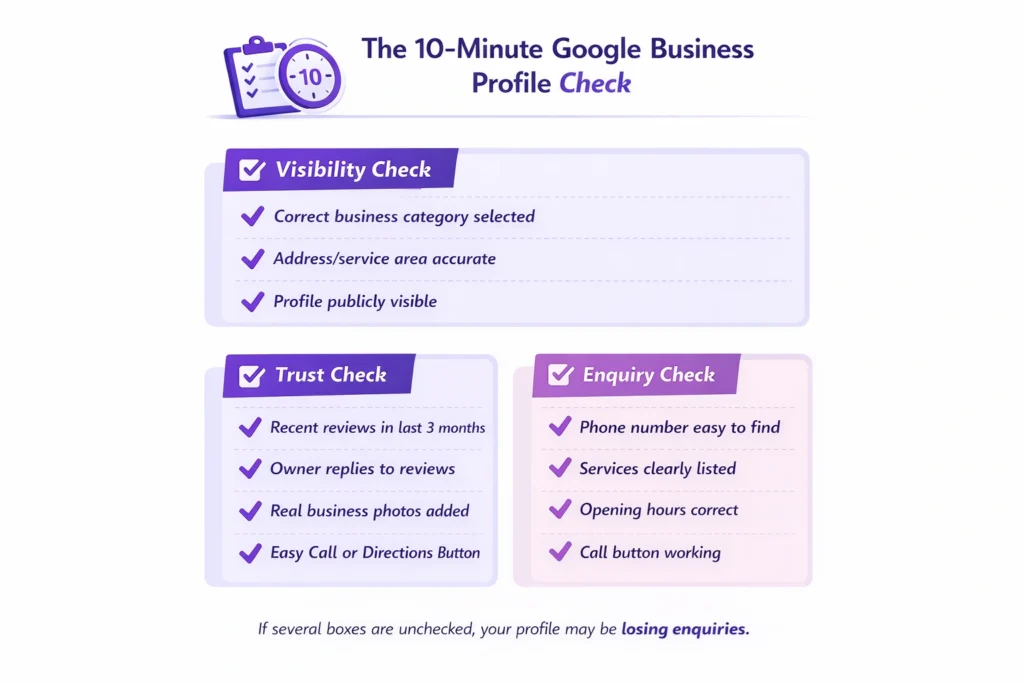
Check your contact information, services, opening hours, and service areas carefully. Strong business information accuracy helps Google feel confident showing your profile to the right people, which directly helps improve local visibility.

NAP details (Name, Address, and Phone Number) must be accurate. If you have a website, then add a “Book an Appointment” link that helps improve the conversion rate.

Make sure the profile looks active

An active Google listing signals that the business is operating and engaged. Updating photos occasionally, responding to reviews, or posting small updates shows both Google and customers that the business is current.

You should post your business updates such as new services, business milestones, office updates, important announcements, offers and promotions, events, products, customer testimonials, behind-the-scenes photos, and educational tips. Weekly 2–3 posts are perfect to keep your profile active.

Show customers exactly what you do

Many profiles describe services too broadly. Clear service descriptions help people quickly understand whether you’re the right choice, which plays a big role in turning views into calls.

Here are the key things to focus on:
1. Clearly explain what your business does
2. Add your primary services
3. Include location or service areas
4. Add trust and experience
5. Use keywords naturally
6. Keep it within 750 characters
7. Do not add links or promotions

Focus on trust, not tricks

Encouraging genuine reviews, adding recent photos, and keeping information updated often does more than anything else when it comes to getting more customer enquiries. These are simple signals customers rely on before deciding to contact a business.

Analyze your competitors in your area who already rank in the top 3 pack listings. Check their profiles and make those changes to your profile. Regular improvements make your profile trustworthy and help you get local enquiries.

When these basics are done well, businesses often notice something shift, fewer empty views and more real conversations starting. That’s usually the point where a profile begins to get more calls from Google rather than just appearing in searches.

To make this clearer, let me show you a simple example of how this plays out in a real business situation.

📊 Forms Create Major Lead Loss

Around 41% of users abandon online forms because they are too long or ask for too much information.

Why it matters:

Many small business websites unknowingly block leads at the final step. Complex contact or quote forms create friction right when visitors are ready to convert.

Here I recommend some free websites and tools that help local businesses analyze their Google Business Profile:

  1. ai
  2. LocalHQ
  3. Growmefy GBP Audit Tool
  4. RankONE GBP Audit Tool
  5. Google Business Profile Insights

You can search these tools online and analyze important metrics that give clear stats.

From Views but No Calls to Regular Enquiries

A good example of this was a local service business I spoke with recently — a skin care salon that felt stuck. The owner told me their Google listing was getting views but no enquiries, even though they appeared regularly when searching their main service.

On the surface, everything looked fine. The business was showing in local search results, reviews were decent, and the profile existed. But when we looked closer, a few small gaps explained why the Google Business Profile was not getting more than 20 calls per month.

The services weren’t clearly listed, photos were several years old, and important information customers usually check first wasn’t easy to find. As a result, competitors with clearer profiles were getting the enquiries instead.

After updating the service descriptions, improving images (before and after results), and tightening up the profile details, something interesting happened. The business didn’t suddenly jump everywhere in rankings but profile visibility improved enough that people started choosing them more often.

Within a few weeks, the owner noticed the difference. Same area, similar search traffic, but the Google Business Profile started bringing enquiries instead of just views. I had double inquiries within three months of optimization.

I am sharing a PDF document, “How I Ranked #1 in Google 3-Pack (Local SEO Case Study).” You can see the result here.

This is why small adjustments matter. Often, it’s not about getting more visibility — it’s about making the visibility you already have work properly.

And when that starts happening, the next question most business owners ask is whether they should fix this themselves or get some help doing it right.

Need Help Fixing a Google Business Profile That Isn’t Working?

If your Google Business Profile is not working the way you expected, you’re definitely not the only one dealing with this. Many business owners set up their listing once and assume it should automatically bring enquiries over time. In reality, profiles often need a careful review to understand what’s quietly holding them back.

Fix Your Google Business Profile Visibility Issues

Get clear insights on what’s stopping enquiries from your listing.

Some businesses prefer to work through the improvements themselves, and that’s completely fine. But if you’ve already tried updating things and still aren’t seeing results, it can help to have someone look at the profile from an outside perspective, the same way you’d ask an expert to review accounts, operations, or your website.

The goal isn’t complicated changes. It’s simply to optimise your Google listing so it clearly represents your business, builds trust quickly, and helps improve local visibility where potential customers are already searching.

If you’d like a straightforward review of what may be stopping enquiries, and what could help you get more calls from Google, you can reach out for a practical assessment of your profile and what to fix next.

Next, let’s answer a few common questions business owners usually have about their Google Business Profile.

Google Business Profile FAQs

Why is my Google Business Profile not publicly visible?

If your profile is not publicly visible, it usually means Google hasn’t fully verified the business yet, or some required details are missing. Sometimes profiles are temporarily limited after edits or policy checks. When business information is incomplete or inconsistent, Google may reduce visibility until everything looks reliable. Checking verification status, business details, and categories is normally the first step when asking why is my Google Business Profile not publicly visible.

A business profile can exist but still struggle with showing on Google Maps. This often happens when competition nearby is strong or the profile lacks clear relevance for certain searches. If you’re wondering why is my business profile not showing up on Google, review your category selection, service areas, and location details. Profiles with accurate information and regular activity tend to appear more consistently on Maps over time.

Many owners notice their Google listing getting views but no enquiries, which usually means customers are seeing the business but not feeling confident enough to contact it. Missing photos, unclear services, weak descriptions, or outdated information can all affect decisions. The focus should be on turning views into calls by making the profile clear, trustworthy, and easy for customers to act on quickly.

To get more calls from Google, start by making sure customers immediately understand what you offer and how to contact you. Updated photos, accurate services, strong reviews, and correct opening hours all help build trust. Businesses that keep their profiles active generally see steady improvement in getting more customer enquiries because customers feel confident reaching out.

There isn’t a fixed timeline. Some improvements can make a difference within a few weeks, especially after correcting information or improving the profile presentation. Google needs time to recognise updates and adjust visibility in local searches. Consistency usually matters more than quick changes.

Yes — but mostly because updates signal that the business is active and reliable. Regularly maintaining details, responding to reviews, and adding current photos helps Google trust the listing. This often improves how frequently the profile appears when nearby customers search for related services.

Absolutely. Customers often compare several businesses before calling anyone. Recent Google reviews and ratings help people feel reassured that the business is active and trustworthy. Even replying to reviews can make a noticeable difference because it shows engagement and professionalism.

In most cases, nothing dramatic has happened. Profiles simply become outdated over time while competitors keep theirs updated. Small issues, incorrect details, limited photos, or unclear services, gradually reduce performance. Regularly reviewing the profile helps prevent enquiries from slowing without you noticing.

Google Business Profile Mistakes Losing You Leads Read More »

3D icon illustration representing Google Business Profile optimization, local SEO growth, map rankings, customer reviews, and improved visibility in local search results.

Why My Business Isn’t Ranking Locally — Even With Great Reviews?

Many business owners ask, why my business isn’t ranking locally even after collecting great reviews. The truth is, reviews alone don’t guarantee visibility. This blog explains what really affects local rankings and what practical steps you can take to improve them.

Deepak Sharma - SEO consultant

Deepak Sharma

SEO Consultant

Feb 20, 2026  |  6 min. read

3D icon illustration representing Google Business Profile optimization, local SEO growth, map rankings, customer reviews, and improved visibility in local search results.

I hear this a lot:

“I’ve got great feedback from customers. So why am I not ranking locally even with good reviews?”

It’s a fair question.

On the surface, it feels logical. If people like your service and leave five-star reviews, your business should show up in local search results. But that’s not how it works in practice.

Good reviews help. They build trust. They influence decisions. But when it comes to Google reviews and ranking for local SEO, they’re only one small part of a much bigger picture.

I’ve reviewed many websites where the business owner was doing a great job offline. Happy customers. Strong reputation. Solid word of mouth. Yet online, they were not ranking locally even with good reviews.

The issue usually isn’t the reviews.

It’s everything around them.

Google looks at how your website is structured, how clear your location signals are, how complete your business profile is, and how strong your local presence appears compared to competitors. Reviews support visibility, but they don’t replace the fundamentals.

📊 Most Visitors Don’t Convert

On average, only about 1.7% of website visitors convert into leads — meaning over 98% leave without taking action.

Why it matters:

This shows that getting traffic is only the first step. If your site isn’t guiding visitors clearly or making it easy to contact you, most visitors will simply leave without becoming leads — even if they find your business. This helps explain why many local businesses with decent traffic still struggle to generate enquiries.

At Digital Deep Tech, when we look into cases like this, we almost always find gaps that have nothing to do with star ratings.

In the next section, I’ll explain why your business might not be showing up properly in Google Maps or local search — even when customers clearly trust you.

Why Your Business Is Not Showing in Google Maps or Local Search Results

After reviewing a lot of small business websites, I can tell you this — when someone asks, why my business is not showing in Google Maps, the answer is rarely about reviews alone.

Reviews are one signal. Just one.

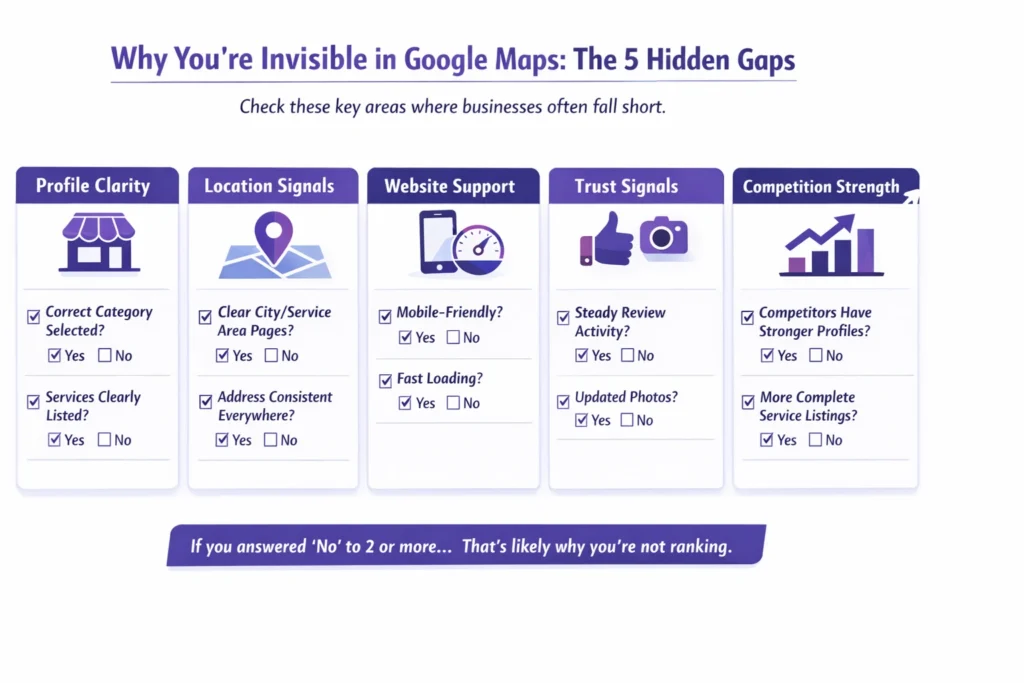
Google looks at three main things in local search results: how close you are to the searcher, how relevant your business looks for that search, and how strong your overall presence appears compared to others nearby.

Infographic explaining why small businesses are not ranking in Google local pack results, highlighting Google Business Profile issues, inconsistent citations, weak local signals, and missing on-page local SEO factors.

If your business is not showing in Google Maps, it’s usually because one of those pieces is weak.

Proximity is simple. If someone searches from 10 miles away, businesses closer to them often win. You can’t control that.

Relevance is about clarity. Does your profile clearly say what you do? Are your services properly listed? Is your website aligned with your location and service areas? If that connection isn’t obvious, Google hesitates.

Then there’s authority. This is where competition comes in. I’ve seen business owners confused about why their Google Business Profile is not ranking, only to realise three competitors nearby have:

  • More complete profiles
  • Stronger websites
  • Clearer location pages
  • More consistent business details online

That’s why it’s important to properly analyze local SEO competition instead of assuming reviews should carry the weight.

Another common issue is setup. Sometimes the business category is slightly off. Sometimes services aren’t listed clearly. Sometimes the profile is missing useful information. These small gaps affect google local pack ranking factors more than most people realise.

I also often find weak or missing location pages on the website. The location pages importance in local SEO is bigger than many expect. If your site doesn’t clearly show where you operate and what you offer in each area, Google has less confidence placing you in local results.

So when someone asks, why is my business not appearing on Google Maps, it’s usually a mix of clarity, competition, and profile structure, not a lack of good customer feedback.

In the next section, I’ll walk through the common mistakes I see business owners make that quietly hold their rankings back.

Common Mistakes to Avoid in Local SEO That Hurt Your Rankings

When I review sites for business owners in the US and UK, the issue usually isn’t effort. It’s small gaps that quietly stack up.

These are the most common mistakes to avoid in local SEO that I see again and again.

1. Ignoring Google Business Profile Optimization

Many owners set up their profile once and leave it.

Incomplete services. Wrong primary category. No updates. Thin descriptions.

Your profile needs to clearly explain what you do and where you operate. If it’s vague or half-filled, Google struggles to position you properly. That’s often why rankings stall.

In my last case study, I was working on a project that had a good number of reviews, but the listing was not ranking in Google’s 3-Pack. I optimized the profile properly and posted regularly to keep the listing active. The results came after one month. You can see in the screenshot below that the listing is now ranking.

2. NAP Inconsistency

Before discussing this, I’ll explain the full form of NAP — Name, Address, and Phone Number. It is very important for any business listing.

Your business name, address, and phone number need to match everywhere online.

Even small differences — “Street” vs “St.” — can create confusion. Google Business Profile NAP consistency guidelines aren’t complicated, but they matter.

If Google sees mixed signals, trust drops slightly. And in local search, small trust drops make a difference.

3. Weak or Missing Local Pages

It starts with clear location signals on your website. If you serve specific towns or cities, those areas need proper pages that explain:

  • What you do there
  • Who you help
  • How customers can contact you

Thin, copied, or generic pages won’t help. They need to feel real and specific.

I often see that many businesses link their homepage to their Google Business Profile listing. This confuses search engines because when someone lands on the homepage, there are no clear local signals.

4. Technical Issues That Quietly Hold You Back

You don’t need to understand every technical detail, but some basics matter.

Slow loading speed. Broken pages. Mobile layout issues. Poor internal linking.

When clients ask me which technical SEO issues are most important for local SEO, I usually say this: focus on speed, mobile usability, and clean structure. If your site is hard to use, rankings suffer.

Local listings help bring local traffic to your website. Before contacting you, most users want to learn about your services and check your online reputation. Your website plays a big role in that decision.

If your website structure is poor, loads slowly, or the content is not aligned with the needs of your local audience, visitors will leave quickly. That is why it’s important to make sure everything is properly set up to improve your conversion rate.

5. Citation Errors

Many business owners don’t fully understand what are local business citations. In simple terms, they’re online listings that mention your business details — directories, local listings, industry platforms.

Common local citation mistakes that hurt local SEO include:

  • Inconsistent contact details
  • Duplicate listings
  • Outdated addresses
  • Wrong phone numbers

These don’t always cause dramatic drops, but they weaken your overall presence.

And just to clear up one more confusion I hear often — are social signals a Google ranking factor official statement? No. Google has said social media activity itself isn’t a direct ranking factor. It can help visibility, but it’s not the core issue when you’re not ranking locally.

None of these problems are dramatic on their own. But together, they explain why a business with good reviews still struggles to appear consistently.

In the next section, I’ll show you what actually works — practical steps you can take to improve your local visibility properly.

How to Improve Local Search Visibility and Get Featured in Google Local Pack

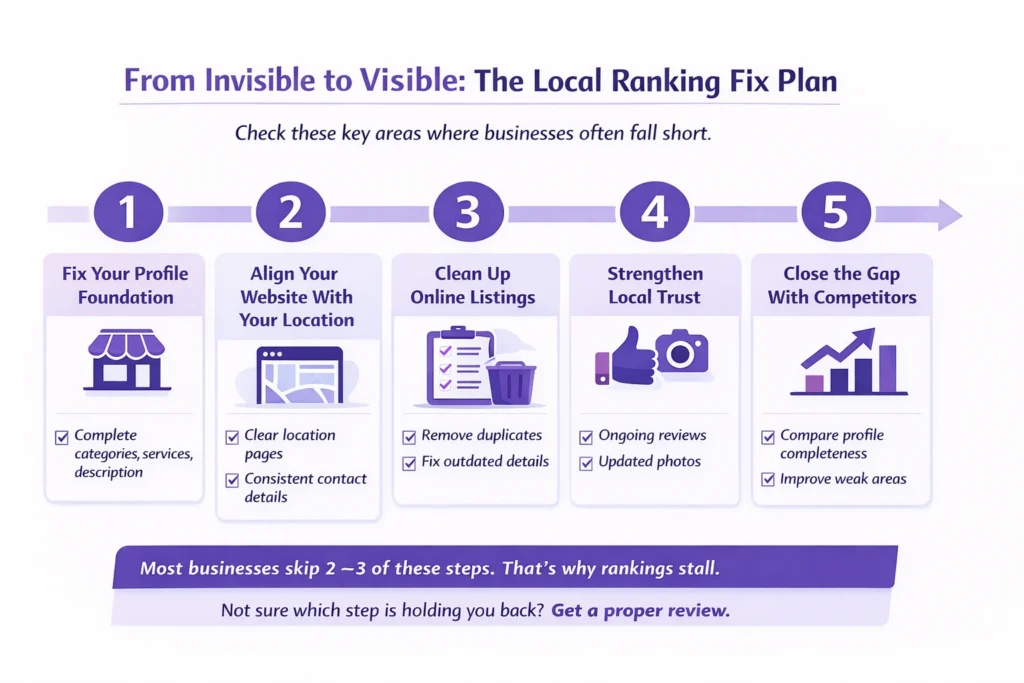
Step-by-step local SEO action plan infographic showing how to improve Google Business Profile optimization, strengthen local ranking signals, and increase visibility in Google local search results.

Now let’s talk about what actually moves the needle.

If your goal is to improve local search visibility and show up more consistently, the solution isn’t complicated — but it does require doing the basics properly.

Here’s what I usually walk clients through on a call.

1. Fully Optimize Your Google Business Profile

This is your starting point.

When people ask how to optimize Google Business Profile, I tell them to think of it like a storefront. It needs to be complete, clear, and active.

That means:

  • Choosing the right primary and secondary categories
  • Listing every relevant service properly
  • Writing a clear business description
  • Adding real photos
  • Keeping hours accurate

A proper Google Business Profile optimization checklist isn’t about tricks. It’s about completeness and clarity. Small gaps here often explain why profiles don’t perform.

If your Google Business Profile isn’t fully set up, nothing else will compensate for it.

2. Fix NAP Consistency Everywhere

Next, make sure your business name, address, and phone number match exactly across all listings.

Even small differences create doubt in Google’s system. When that doubt builds up, rankings soften.

Consistency strengthens trust. And trust supports visibility.

3. Improve Website Local Signals

Your website must clearly support your location.

That includes:

  • Clear service area mentions
  • Strong location pages
  • Contact details in the footer
  • Consistent messaging between your site and your profile

If someone asked me how to optimize for Google local 3 pack, I’d say this: your website and your profile must tell the same story.

When they align, your chances of appearing in local map listings increase.

4. Build Authority and Local Trust

Authority doesn’t mean hundreds of links or flashy campaigns.

It means:

  • Earning real reviews steadily
  • Getting mentioned in local directories
  • Keeping information updated
  • Publishing helpful local content when relevant

This is how you slowly build the kind of presence that helps you get featured in Google local pack results.

There’s no shortcut here. It’s steady work.

5. Monitor Competition

Finally, pay attention to who is ranking above you.

Look at:

  • Their profile completeness
  • Their website quality
  • Their local pages
  • Their review patterns

Sometimes improving visibility in local map listings is less about doing more — and more about closing the gap between you and the businesses already showing up.

At Digital Deep Tech, when we apply these steps consistently, rankings don’t jump overnight — but they do move in the right direction.

In the next section, I’ll give you a simple real-world example of how this plays out for a typical local business.

Why a 5-Star Business Still Didn’t Rank in Google Maps

Let me give you a real-world type of situation I see often.

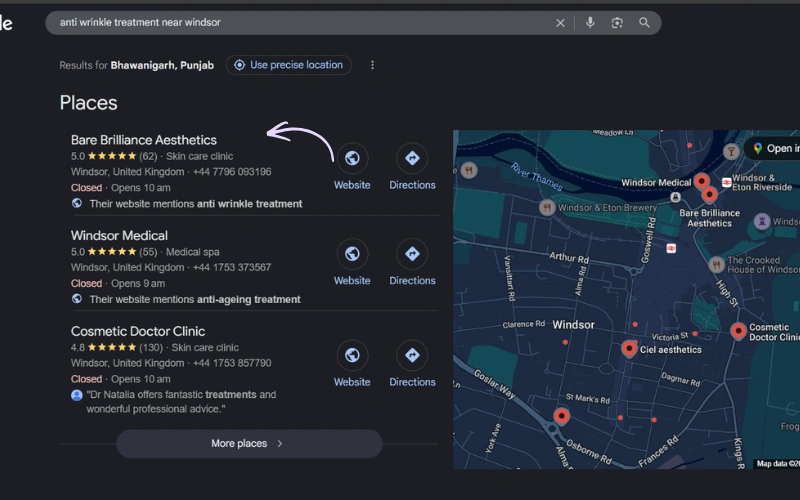
A local salon in the Windsor, UK reached out. They had over 60 reviews. Average rating above 4.8. Customers were clearly happy.

But they kept asking, “Why are we not showing in the local pack when smaller salons are?”

When I looked at things more closely, the problem wasn’t reputation.

It was structure.

First, their location page was thin. It mentioned the city name once and didn’t clearly explain the areas they served. There was no depth. No real local signals.

Second, their business details weren’t consistent across directories. Some listings had an old phone number. One had a slightly different business name. These small inconsistencies weaken trust.

Third, their profile setup wasn’t complete. Services weren’t clearly listed. Categories weren’t fully aligned with what they actually did. It wasn’t terrible — just unfinished.

None of these issues alone seemed dramatic. But together, they explained why they were invisible in Google Maps.

We focused on tightening everything up. Clearer location pages. Consistent contact details everywhere. A properly structured profile.

This wasn’t about tricks. It was about proper setup.

Some business owners try to solve this themselves. Others choose to work with experts in Google Business Profile optimization when they realise the details matter more than they thought.

There are many providers offering Google Business Profile optimization services, but the real difference comes from understanding how your website, profile, and local presence connect together — not just filling out fields.

In this case, once the gaps were fixed, visibility improved steadily. No overnight spike. Just gradual, stable movement into better positions.

If your business feels stuck despite strong reviews, it’s usually something similar — not a lack of customer trust, but a few structural weaknesses holding you back.

In the final section, I’ll explain what your next step should be if you want clarity on what’s affecting your rankings.

Not Ranking Locally? Let’s Fix What’s Really Holding You Back

If you’ve read this far, you probably recognise parts of your own situation.

Strong reviews. Solid service. But still not showing where you should in local search.

The truth is, guessing won’t solve it.

What usually helps is a proper manual review — someone looking at your website, your profile, your location pages, and your competition together. Not an automated report with charts, but a real assessment that explains what’s working and what isn’t.

Not Sure What’s Holding You Back?

Get a clear, practical review of your local visibility gaps.

When I review a business, I look for the small structural gaps we’ve talked about in this article. Then I outline a clear action plan. What to fix first. What can wait. What will likely move visibility in a steady, realistic way.

No promises. No dramatic claims. Just clarity.

If you’d like that kind of review, you can book a consultation with Digital Deep Tech. We’ll go through your setup properly and give you straightforward feedback on what’s holding your rankings back — and what to do next.

From there, you can decide how you want to move forward.

📊 Form Abandonment Is a Major Leak

About 41% of users abandon forms because they have too many fields, significantly reducing lead capture.

Why it matters:

If your contact or enquiry form asks for too much information or feels complicated, nearly half your potential leads may leave before completing it. For small businesses, simplifying forms and removing friction often leads to measurably better lead flow.

FAQs

Why am I not ranking locally even with good reviews?

This is one of the most common questions I hear. The honest answer is that reviews are only one part of the puzzle. If you’re wondering why my business isn’t ranking locally, it’s usually because Google looks at more than ratings. It considers how close you are to the searcher, how clearly your services are defined, how strong your website is, and how your business compares to competitors nearby. Reviews support trust, but they don’t replace a solid setup.

Yes, when it’s done properly. Google Business Profile optimization helps Google understand exactly what you do, where you operate, and which searches you’re relevant for. A complete profile with accurate categories, clear services, updated photos, and consistent details improves clarity. That clarity increases your chances of appearing in local results. It’s not instant, but it does make a measurable difference over time.

It depends on your starting point and your competition. If your profile and website only need minor adjustments, you may notice movement within a few weeks. If there are structural issues or strong competitors in your area, it can take a few months. Local rankings usually improve gradually, not overnight. Steady corrections and consistency matter more than quick fixes.

No, reviews alone are not enough to rank in the local pack. They influence trust and can improve click-through rates, but they are just one ranking signal. Businesses with fewer reviews sometimes rank higher because their profiles are more complete, their website is stronger, or their location signals are clearer. Reviews help, but they don’t override weak foundations.

The most important google local pack ranking factors generally include proximity to the searcher, relevance of your business to the query, and overall authority. Authority comes from a strong website, consistent business details online, and steady customer engagement. Google wants to show businesses that are clear, reliable, and easy for users to contact.

If your business isn’t appearing on Google Maps, it’s often due to incomplete profile setup, category misalignment, inconsistent contact details, or weak location signals on your website. In some cases, strong competitors nearby may simply have more complete profiles. A proper review usually reveals one or two gaps that explain the issue.

Start by ensuring your profile is fully completed and accurate. Then align your website with your service areas clearly. Keep your contact details consistent everywhere. Continue collecting genuine reviews over time. Finally, monitor competitors and close the gaps between your setup and theirs. Showing in the local 3 pack is usually the result of steady improvements, not a single change.

Why My Business Isn’t Ranking Locally — Even With Great Reviews? Read More »

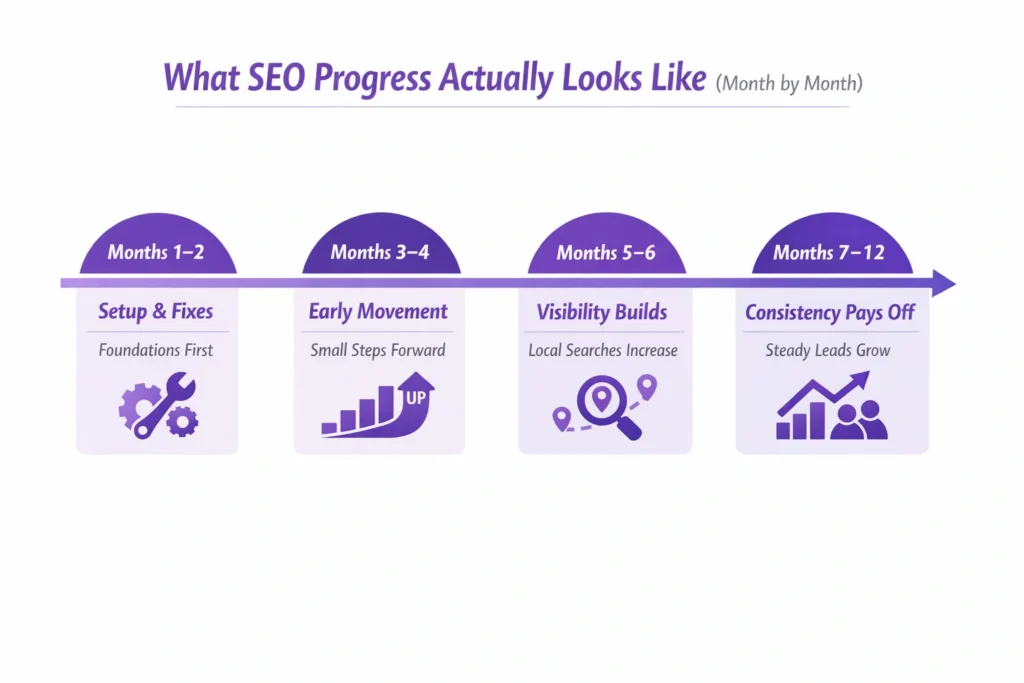
How long SEO takes for a small business and what realistic results look like over time.

How Long Does SEO Take for a Small Business?

Wondering how long does SEO take to work for small business websites in 2026? This guide breaks down what really happens after you start SEO, what early progress looks like, and how small businesses should set realistic expectations without relying on guesswork or empty promises.

Deepak Sharma - SEO consultant

Deepak Sharma

SEO Consultant

Jan 20, 2026  |  6 min. read

SEO timeline icon representing gradual growth and long-term results for small businesses.

Most small business owners ask this question after they’ve already tried something and felt disappointed. Money was spent, time passed, and the website still isn’t bringing enquiries. At that point, frustration is completely understandable.

The problem is that small business SEO expectations are often set without any real explanation. You’re told it will “take time,” but no one explains when SEO starts working or what progress should actually look like in the early stages. Without that context, it’s easy to assume nothing is happening.

This post is here to reset that. Not with promises, but with clear, honest answers about how long SEO takes to show results and what’s normal along the way. Once you understand the process, it becomes much easier to judge whether things are moving in the right direction.

Why SEO Takes Time for Small Businesses

SEO feels slow because it’s not something you switch on and see instant movement. There’s no button to press and no quick spike the next morning. What’s really happening is quieter and takes a bit of patience, which is why many business owners feel stuck early on.

One reason why SEO takes time is that search engines need to trust your website before they show it to more people. If the site is new, that trust hasn’t been earned yet. SEO for new websites usually moves slower because there’s no history, no consistency, and often a few basics that need fixing before anything else can work properly.

Another issue is the foundation itself. Many small business sites look fine on the surface but have unclear pages, weak content, or confusing structure underneath. Sorting that out doesn’t create instant traffic, but it’s necessary. This is where real SEO progress over time begins, even if it’s not obvious right away.

In the early months, the work is mostly about putting things in the right place so growth can happen later. It may feel invisible, but it’s the stage that makes the next one possible.

What I analyse in 2026:

Local competition matters. Mostly, I see that local businesses from various industries have little SEO knowledge and often do not hire any SEO agency. There are many reasons behind this, and budget for local SEO is one of them. By targeting the right keywords with low competition but high customer demand, it takes less time to rank on Google and in AI-driven searches.

Only about 2.35% of website visitors convert into leads on average.

That means roughly 97 out of every 100 visitors leave without taking action, like filling a form or clicking to call. This shows how small the window is for turning interest into contact.
Source: Contentsquare Digital Experience Benchmark Report 2026

Common Timeline Mistakes That Slow SEO Results

One of the biggest mistakes I see is expecting ranking improvements within a few weeks. That expectation usually comes from comparing SEO to ads, where results show up fast. SEO doesn’t work that way, and treating it like a short-term fix almost always leads to disappointment.

Checklist infographic helping local businesses understand if their website is ready for SEO results and what factors slow or improve rankings.

Another common issue is focusing on keywords alone. Business owners are often told that if the right words are added, traffic will follow. In reality, pages need to make sense, answer real questions, and work properly for local searches. Without that, even good keywords won’t move the needle.

Many people also stop too early. The first SEO results are rarely dramatic. They show up as small signs, a page moving up slightly, a few more impressions, better visibility in local searches. Organic traffic growth usually comes later, after those early signals stack up.

This is where short-term vs long-term SEO really matters. The early work can feel slow, but quitting at that stage often means walking away just before things start to turn.

The Right SEO Strategy That Works in 2026 for Small Businesses

  1. Properly optimize your Google Business Profile.
  2. Optimize your website for the local audience.
  3. Publish one blog per week addressing local customers’ pain points.
  4. Create local area pages—more content means more keywords to rank.
  5. Build quality backlinks and local business listings.

I follow these five simple steps to rank local businesses in 2026 and track results in Google’s AI overview.

What a Realistic SEO Timeline Looks Like

A realistic SEO timeline for small businesses looks very different from what most people are told at the start. It’s not a straight line and it’s rarely dramatic in the early months. Progress tends to show up quietly before it shows up clearly.

Month by month SEO timeline showing what progress looks like for a small business, from setup and fixes to consistent enquiries over 12 months.

In the beginning, the SEO results timeline is usually about getting the basics right. Pages become clearer, the site structure starts to make sense, and search engines understand what the business actually offers. You may notice small ranking movement, but not a flood of traffic yet. That’s normal.

For local businesses, things often move a bit faster. When location pages are set up properly and the Google Business Profile is in good shape, visibility can improve sooner than national or broader searches. That’s often when people start asking how long until small business SEO shows results, because early signs begin to appear.

Over time, consistency is what makes the difference. Steady improvements, useful content, and patience lead to a small business SEO timeline for results that builds on itself instead of starting over every few months.

What I have seen in the last 10 years:

SEO has not changed, or you could say it has evolved. As we discussed above, if the website is new, it normally takes 3 to 6 months to rank for local keywords. But if your website is old—up to 10 years—and has good authority, then ranking is not hard. The right SEO strategy can give the website the wings to rank in up to 3 months.

53% of mobile visitors will abandon a page if it takes longer than 3 seconds to load. Slow load times also increase bounce rates and cut conversion opportunities.

Many small business sites load slowly or aren’t mobile-friendly. When more than half of mobile visitors leave before the page finishes loading, you lose most of your potential leads before they ever see your offer.
Source: Site Qwality Website Speed Crisis Report (2025)

Example: How SEO Progress Builds Over Months

Here’s a situation I often see with a local service business called Bare Brilliance. In the first month, nothing looks different from the outside. No extra calls, no sudden jump in traffic. At this stage, many owners start wondering how long SEO take to start working for a small business like theirs does.

In the first two months, I optimized the website for local search queries, fixed technical issues, optimized the Google Business Profile, and improved UI and UX with the help of our website developer.

By around the third month, small changes begin to show. A couple of service pages move onto page first. The site starts appearing more often in local searches, even if enquiries are still limited. It’s not exciting yet, but it’s progress.

Around month six, things feel different. The business starts getting calls from local searches that weren’t there before. By the end of the year, SEO often becomes a steady source of enquiries rather than something they question every month. The client appreciated the results.

This isn’t a rare success story. It’s how SEO usually unfolds when the work is done properly and given enough time to settle.

Get clarity before you decide

If you’re still unsure whether your website is on the right path, that’s completely fair. Every business is different, and timelines can vary based on what’s already in place and what needs fixing.

Get Your SEO Timeline Explained Clearly

See what SEO progress should look like for your business and location.

If you want an honest view of how long SEO is likely to take for your business, and what progress should look like at each stage, get in touch. We can walk through your website together and set expectations that actually make sense for you.

FAQs

How long does SEO take to start working for a small business?

For most small businesses, early signs usually appear within two to three months. This doesn’t mean leads or sales yet. It’s more about visibility. Pages start getting impressions, rankings move slightly, and search engines begin to understand the site better. That early movement is often the first signal that SEO is working.

When people ask how long SEO takes to show results, they’re usually thinking about calls, enquiries, or form submissions. For many small businesses, that stage arrives around four to six months. Timing depends on competition, location, and the condition of the website when work begins.

SEO usually starts bringing leads once rankings improve and trust builds over time. This often happens after several months of steady progress. Leads don’t arrive all at once. They tend to grow gradually as more pages appear in the right searches and more people find the site naturally.

SEO takes time because search engines don’t take risks on new or unclear websites. They need to see consistent signals that a site is useful, reliable, and relevant. That trust builds slowly, especially for small businesses that are still strengthening their online presence.

Yes, SEO for new websites usually takes longer. A new site has no track record, no history, and often needs structural fixes before it can grow. Once those basics are in place, progress becomes more consistent, but patience is important early on.

SEO is a long-term approach. Short-term tactics may cause brief movement, but they rarely last. Long-term SEO builds steady growth, stronger rankings, and more reliable enquiries over time, especially for local businesses working within a defined area.

Often, yes. The local SEO results timeframe can be shorter because competition is limited to a specific area. When location pages and local profiles are set up properly, small businesses sometimes see visibility improvements sooner than with broader, non-local searches.

How Long Does SEO Take for a Small Business? Read More »