Author name: Deepak Sharma

I'm Deepak Sharma, a Digital Marketing Freelancer in India, helping businesses boost online visibility & sales. With 8+ years in SEO, PPC & social media marketing, I specialize in ranking websites higher and scaling brands. As the founder of Digital Deep Tech, I’ve worked with 50+ businesses to grow their revenue. Follow #DSWebRank for expert insights on SEO, lead generation, and digital growth strategies. Let’s take your brand to the next level! 🚀

Banner explaining why SEO traffic doesn’t convert into enquiries

Why SEO Traffic Doesn’t Turn Into Enquiries

If you’re wondering why my website traffic doesn’t turn into enquiries, this guide breaks it down in plain language. It explains what usually goes wrong after visitors land on your site and what small, practical changes can help turn traffic into real enquiries.

Freelance content writer in India

Priya Sharma

Content Writer

Jan 14, 2026  |  6 min. read

Icon illustrating SEO traffic with low enquiry conversion

You’re doing the work. Your site is getting visitors from Google, but the phone doesn’t ring and the contact form stays quiet. This is one of the most common frustrations I hear. It’s also why many people start asking why websites fail to produce sales, even when traffic looks fine. In most cases, the issue isn’t effort or visibility. It’s what the visitor experiences once they arrive.

The Real Reason Traffic Isn’t Turning Into Leads

In many cases, the website is attracting visitors, just not the right ones. Google is doing its job by sending people your way, but those people may be early in their research or looking for something slightly different from what you offer. That’s usually where things start to break down.

I see this often when a site ranks for broad topics but doesn’t clearly spell out who it’s actually for. Someone lands on the page, scans it for a few seconds, and can’t tell if you solve their specific problem. They don’t dislike the site. They just don’t see a reason to get in touch.

This is also where how to get right website traffic matters. It’s not about more visitors. It’s about attracting people who already feel like you’re a good fit. When the message and the visitor’s intent don’t line up, traffic increases but enquiries don’t.

Most business owners assume that if people are arriving, the hard part is done. In reality, that’s only halfway. What comes next depends on clarity, relevance, and whether the site makes it easy for the right person to recognise themselves in what they’re reading.

Only about 2.35% of website visitors take an action like filling a form or booking a call, meaning roughly 97 out of 100 people leave without converting.

This shows that getting traffic is only the first step. The vast majority of visitors don’t become leads unless the site guides them clearly toward action.
Source: Website Conversion Rate Statistics

Mistakes That Stop Visitors From Enquiring

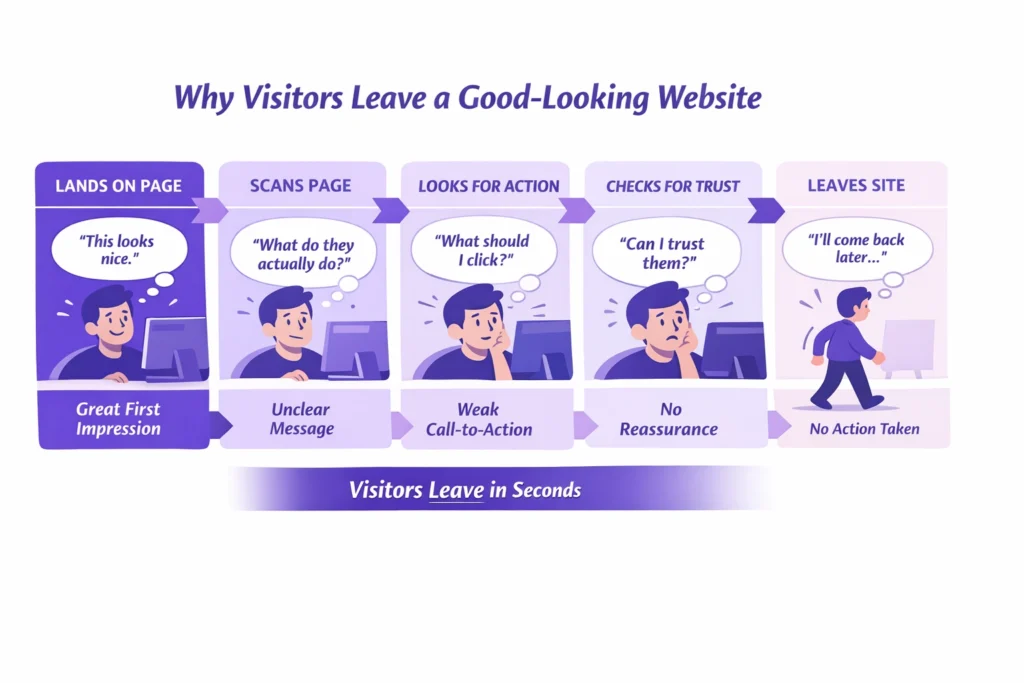
One of the biggest assumptions I see is that once traffic arrives, enquiries will follow on their own. Many owners believe the website will naturally do the job of converting your website traffic into sales without much guidance. Unfortunately, it rarely works that way.

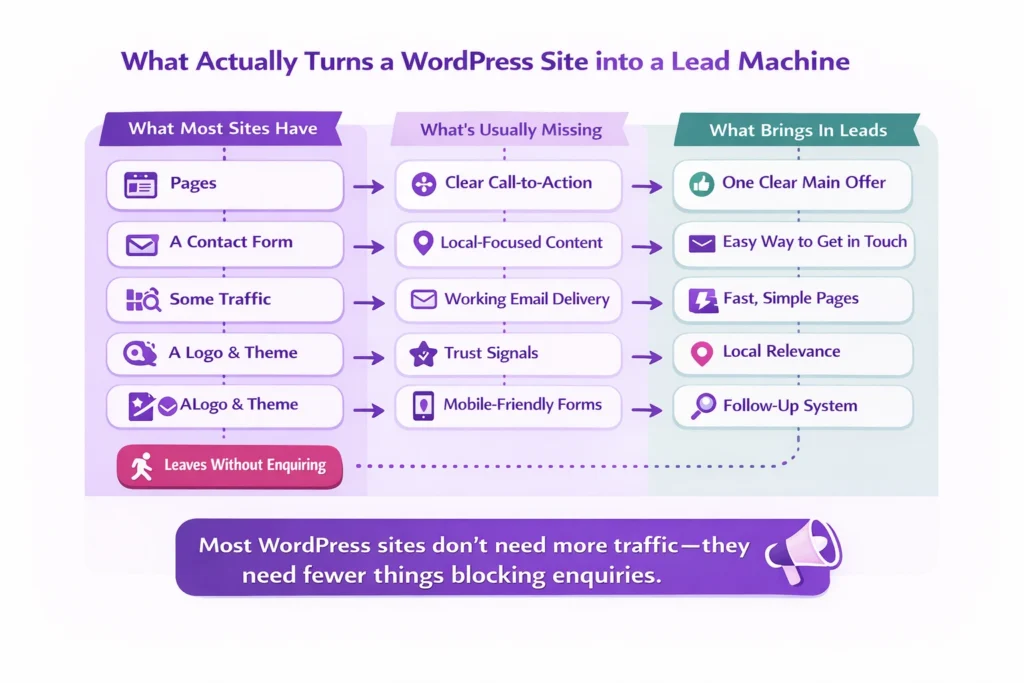
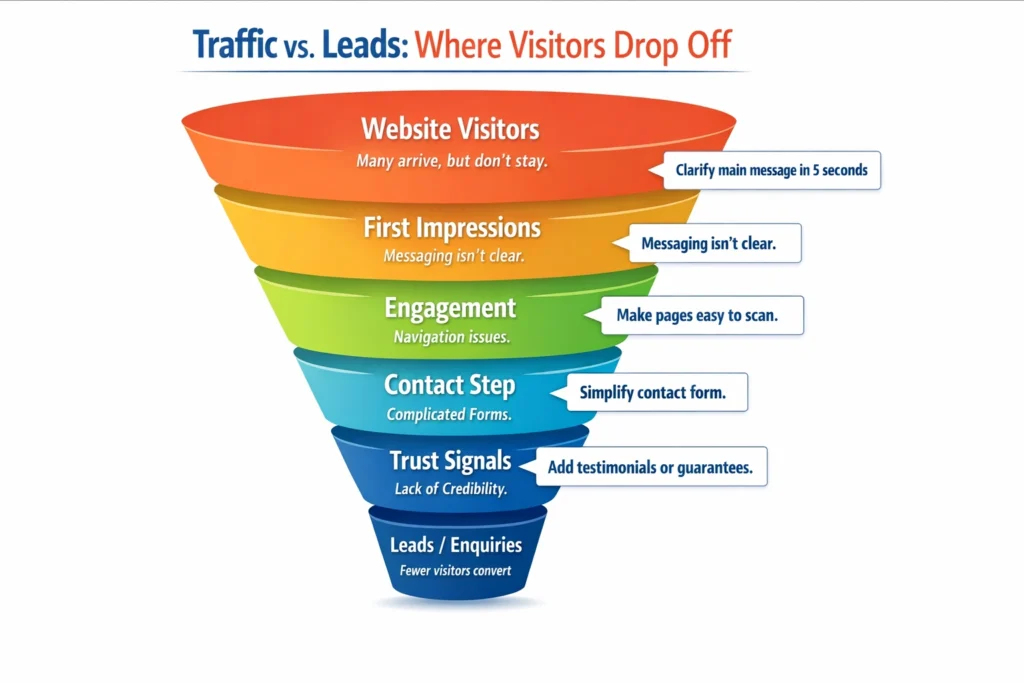
Traffic vs leads funnel infographic showing where website visitors drop off before becoming enquiries and how to improve conversions.

A common mistake is talking too much about the business and not enough about the visitor. Pages list services, credentials, and features, but they don’t explain how those things help someone with a real problem. Visitors end up unsure whether to take the next step.

Another issue is asking for too much, too soon. Long forms, vague contact buttons, or requests for detailed information can feel like a commitment. When someone is still deciding, that friction is often enough to stop them.

There’s also a tendency to keep adding more content instead of fixing what already exists. Traffic grows, but the core pages stay unclear. At that point, the site is busy but not effective. These small missteps add up and quietly block enquiries before they ever happen.

How to Make Your Website Convert

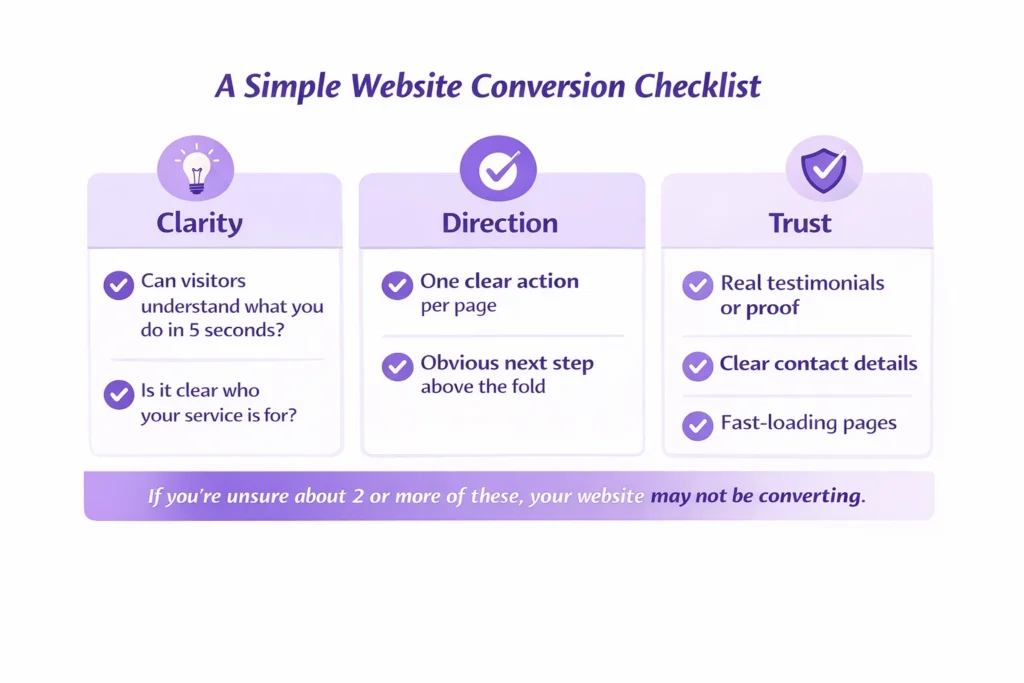
If you’re trying to figure out how to convert website traffic into leads, start with the basics most sites overlook. When someone lands on your page, they should quickly understand who you help, what problem you solve, and what to do next. If that isn’t clear within a few seconds, they’ll move on.

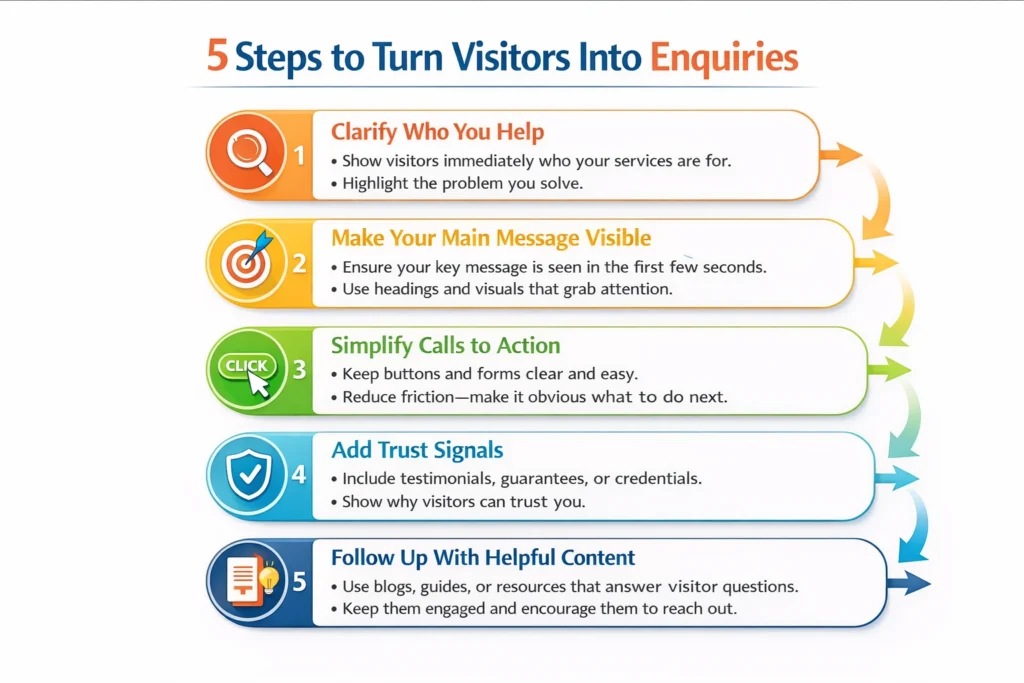
5-step website conversion infographic explaining how to turn visitors into enquiries using clear messaging, CTAs, and trust signals.

Your main pages should guide the visitor, not just inform them. Use simple language. Explain the problem you solve in the same words your clients use. Make the next step obvious, whether that’s a short contact form, a clear call to action, or an invitation to start a conversation without pressure.

Trust matters just as much as clarity. Real examples, brief explanations of how you work, and reassurance around what happens after someone gets in touch can remove hesitation. People don’t avoid enquiring because they’re not interested. They hesitate because they’re unsure.

This is how you start to convert website traffic into sales without chasing more visitors. When the right people feel understood and guided, enquiries happen naturally. The traffic you already have becomes far more valuable.

UI and UX (Website Structure Also Matters)

Another important factor is UI and UX. Your website should be designed for both your target audience and search engines. Speed matters too—pages need to load quickly on desktop and mobile because visitors usually spend only a few seconds deciding if they’ll stay. A clean layout and fast loading time make it easier for them to engage.

Sites that take over 3 seconds to load see much higher abandonment, with visitors rapidly leaving and conversions dropping sharply. Faster-loading sites keep more people engaged and reduce bounce rates.

If a site is slow or confusing, visitors leave before they even see your message. Fixing load time and clarity can prevent this early drop-off.
Source: Web Design Statistics 2026

Google also values EEAT, which means your website should not just show your services, but also demonstrate your experience, expertise, authority, and trustworthiness.

Real Example from a Client Project

A Salon service business I worked with was getting steady traffic every week, but enquiries were rare. On the surface, everything looked fine. Rankings were solid and visitors were spending time on the site. Still, nothing was coming through.

When we looked closer, the issue was clear. The homepage talked about the company, not the customer. The contact page felt formal and asked for too much information. Visitors had no clear reason to reach out at that moment.

Once the messaging and content were updated to focus on the client’s problem, and the contact step was simplified, things changed. This is often how to turn website traffic into sales—not by adding more pages or chasing more visitors, but by making it easy for the right person to say yes and start a conversation.

What we focused on

  1. Analyzed the website structure and user journey.
  2. Optimized content for both customers and Google.
  3. Simplified the CTA structure to make it clear and easy to use.
  4. Published regular blogs addressing the problems customers face.

Result

  1. Traffic remained stable, but sales improved.
  2. The website now looks professional and builds trust.
  3. Continued blog publishing helped improve search rankings.

Get clarity before you decide

If your site is attracting visitors but enquiries aren’t coming through, start by looking at the pages that matter most. Small changes in messaging, layout, or calls to action can make a big difference. Clear, simple steps help visitors understand why they should get in touch.

Check How Your Website Converts Today

Quickly see what stops visitors from turning into real enquiries.

I can take a quick look at your website and share clear feedback, sometimes through a short video so you can see exactly what I’m referring to. The goal isn’t to sell you anything. It’s to help you understand what’s really happening on your site and whether focusing on SEO makes sense for your situation right now.

Focusing on converting your website traffic into sales isn’t about adding more content or spending more on traffic. It’s about making it obvious and easy for the right people to take the next step. Review your key pages from a visitor’s perspective and remove anything that could cause hesitation. Even small adjustments can turn passive visitors into real enquiries.

FAQs

Why is my website getting traffic but no enquiries?

This happens more often than you think. Visitors arrive, but the page doesn’t clearly show them why they should contact you or how to take the next step. Simple things like unclear messaging, hidden contact options, or long forms can stop people from enquiring. Fixing these points can help convert visitors into leads.

Usually, it’s not. Most of the traffic coming from search engines is fine—it’s real people looking for solutions. The problem is often how the website handles that traffic. If pages aren’t guiding visitors effectively, even good traffic won’t result in enquiries. Making small improvements can help turn visits into action.

In most cases, improving the website experience is faster and more effective than chasing extra traffic. Focusing on how to convert website traffic into leads ensures the visitors you already have are more likely to reach out. Sometimes a few simple adjustments can make a big difference.

Only if they’re completely off-target. Often, the issue isn’t keywords at all, but how the site communicates with visitors. When done right, even existing traffic can start converting. Learning how to turn website traffic into sales is about guiding visitors, not just chasing new ones.

Why SEO traffic doesn’t turn into enquiries Read More »
Does SEO still work for small businesses in 2026 and is it worth the investment

Does SEO still work for small businesses in 2026?

Many small business owners are asking if SEO is still worth it for small businesses in 2026. This article explains what’s changed, why results feel harder to see, and when SEO still brings real leads instead of just traffic.

Santosh Sharma

Santosh Sharma

Content Writer

Jan 08, 2026  |  6 min. read

3D SEO icon showing search growth and visibility for small businesses in 2026

If you’ve been wondering whether SEO still makes sense in 2026, you’re not alone. I hear this question almost every week. A lot of business owners are asking things like is SEO dead in 2026 or why SEO is dead in 2026 because what used to feel predictable now feels messy and uncertain.

Search results look different. Ads take up more space. Answers show up before you even click a website. It’s fair to question whether putting time and money into SEO is still worth it for a small business, especially when enquiries aren’t coming in the way you expected.

For local businesses, the doubt can feel even stronger. When visibility drops or leads slow down, it’s easy to assume local SEO isn’t working anymore. But in most cases, the problem isn’t that SEO has stopped working. It’s that the rules around how people search and decide have changed quietly.

To understand whether SEO is still worth it for your business, it helps to look at why this confusion exists in the first place.

Why SEO feels harder than before

The short answer is that SEO didn’t suddenly stop working. What changed is how people search and how Google shows results. Most expectations, though, are still based on how things worked years ago.

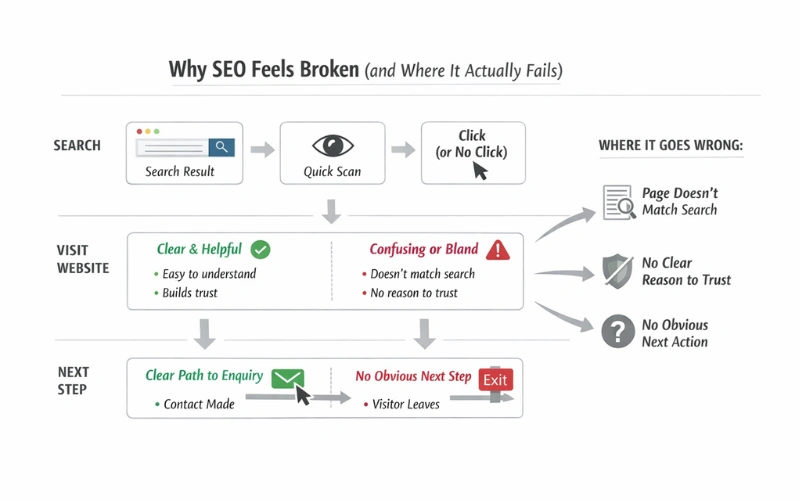
Why SEO Feels Broken Small Business in 2026

Today, someone might scan a result, read a quick answer, compare a few options, and leave without ever clicking the first link. That makes it feel like SEO isn’t doing its job. Business owners then start asking, does SEO work for small business anymore, when the real issue is that success is being judged the wrong way.

Another reason this feels broken is how SEO was sold. Many small business owners were promised traffic. Reports focused on rankings and visitor numbers, not on whether the website actually helped someone take the next step. Traffic went up, but enquiries didn’t, so trust in SEO dropped.

This is why SEO is important for small business in a different way than before. It’s no longer just about being visible. It’s about showing up in the right places and making it clear why someone should contact you when they land on your site.

For most small business owners, SEO still plays a role. But it only works when it’s aligned with how real people search and decide today, not how search worked in the past.

In 2025, about 58.5% of Google searches in the U.S. and 59.7% in the EU ended without clicking through to any website.

This means most people looked at search results but didn’t visit any external sites, making traditional SEO traffic less reliable on its own.
Source: Top SEO Statistics for 2025 — SMAMarketing

Common mistakes small business owners make

One of the biggest mistakes I see is expecting SEO to work quickly. It’s often treated like a switch you turn on and leads start coming in. When that doesn’t happen in a few weeks, frustration sets in and confidence drops.

Another common issue is judging success by traffic alone. More visitors look good on a report, but traffic doesn’t pay the bills. If people are landing on your site and leaving without getting in touch, the numbers don’t mean much. Enquiries are what matter.

A lot of small businesses also get stuck with generic SEO services for small business that look the same for everyone. The same checklist, the same monthly tasks, no real understanding of the business behind the website. Local businesses face this even more with local SEO services for small business that promise visibility but ignore what happens after someone clicks.

Website clarity is often overlooked too. Pages try to say everything at once or focus too much on the business instead of the visitor’s problem. When messaging isn’t clear, people hesitate and move on.

Finally, many owners stop too early. SEO gets cut just as small improvements start to build because results feel slow or unclear. Working with an SEO consultant for small business only makes sense if there’s patience to let the right changes settle and do their job.

Organic click‑through rates (CTR) for queries with AI summary features dropped by about 61% from mid‑2024 to late‑2025.

This shows that when search engines show direct answers, users are much less likely to click to a website.
Source: Google AI Overviews drive 61% drop in organic CTR — SearchEngineLand

What makes a real difference

What works today is simpler than most people expect. It starts with knowing exactly who the site is for and what problem it’s meant to solve. When SEO for small business tries to appeal to everyone, it usually connects with no one. Clear focus makes it easier for the right people to recognise themselves and stay.

Pages also need to match why someone landed there in the first place. If a visitor is searching for a specific service or answer, the page should meet that need quickly and clearly. This is one of the most overlooked parts of SEO strategies for small business. Relevance matters more than volume.

Another practical fix is making the next step obvious. If someone is interested, they shouldn’t have to hunt for how to get in touch or what happens next. Simple wording, clear buttons, and reassurance at the right moment remove hesitation.

It’s also important to measure the right thing. Rankings can move up and down, but leads tell the real story. One of the biggest benefits of SEO for small business is attracting people who are already looking for help. If those people aren’t reaching out, something in the journey needs adjusting.

Finally, consistency beats quick wins. Steady improvements, reviewed over time, work better than jumping from one idea to the next. That’s usually how you improve SEO for small business in a way that lasts and actually supports the business.

A real example from a local business

I see this a lot with local service websites. On the surface, everything looks fine. The site is clean, the content reads well, and traffic numbers look healthy. But when you dig a little deeper, the traffic isn’t coming from the right places. For local businesses, that’s a problem. You don’t need everyone. You need the right people in the right area.

In one case, the question wasn’t does SEO work for small business. It was whether the website was set up for local intent at all. We started by reviewing the site content and how a local visitor would move through the pages. The information was there, but it wasn’t written with a local searcher in mind.

We adjusted key pages to reflect location-specific needs, looked at what people in that area were actually searching for, and made the next steps clearer. We also focused on trust, adding real examples of past work and publishing regular blogs that answered common local questions.

Over time, the traffic became more relevant. Enquiries started coming from people who were a good fit. Local visibility improved, and conversations turned into real work. For many SEO for small business owners, that’s what progress really looks like. Consistent effort, clearer intent, and results that make sense for the business.

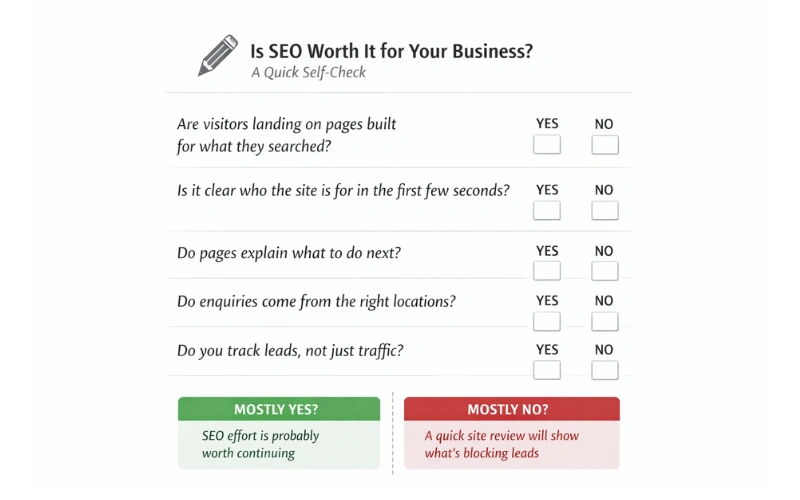
Is SEO worth it for your business? A quick self-check

Get clarity before you decide

If you’re still unsure whether SEO is worth it for small business in 2026, the fastest way to get clarity is to look at your own site through fresh eyes. Not a long report. Not a sales call. Just an honest review of what’s helping and what’s quietly getting in the way.

Is SEO Worth It for You?

Get a quick, honest review of what’s helping or blocking leads.

I can take a quick look at your website and share clear feedback, sometimes through a short video so you can see exactly what I’m referring to. The goal isn’t to sell you anything. It’s to help you understand what’s really happening on your site and whether focusing on SEO makes sense for your situation right now.

Once you have that clarity, you can decide what to fix, what to ignore, and how far you want to take things.

Does SEO still work for small businesses in 2026? Read More »

Why a business website isn’t generating leads and how to fix common conversion issues

Why Your Website Isn’t Generating Leads and How to Fix It

Most websites get traffic but few leads because visitors aren’t guided clearly. Small issues with messaging, structure, and calls to action quietly block enquiries. Simple, practical fixes can turn clicks into relevant, consistent conversations with potential clients.

Deepak Sharma - SEO consultant

Deepak Sharma

SEO & Website Consultant

Jan 05, 2026  |  6 min. read

Lead generation icon representing website enquiries and conversions

“Most people ask this after thinking, ‘Why is my website not getting leads when it looks fine?’” If you’re reading this, there’s a good chance your website looks fine on the surface.

The design is clean.
You’re getting some traffic.
People are landing on the pages.

But the inbox stays quiet.

No enquiries. No calls. No real signs that the website is doing its job.

This is something I see all the time, especially with service businesses in the US and UK. And in most cases, it’s not because the website is bad or broken. It’s usually because a few small things aren’t working together the way they should.

On their own, those issues don’t feel serious. But stacked together, they quietly stop visitors from taking the next step.

Let’s look at why this happens in the first place.

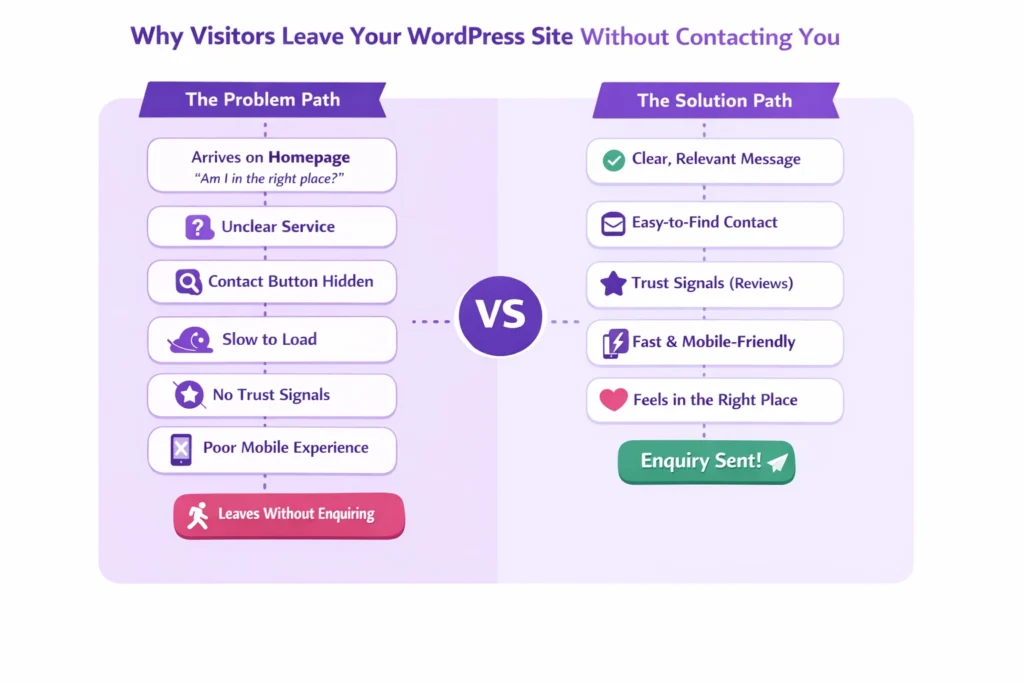
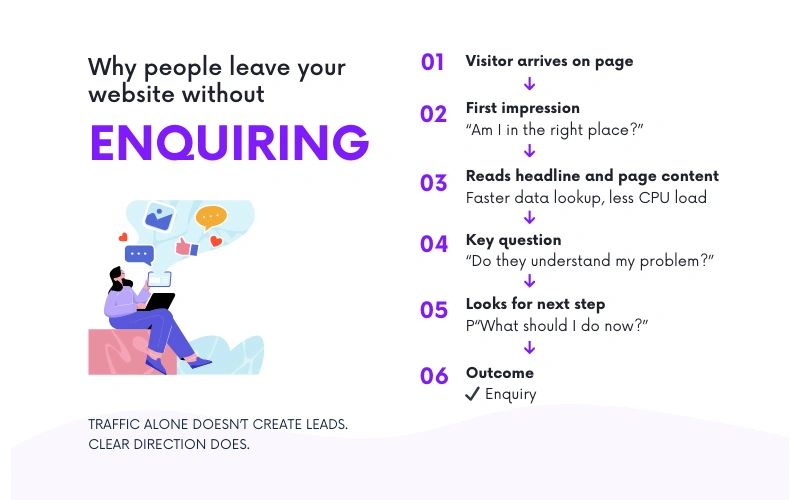
Diagram explaining visitor decision flow and why a website is not generating leads

Why this problem happens

Most websites don’t fail because no one is visiting them. They fail because visitors don’t know what to do next.

Someone lands on your site, scrolls a bit, maybe reads a headline or two, and then leaves. Not because they weren’t interested, but because nothing clearly guided them forward. No obvious next step. No clear reason to get in touch right now.

This is where a lot of business owners get stuck. They see rankings improving or traffic numbers going up and expect enquiries to follow. But Google rankings don’t equal trust, and traffic doesn’t automatically turn into conversations. A search result can bring someone to your site, but the site still has to do the work.

Visitors make quick decisions. In the first few seconds, they’re asking themselves simple questions. Am I in the right place? Do they understand my problem? What should I do next? If those answers aren’t clear, they move on.

This isn’t really a design issue, and it’s not just a traffic issue either. It’s a strategy problem. The website isn’t leading visitors anywhere. It’s just presenting information and hoping people figure it out on their own.

And most of the time, that’s where things quietly break down.

The average website conversion rate is about 2.35%

Across industries, only roughly 2 or 3 out of every 100 visitors take a desired action like filling out a form or contacting a business.
Source: Conversion Rate Optimization Statistics 2025 — market.biz (2025)

Common mistakes business owners make

Most of these issues don’t come from bad decisions. They usually come from being busy and assuming the website is “good enough” once it’s live.

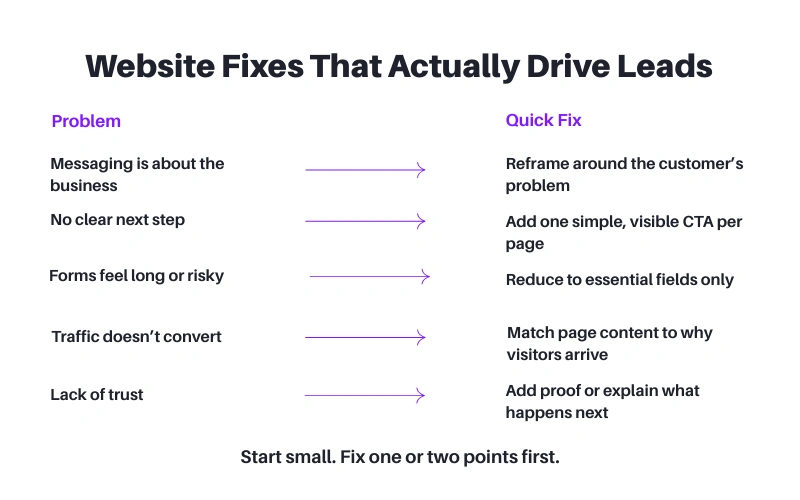
One common mistake is messaging that talks too much about the business and not enough about the customer. Pages often lead with years of experience, services offered, or background details. That information matters, but not before a visitor understands whether you can help with their specific problem.

Another issue is the lack of a clear next step. Key pages don’t guide people anywhere. There might be a contact page, but nothing encouraging or reassuring someone to actually use it. Visitors are left to decide on their own, and most won’t.

Forms can also quietly stop enquiries. Long forms, too many required fields, or vague labels make people hesitate. If a form feels like effort or risk, they’ll close the page instead of filling it out.

Then there’s traffic that looks good on paper but isn’t relevant. People land on the site, but they’re not the right fit, or they’re looking for something slightly different. That kind of traffic rarely turns into enquiries, no matter how good the site looks.

Finally, many websites are built once and left alone. The business evolves, but the site stays the same. What worked two or three years ago often doesn’t match how customers search or decide today.

These are small things on their own. Together, they explain why a website can look professional and still struggle to bring in real enquiries.

Nearly 68% of visitors abandon web forms before completing them

This shows how large the drop-off can be when people reach a lead form but don’t complete it. If your forms are long or confusing, most visitors leave before submitting.
Source: Best Multi-Step Form Abandonment Stats 2025 — Amra and Elma (2025)

What actually works (practical steps)

The fix usually isn’t a full redesign or starting from scratch. It’s about making the website easier to understand and easier to use.

Start with the first screen people see. It should be clear who the site is for and what you help with, without making visitors work it out. If someone has to scroll or read too much just to understand whether you’re relevant, you’ll lose them.

Each page also needs one main purpose. Too many pages try to do everything at once. Explain the service, tell your story, show testimonials, and push five different actions. When everything feels important, nothing stands out. Decide what you want someone to do on that page and support that one action.

Calls to action don’t need to be clever. They need to be visible and easy to understand. If a visitor is interested, they shouldn’t have to hunt for how to get in touch or what happens next.

Pages also work better when they’re built around what people are actually searching for, not just what the business wants to say. When the page matches the reason someone arrived there, it feels natural to keep reading and take the next step.

Trust matters most at moments of hesitation. That’s where simple proof helps. A short testimonial near a form. A clear explanation of what happens after someone contacts you. Small details that reduce doubt.

Finally, stop guessing. Look at what people are doing on the site. Where they drop off. Which pages get attention and which don’t. You don’t need perfect data, just enough to make informed changes.

This isn’t about getting everything right in one go. It’s about making steady improvements that remove friction and make it easier for the right visitors to reach out.

Why traffic alone doesn’t bring enquiries

I see this pattern a lot when reviewing service business websites.

The site is getting traffic, but enquiries aren’t coming in. When we look closer, the issue usually isn’t volume. It’s relevance and structure. People are landing on blog posts or service subpages, not the homepage. Those pages were never set up to guide visitors properly, so the traffic goes nowhere.

In one case, the content itself was fine, but it wasn’t written with the visitor’s journey in mind. The messaging didn’t clearly speak to the problem people were trying to solve. Pages didn’t explain what to do next. Calls to action were either missing or placed where no one was ready to act.

We didn’t overhaul the site. We adjusted how key pages spoke to the reader, clarified the purpose of each page, and added simple, clear next steps where people were already spending time. We also made sure those pages matched why visitors were landing there in the first place.

The result wasn’t a flood of traffic. In fact, overall visits dipped slightly. But the enquiries that came through were more relevant, more consistent, and easier to convert into real conversations.

That’s usually how it works. When a website starts guiding the right people instead of just attracting clicks, the quality of leads improves naturally.

Get a fresh look at your website

Quick, honest feedback on what’s helping or blocking enquiries.

If you’re still unsure why your website isn’t bringing enquiries, the fastest way to get clarity is to have someone look at it with fresh eyes.

If you want, I can take a quick look at your site and point out what’s getting in the way. No pitch. Just clear feedback on what’s working, what isn’t, and where small changes could make a difference. In some cases, a short video walkthrough is easier, so you can see exactly what I’m referring to.

This isn’t about selling anything or committing to a big project. It’s simply about understanding what’s happening on your site right now and why visitors aren’t taking the next step.

Once you have that clarity, you can decide what to fix and how far you want to take it.

Why Your Website Isn’t Generating Leads and How to Fix It Read More »

Scaling database-heavy applications for smooth performance

What Database-Heavy Applications Need to Scale Without Issues

Database-heavy applications demand more than just powerful servers. This guide explains the core technical requirements needed to maintain performance, reliability, and scalability as data volume and user traffic grow over time.

Freelance content writer in India

Priya Sharma

Content Writer

Dec 21, 2025  |  6 min. read

AI-Powered SEO Checklist (Free PDF Guide)

Business websites, gaming websites, and AI/ML applications are database-heavy websites. Hence, they require enterprise-grade servers to handle heavy workloads. Dedicated servers with cPanel could be a great alternative to host strenuous websites/applications with user-friendly management. These websites constantly read, write, and process complex queries, making them highly sensitive to performance bottlenecks.

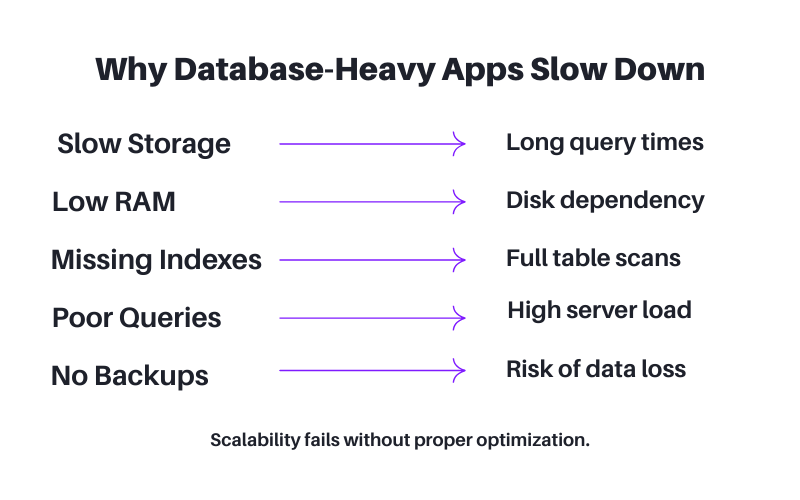
Scaling a database-heavy application is not just a matter of adding more hardware. It needs a mix of optimized architecture, efficient querying, controlled resource usage, and strong backend systems. Without the right technology and infrastructure, databases start to lag, and queries slow down, resulting in a negative user experience. In such cases, you need a cheap 10 Gbps dedicated server to scale applications smoothly while maintaining top-tier performance.

Core requirements for running database-heavy applications at scale

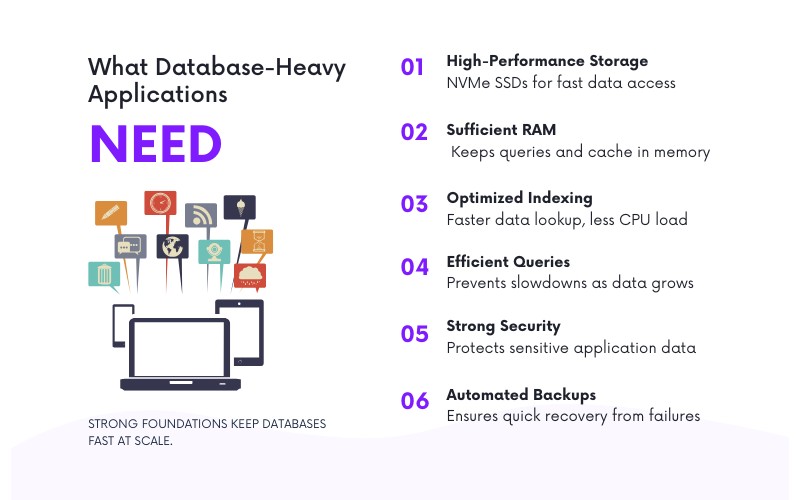
Things Required to Run Database-Heavy Applications

High-Performance Storage Is Non-Negotiable

For database-heavy workloads, storage speed directly impacts how fast queries run and how quickly data can be retrieved. SSD NVMe storage has faster processing power than conventional SSDs. It makes an ideal storage option for applications that demand faster processing. NVMe keeps unnecessary delays at bay. Faster storage helps maintain consistent performance even under heavy I/O workloads.

RAID configurations, like RAID 10, add another performance layer in hardware. RAID 10 combines speed and fault tolerance to protect your data while maintaining speed. Redundant storage becomes a crucial factor in avoiding downtime for smoother operations. Even an optimized database struggles to scale effectively without the right storage performance.

Adequate RAM to Handle Caching and Query Execution

Memory is the crucial aspect in database applications’ performance. Databases use RAM to store indexes, buffers, temporary tables, and cached results. If an application runs out of memory, the database has no choice but to resort to the much slower disk space. As a consequence, running queries takes much longer, loading pages takes a while, and performance drops. With enough memory, the system keeps the most frequently accessed data in memory for quick retrieval, rather than having to load more pages from disk.

More users and bigger datasets that you need to report on draw from the application’s memory. With a lot of users at the same time, the application works at high concurrency and needs enough memory to get queries from the database for all users. If enough RAM is available to the application, you ensure low latency, high responsiveness, and consistent performance during high load times. Investing in memory will also be one of the most cost-efficient ways to improve performance on workloads where databases are frequently accessed.

Proper Indexing and Query Optimization for Faster Queries

The most powerful server will still be the slowest if the queries being made are not optimized. Proper indexing means that the database can find the required data much faster, rather than needing to scan whole tables. If an application is slow to respond as data grows, it is often because the indexes that are needed are missing or the ones that are outdated. If you improve the existence of indexes in a system, you can significantly improve query speed and reduce CPU load.

As businesses expand, they have to pay greater attention to optimizing queries. Queries that are poorly framed, have excessive joins, or have filters that are inefficient can place tremendous strain on your systems. Periodic audits can help alleviate this risk by identifying queries that use excessive resources as they become progressively slower. As your database grows, your queries cannot remain static. There is little doubt that the performance of your database will depend on the efficient use of queries. In addition, the optimal use of indexing is critical to the efficient functioning of your database. A well-optimized database should be flexible enough to scale to your needs.

Robust Protection and Automated Data Backups

For many applications that rely on databases, the information handled is quite sensitive and must therefore be kept safe. Safeguarding information is foremost and is achieved by employing defensive techniques such as encryption, firewalls, access restriction, and monitoring tools to deter and detect any breaches and unauthorized information access. When applications become larger, security becomes more of a concern, as danger grows, requiring frequent audits and upgrades. Strong protection of sensitive information will provide and maintain the integrity of the application and gain the confidence of the users.

Common performance issues in database-heavy applications

Protection of the stored information must be complemented by retention, and retention is achieved by backups. Automated data backups will protect the system from losses that might be due to accidental deletions, corruption, lost storage devices, or hardware failures. Automated backups come with features such as point-in-time recovery and off-site backups to ensure that data is restored to its previous state quickly. Dealing with larger databases also means that data protection strategies must be designed to scale with the increased data. Together, protection and backups are the hallmark of a reliable database system.

Need Better Performance at Scale?

If your application struggles with speed, reliability, or growth, we can help you optimize performance, infrastructure, and scalability.

Wrap Up

Database-heavy applications are powerful tools but require careful planning and the right infrastructure to operate smoothly at scale. Once the website’s traffic intensifies, performance bottlenecks lead to inadequate storage, memory, queries, and scalability that are properly managed. By integrating high-performance hardware, optimized queries, and secure, scalable architecture, these applications grow without suffering performance losses or downtime.

By building an application with a powerful backend, you will create a dependable and efficient user experience for every single user. By investing in performance, security, and scalability today, you will be able to protect against large-scale disruptions in the future and allow your company to continue to grow. When your application has the proper foundation, it can handle hundreds of thousands to millions of interactions without any issues.

What Database-Heavy Applications Need to Scale Without Issues Read More »
Speed Optimization Secrets for WordPress Hosting Environments

We’re often asked about tips, tricks, hosting options, and caching for speeding up your WordPress website. In this blog, learn how to improve your website’s loading speed, performance, and user experience.

Freelance content writer in India

Priya Sharma

Content Writer

Oct 9, 2025  |  6 min. read

- Speed Optimization Secrets for WordPress Hosting Environments

Web page speed is a crucial factor even when you opt for the cheapest hosting for WordPress solutions. It helps to build user satisfaction and organic search visibility. On WordPress sites, even a small delay in the load time can deter the customers, reduce conversion rates, and hurt SEO.

Thankfully, speeding up WordPress isn’t difficult. When you experience slow speed and transfer WordPress website to another provider, ensure you use a methodical approach. It’s all about combining reliable hosting and smart optimization—quickly narrowing performance gaps and keeping visitors engaged.

Start with a Solid Hosting Solution

Start with a Solid Hosting Solution

Optimization depends on hosting quality. Shared hosting is budget-friendly, but essential resources (CPU, memory, and bandwidth) are divided and shared among many sites. This simply means that if other websites expect heavy traffic and use the resources, you have to compromise with the remaining resources.

On the other hand, solutions like VPS hosting or dedicated servers allocate you definite resources. Similarly, managed WordPress hosting, built for the platform, includes caching, security, and one-click updates. For growth- or revenue-critical sites, VPS or managed hosting is the most reliable choice.

Leverage the Power of Caching

When it comes to caching, WordPress offers several options (browser caching, server-side caching, and specialized caching plugins) to mitigate server load. Caching your web pages helps you to store HTML, images, and scripts on your device. This process lets the server deliver a snapshot without rebuilding from the database.

 If your host already has server-level caching in place, avoid enabling multiple layers to prevent interference and confusion. Choose one caching layer and configure it correctly for the best results.

Accelerating with a CDN

Implementing a Content Delivery Network (CDN) is a straightforward way to lower loading times. A CDN stores copies of your site’s static assets—images, CSS files, and JavaScript—on multiple servers around the world. When a visitor searches for your site, the CDN serves assets from the nearest geographic node, minimizing distance and speeding up delivery of the required content. The reliable providers like MilesWeb integrate features like DDoS protection, lightening the primary server’s load in the process.

Streamlining Themes and Plugins

A sluggish site often has heavy themes, plugins, and widgets. It is necessary to switch to a lightweight theme that loads a bare minimum of code for rendering. In contrast, themes that pack every bell-and-whistle option drip-feed scripts and styles you’ll never tap.

Wordpress SEO Expert for Speed Optimization

Plus, every plugin tacks more code and extra database queries onto your load. Make it a habit to periodically audit your active themes and plugins, disabling or trashing anything you never use. This enables the site to run on a lean database and processor efficiently, speeding up the rendering time across the board.

Database Optimization

WordPress sites also collect hidden database clutter. Extra post revisions, ghost comments, and orphaned tables left over from deleted plugins silently add weight. Empty tables or stacks of revisions slow queries, causing notable page load delays. To stave off this bloat, run database cleanup plugins such as WP-Optimize or set up WP’s database maintenance tasks and backflushing.

You can fine-tune bloat even further by adjusting the site settings to limit the number of revisions that each post can keep, trimming historic clutter on a per-entry basis right from the moment it is first published.

By dropping unneeded image metadata and resizing to the largest display size required on the site, you can keep the quality high while squeezing the file size.

Image Compression and Lazy Loading

Lazy loading keeps images offscreen from loading and keeps them from using resources until a visitor scrolls down. Instead of sending the entire gallery at once, the site only serves the images within a few viewport heights of the visible area.

The browser, seeing that certain images aren’t scheduled to display straight away, defers their requests. This trims both the initial bandwidth and rendering time, allowing the visitor to interact with the server and margin elements before the full visuals land.

When a page is pre-compressed and images are raw and arranged, the smaller files and reduced requests combine for a lean, responsive experience that weighs noticeably lighter the instant the first few elements arrive. Coupling compression with lazy loading means images are fetched only when they come into the viewport, sharply reducing the initial load demand of the page.

Server-Level Optimization

Then, verify the gift. Plugging into these features means you get the benefits without the constant babysitting, yet you must still spot-check to ensure the schedule is sticking to the script. A week without a cleared cache can unwittingly spoil performance, so don’t treat automation like a black box.

Adapting to Changes

Daily changes in the landscape, such as the introduction of new third-party scripts, network congestion, and the growing popularity of Core Web Vitals, can alter your optimal tuning settings. A static set of optimizations, however finely crafted, can drift from its peak. Integrate monthly reviews into your workflow, comparing loading metrics and revisiting optimizations like prefetch headers.

Ready to make your WordPress site faster?

Let’s discuss how you can boost your WordPress site speed and create a faster, smoother experience for your visitors.

Sharing Knowledge

Each tweak you master is a potential courage booster for the broader site-owner community. Capture lessons from the implementation trenches via quick tutorials, forum replies, or a GitHub snippet. The hospitality of shared know-how not only uplifts others but also reinforces your discipline; teaching turns quick wins into long-term memory. As you pull one site ahead of speed curbs, you also light a reliable path for others to follow without repeating your miles of testing and tuning.

Final Thoughts

Speeding up a WordPress site means incorporating a solid hosting plan with better optimization. Everything counts, whether it’s setting up caching, tapping into a CDN, pruning the database, or fine-tuning the server. Ticker by ticker, these tweaks cut load times and lift the overall user experience.

For anyone who’d prefer to glide through the process, MilesWeb’s managed WordPress hosting stacks up the fundamentals—caching, performance tuning, and more—already fine-tuned. That takes the heavy lifting off your plate.

Speed Optimization Secrets for WordPress Hosting Environments Read More »
Branding strategies that build trust for reseller hosting businesses

How to Brand Your Reseller Hosting Business and Build Trust

At Digital Deep Tech, we show how to brand your reseller hosting business effectively. Learn strategies to build trust with clients and stand out in a competitive market. Discover practical tips for creating a professional online presence and reputation. This guide helps you grow your reseller hosting business with credibility and authority.

Freelance content writer in India

Priya Sharma

Content Writer

Dec 20, 2025  |  6 min. read

wordpress page load speed optimization service

Branding and promotion are crucial for every service, and reseller hosting is no exception. Whether it is a small logo or adding a crucial feature, small changes can bring big results. With the help of white label hosting, you can make many changes and win clients’ trust. Higher professionalism, consistency, and quality service instantly win confidence. Small branding changes often have a huge psychological impact on how customers perceive reliability, safety, and service quality.

The best part is you don’t need a massive investment or marketing to achieve success through the cheap reseller hosting in India. Small branding tweaks elevate the business from just another web hosting provider to a trustworthy partner. This blog highlights those primary changes that you can bring to your business to win clients’ trust.

Small branding tweaks that build trust in reseller hosting businesses

Small Branding Tweaks That Build Big Trust in Reseller Hosting

A Professional Logo and Consistent Visual Identity

A sleek and professional identity makes the web hosting business feel reliable. A good logo, color palette, and typography help consumers instantly associate a brand with quality.

Having a great visual identity makes a company look organized and stable. Visual elements such as logos, colors, and font styles should match across all communications to help build familiarity and establish trust between the client and the brand. By using consistent branding, clients will feel more secure doing business with the brand.

White-Label Client Portals That Look Clean and Polished

The client portal is the primary branding tool in the reseller hosting. When customers log in to an interface with a logo and colors, they feel like they are working with a real web hosting company, not a reseller. It builds authenticity that generic dashboards cannot deliver.

A clean interface builds trust. Ensure the website portal looks neat, simple, and easy to use. Remove unnecessary clutter, add promotional links, and personalize the welcome message. These efficient visual tweaks enhance the user experience and make clients feel they are getting premium service.

A Professional Business Email (No Gmail or Yahoo) Adds Instant Credibility

Having a branded business email account adds an element of professionalism from day one. When you see an official-looking email address, let’s say @yourcompany.com, it sounds legit and not nearly as much so with an address that points to Gmail or Yahoo.

A branded email streamlines the communication flow. When clients receive onboarding emails, reminders, or support updates from the domain, they recognize and trust the sender. This reduces confusion, prevents support delays, and helps you maintain a strong, reliable brand presence across all customer interactions.

Well-Designed Landing Pages That Explain Your Hosting Plans Clearly

Your landing pages are the first customer touchpoint to buy web hosting services. A well-structured website with the right CTAs, pricing, and plan comparison increases the brand’s transparency. Consumers endorse clarity, especially in using technical services. Better formatting with clear headings, a friendly tone, and benefits for brands in communicating with the audience.

How branding builds trust in reseller hosting businesses

Trust that builds over the long term takes place when you communicate consistently. Write clear headings, friendly language, and the benefits of the offer. Avoid jargon that intimidates customers. A clean design and proper explanations will also help people who aren’t so tech-savvy feel comfortable using your hosting service.

Branded Support Experience That Feels Personal and Responsive

Support is often where the majority of hosting companies win or lose trust. A branded support system, ticketing portal, chat widget, and template responses help clients feel like they’re dealing with professionals. Even basic personalization, such as integrating their name together with quick summaries within replies, promotes credibility.

Build a Hosting Brand Clients Trust

We can help you improve branding, website clarity, and trust signals that matter.

Your hosting brand is judged by how fast and well you respond. Courtesy, promptness, and consistency of support factor into reliability at once. Over time, your customers will begin to identify your brand with comfort and reliability, which will encourage them to renew and refer their network.

Thoughtful Onboarding Emails That Make Clients Feel Supported

Automate the onboarding email, but don’t forget to integrate compelling elements to grab attention. Add a YouTube video link to guide them with step-by-step instructions to set up an account. Share all login details within the email. It reduces confusion and shows them how to operate like a professional hosting company.

A follow-up onboarding email reinforces this trust. Troubleshooting guides, security tips, and other minor changes can make clients feel reliable, supported, and stress-free during technical glitches. It improves the client satisfaction rate, adding to CLV (Customer Lifetime Value).

Conclusion

Branding doesn’t need many resources, but it is a smart move. In reseller hosting, work on minor improvements like branded emails, captivating visuals, and easy client support portals to create a powerful impression. When your brand looks reliable, customers automatically trust your services more, even before they experience the technical performance.

By honing in on consistency, quality, and the customer perspective, you can create a hosting brand that feels real and professional. These little branding details influence a customer’s point of view on your business and can set you apart in the marketplace. And eventually, that strong branding is your best asset; it’s the key to getting higher conversions and building loyalty over time.

How to Brand Your Reseller Hosting Business and Build Trust Read More »

Lead generation ideas without cold calling

7 Lead Gen Ideas for Agents Who Hate Cold Calling

Cold calling isn’t the only way to grow. This guide shares practical lead generation ideas for agents who prefer digital, relationship-driven methods. Learn how to attract the right leads using online presence, email, reviews, and smart follow-up without awkward sales calls.

Freelance content writer in India

Priya Sharma

Content Writer

Dec 12, 2025  |  6 min. read

latest SEO blogs

Do you hate cold calling?

You’re not alone.

Most people hate getting random calls from strangers and many real estate agents hate making the calls themselves.

The good news is you can still generate leads without picking up the phone!


There are ways to grow your business and connect with potential clients naturally. These are a few lead gen ideas for agents who hate cold calling.

Lead generation ideas for agents without cold calling

Lead Generation Tactics That Don’t Involve You Cold Calling

1. Build a strong online presence

Most buyers and sellers usually begin their search online.

Make sure your website is easy to navigate and clearly shows the services you offer. Regularly post market updates, tips for buyers and sellers, and neighborhood insights.

Use social media to share these updates and engage with your audience. This approach can attract leads who are already interested in your expertise.

2. Leverage referrals

Referrals are one of the most reliable sources of leads.

Never underestimate the simple action of asking your past clients for recommendations and make it easy for them to share your contact information. You can create a simple email, memorable business card or even a social media message template that makes referring you straightforward and effortless for them.

3. Use email marketing

Email is a direct way to stay in touch without cold calling.

You can create a newsletter that provides useful content like market updates, open house announcements, or buying tips. Tools like Follow Up Boss make it easy for real estate agents to manage contacts, send automated emails, and track engagement. Segment your list so you can send messages that are relevant to each group of contacts.

4. Hire a virtual assistant for outreach

Some agents avoid cold calling by hiring a virtual assistant to handle it for them.

A VA can reach out to leads, schedule appointments, and keep your follow-up organized. This allows you to stay focused on client meetings and closing deals while still maintaining lead generation.

5. Focus on online reviews

Positive online reviews build trust and attract leads without a phone call.

Encourage your satisfied clients to leave reviews on your Google Business Profile, Yelp, or social media and respond to reviews to show engagement and professionalism.

6. Use AI for lead generation

Did you know that there are AI tools which can handle lead generation and follow-up for you?

AI platforms like DealJoy.AI find potential seller leads, send emails, and manage follow-up automatically. This saves you time and lets you focus on other ways to grow your business.

Using AI also spreads your opportunities across multiple sources, so you’re not relying on a single method for leads.

7. Follow up strategically

Following up is important even without cold calling.

Use email or social media to check in with past clients or leads who have shown interest. Consistent follow-up keeps you on their radar and can turn contacts into your clients.

Build Leads the Smarter Way

If you want consistent leads through SEO, content, and smart digital strategies, we can help. Let’s build a system that works without chasing people.

You Can Get Leads Without Cold Calling

You do not have to rely on it to grow your real estate business if cold calling is a real struggle for you.

You can generate leads in ways that feel more natural. Pick the strategies that fit your style and integrate them into your routine for steady results. Just make it a point to stay consistent, trust your approach, and know that with the right methods, you can build a thriving business without ever making a cold call. Goodluck!

7 Lead Gen Ideas for Agents Who Hate Cold Calling Read More »

Using Shared Hosting for Staging and Development Workflows

Learn about the ways shared hosting would assist your staging and development processes. How to test updates, fix projects and roll out websites safely without additional cost.

Freelance content writer in India

Priya Sharma

Content Writer

Oct 9, 2025  |  6 min. read

Using Shared Hosting for Staging and Development Workflows

Startups and even small businesses prefer cloud shared hosting services as a beginner-friendly solution to host low-traffic websites. But what if shared hosting could also play a strategic role in your development cycle?

Why Staging Matters in Development

Setting up staging and development workflows on shared hosting may not look typical. But it can bring surprising results if done correctly. Carefully configure your environment; you can use shared hosting or affordable cloud hosting to launch websites, but also to experiment, test, and refine your projects before going live.

Why Staging Matters in Development?

A staging environment acts as a mirror of the live website. It allows you to test new features, plugins, or updates without impacting the actual users.

In shared hosting, staging can still be achieved through subdomains or by installing a duplicate instance of CMS in a separate directory. This way, you can test out changes – such as theme updates, checkout flows, or security patches – before pushing them live with confidence.

For developers working on client projects, staging also helps in building trust with your clients. Clients often want to “see” updates before you go live, and being able to demo the staging setup, allowing clients to interact, provide feedback, and ask for adjustments, is a safer and more engaging way than just sending screenshots.

Using shared hosting provides you with the ability to stage without needing to invest too much in extensive infrastructure, which is often critical for agencies with multiple small-scale projects.

Using Version Control with Shared Hosting

Using Version Control with Shared Hosting

One myth about shared hosting is that it lacks the flexibility to support modern development measures like Git-based workflows. However, several shared hosting providers today allow SSH access, Git integration, or built-in deployment tools. By connecting the shared hosting environment with a version control system, you can manage changes systematically, roll back when required, and ensure efficient team collaboration.

Even if your hosting plan does not have Git built in, you can still have your codebase local and deploy it via FTP or through cPanel. It may not be as pretty as VPS or cloud hosting, but it is a happy medium where you’re not overcommitting financially, yet still working at a professional level. If you are a freelancer or a small team, this approach can be practical for maintaining shared hosting across development, staging, and live production environments.

Database and Content Synchronization

Among the difficulties of staged environments are the maintenance of databases and content on the live site. Users of shared hosting can manage this by routinely exporting and importing databases through phpMyAdmin. This approach will help you always have a perfect staging site that reflects what is happening in your live setup.

Practicing routine synchronization helps you to avoid the most widespread trap of so-called outdated staging, when the staging site is no longer what the user sees on the live site. Staying compliant with both will make your testing significant, and once you apply fixes or upgrades, you won’t need to translate anything after deployment.

Resource Limitations and How to Manage Them

Resource Limitations and How to Manage Them

Shared hosting has certain limitations, like disk space, memory, and CPU usage. These resources are shared among multiple users. Running too many staging instances can slow down performance or trigger overuse resource warnings. The trick is to keep your staging sites efficient by turning off unneeded plugins, reducing the traffic (because it’s testing), and cleaning up junk files.

By checking the staging environments as small, functional test websites, rather than replicas of your production systems, you are making good use of their intended efficiencies. For small businesses and developers, shared hosting provides a practical and cost-effective solution to manage both live and testing environments under one plan.

Start Staging Smarter Today

Launch updates safely, impress your clients, and streamline your development workflow.

Conclusion

Shared hosting is not the first option that comes to mind when developers consider stage and development workflows, but it offers more benefits than people realize.

When properly configured, subdomains, database synchronization, lightweight staging builds, and version control integration enable it to create a stable platform for testing and previewing in front of the client. It allows teams to enhance their projects with high confidence, all while minimizing infrastructure costs.

For small agencies, freelancers, and startups, shared hosting offers an affordable way to establish a professional workflow without the need to transition to an astronomically priced environment.

You can optimize shared hosting to do what it does well and avoid its limitations, making it more than just a cheaper hosting option. It becomes an integral part of your development toolbox.

Using Shared Hosting for Staging and Development Workflows Read More »
SEO Outsourcing: A Complete Guide for Businesses

SEO Outsourcing: What You Need to Know

Learn the basics of SEO outsourcing, its benefits, problems, and key factors to consider. Learn how collaborating with the right SEO experts can help you save time, reduce costs, and improve long-term results.

Freelance content writer in India

Reviewed by Priya Sharma

Content Writer

Sept 14, 2025  |  6 min. read

The Potential Risks of SEO Outsourcing

Every business wants an online presence. Before making a purchase, most customers search for information first. Search Engine Optimization (SEO) helps your business seen on the search engine. SEO gets businesses ranked higher on Google and attracts free, organic traffic.

Why Businesses Choose to Outsource SEO

The challenge is that many companies do not have the skills, time, or budget to handle SEO planning/activity. Outsourcing to freelancers or agencies can fill this gap. They give businesses professional search visibility and allow them to focus on their core work.

Since 93% of online experiences begin with a search engine, being visible when a customer is looking for information is important. If your business doesn't appear in results, competitors who invest in SEO will.

SEO outsourcing gives small businesses the chance to compete with bigger companies.  Amazon, for example, integrates resources and capabilities from both in-house teams and external agencies to manage millions of product listings.

Why Businesses Choose to Outsource SEO

SEO outsourcing is not limited to large companies. Small and startups use it too. It allows them to focus on what they do best, while experts handle technical tasks such as link building, keyword research, content optimization, and analytics. This approach is often less expensive than hiring full-time employees, while still providing access to professional-grade tools and up-to-date knowledge.

Search engines frequently update their algorithms. Outsourcing ensures your company remains competitive and aligned with the latest trends. Indian tech startups, including Nykaa and Zomato, rely on SEO agencies to strengthen their position against international brands.

The Advantages of Outsourcing

The Advantages of Outsourcing SEO

Outsourcing SEO provides significant value. Outsourced teams offer scalability to intensify campaignsduring major product launches or busy seasons without the delay of new hires. They also provide diversity of expertise, combining technical SEO expert, content writers, link builders, analysts, etc. into a single coordinated effort.

 This breadth of skills produces a well-rounded strategy that many internal teams cannot match. An example is Flipkart. They are working with multiple digital agencies to optimize product-based SEO and local content opportunities, providing it a stronger competitive position against Amazon. 

Things to Consider Before Outsourcing SEO

While outsourcing offers many advantages, businesses should carefully consider the following factors:

  • Timeframe: SEO takes time. Results typically appear only after three to six months before any changes happen in terms of search rankings. 
  • Provider evaluation: Evaluating an SEO provider requires more than cost comparison—case studies, testimonials, and experience in relevant industries should all be reviewed. 
  • Communication: The better the communication, the better the trust will be built, which ultimately creates a better quality of service. Clear expectations, reporting schedules, and feedback systems reduce the risk of misunderstandings.
  • Cost clarity: Rates can vary widely, so pricing and deliverables should be confirmed in advance.

Specialization is also worth considering. For instance, textile exporters in Surat often hire agencies with expertise in global buyer behavior, which helps them market their products effectively to international audiences.

The Benefits of Outsourcing SEO

The Benefits of Outsourcing SEO

There are clear advantages to outsourcing. Many companies report increases in organic traffic and conversion rates as a byproduct of improved rankings. Outsourcing is usually less expensive than keeping in-house SEO experts. Firms now have immediate access to the best talent and strategies.

Given the costs, outsourcing is an efficient decision on many levels. Some more advantages of outsourcing SEO are that it provides ongoing devotion to website performance, which most in-house teams may not deliver. For example, the Indian EdTech startup, Byju’s, partnered with international SEO agencies to optimize its content for global customers to expand its activities/target the US and UK markets.

The Potential Risks of SEO Outsourcing

Despite the benefits, outsourcing carries risks if the wrong partner is chosen. Agencies that rely on unethical or outdated tactics can reduce return on investment, harm search rankings, and damage a company’s reputation. Lack of transparency, poor-quality backlinks, or unrealistic promises are common warning signs.

US department store JCPenney is a well-known example. The company faced severe penalties from Google after its agency engaged in manipulative practices. This demonstrates why businesses should start with trial projects to test the approach of the agency, transparency, communication, and partnerships before committing to long-term contracts.

How to Outsource SEO Effectively

How to Outsource SEO Effectively

For companies looking to outsource SEO, they should approach outsourcing in a structured way.  Goals must be defined clearly, whether the priority is increasing organic traffic, raising keyword rankings, or improving conversions. Providers should be vetted carefully, with reviews and case studies examined for credibility.

Communication plans should include regular reports and meetings to track progress. Companies should sign service level agreements (SLA’s) to avoid misunderstandings and access to analytic dashboards to legitimize data as well. Training internal teams alongside the agency also strengthens collaboration and maximizes results.

A checklist can be helpful when evaluating potential SEO partners. Organizations should confirm:

  • The size and expertise of the agency’s team
  • The range and quality of SEO tools they use
  • Proven results and case studies within similar industries
  • Their approach to link building and content development

Ready to Make Your SEO Strategy Work Globally?

Let’s uncover the right keywords for your international audience — no guesswork, just results.

Conclusion

SEO outsourcing is not simply a way to reduce costs. It’s a growth strategy that blends flexibility, expertise, and resources to help businesses  compete in crowded markets. Global leaders like Amazon, Airbnb, Flipkart, and Nykaa depend on outsourcing, as do countless small businesses seeking to reach wider audiences.

The greatest advantage is sustainability. Outsourced SEO creates steady website traffic, strengthens brand loyalty, delivers long-term and attainable growth. By investing early, businesses can secure a stronger digital presence and achieve higher returns on their time, money, and effort.

SEO Outsourcing: What You Need to Know Read More »
How Can SEO and Social Media Work Together

How SEO & Social Media Boost Website Visibility

At Digital Deep Tech, we’ve seen firsthand how SEO and social media work hand-in-hand to put businesses in front of the right audience. Ranking on the first page builds trust and drives clicks, while a strong social media presence keeps your brand visible, shareable, and engaging. Together, they don’t just boost website visibility — they create opportunities for long-term growth.

Freelance content writer in India

Written by Priya Sharma

Content Writer

Aug 8, 2025  |  6 min. read

How SEO and Social Media Boost Website Visibility

The internet is shaping businesses across every industry, and if you aren’t getting your website on the first page, you’re missing out on a lot of opportunities. More than likely, your ideal customers or clients are choosing from the businesses that have reached the top spots and established a strong web presence in general. And you know how they accomplish this? SEO and social media — that’s how.

How People Search the Web

There’s no nice way to put this because the statistics are rather grim if you own a business that ranks on the 3rd, 4th, 5th — or even the second page — of the SERPs.

But, here’s the truth…

Statistics indicate that 71 percent of people only check the first page of the results. So, no matter how much better your company is than the others, if you’re not hitting in this range, you’re more than likely losing business to the competition. Some studies show this percentage is even higher, in the 90-percent range, to be exact.

The people who are looking beyond the first page are often the ones who are inquisitive and want to delve deeply into a topic. They’re looking for alternate viewpoints and additional facts, rather than for a business to handle their plumbing or landscaping or a vet for their pet.

When people search the web for a business that sells the products they need or services they desire, they’re typically sticking with the first-page results. Some are trusting that Google’s algorithm will steer them in the right direction.

On the other hand, some are looking for answers, and they want them now! They’re busy and don’t want to scour through dozens of businesses all offering the same thing and claiming to be the best or provide what the reader is looking for.

Sometimes, the person is just overwhelmed by all the options. Limiting it to the first 10 results is less stressful and more manageable.

And who’s to say some aren’t just lazy and don’t want to put in the work or spend that time looking?

Getting Your Name Out There

Some people find a business, stick with it for all their needs in that area, and spread the word. Others then follow suit and use that company. But word-of-mouth marketing isn’t as common with the prevalence of the web nowadays, especially with the younger generations who grew up turning to the web for nearly all their educational needs outside of the classroom.

When you have strong SEO that gets your company’s name on the first page, you’re getting more exposure.

But there’s another part of the equation that can also help — social media. Did you know that the average person spends 141 minutes on social media each day? And while these platforms were once a place just to keep in touch with friends and family and meet new people, they’re now a prime source for businesses to throw their lines and gain visibility.

If you have a strong social media presence, people will share your posts and get your name out there even more. Moreover, when you create engaging content, you’ll have people interacting with your business, which makes your company seem more personable.

A Little Word of Advice — Providing Value Matters

Think about 10 years ago. The Google SERPs were filled with page after page of the exact same content, just regurgitated in different words. There was very little variation because reaching the top was about keyword density and placement, not how much value a page brought to the audience. And if you remember, the keywords didn’t even have to make sense in the piece, making it so the reader, more than likely, didn’t get anything from the piece.

The search engine algorithms aren’t so generous with poor quality content nowadays. If it doesn’t provide the reader with anything and only uses keywords naturally in the piece, it’s not going to rank anywhere near the top.

So, as you’re planning your pieces and writing them (or hiring a company to do it for you), you must consider the reader with every piece and give them something useful they can take away from the blog or web content. But sprinkling some keywords throughout is still important, or you’ll miss the mark and not rank, and therefore, not get the visibility you desire.

The same concept can be applied to social media. You need to provide viewers something that’s going to make them want to look at what you’re posting, whether it’s educational, entertaining, or promotional.

As you see, SEO and social media can boost your website’s visibility. You can even use your social media to promote your website and drive more traffic to your site. With these two being so important in today’s marketing landscape, using them to your advantage — and properly — is in your business’s best interest. And don’t forget about local SEO if you have a brick-and-mortar location or are offering services to your community.

Ready to Make Your SEO Strategy Work Globally?

Let’s uncover the right keywords for your international audience — no guesswork, just results.

About Author: Priya Sharma is a dedicated content writer at Digital Deep Tech, passionate about turning complex marketing ideas into simple, relatable stories. She loves crafting content that helps businesses connect with real people and build lasting trust.

How SEO & Social Media Boost Website Visibility Read More »
On-Page SEO vs. Off-Page SEO

On-Page SEO vs. Off-Page SEO: What’s the Difference?

On-Page SEO vs. Off-Page SEO

Introduction

One question more than any other I get asked as a Local SEO expert and the founder of Digital Deep Tech is: What is the difference between On-Page SEO and Off-Page SEO? Most people consider SEO as one single thing, though it is indeed split into two major components: On-Page SEO and Off-Page SEO.


Although they both serve a different purpose, being able to use either one well does a lot to make sure that the success of your website bears fruit. I’d like to outline the differences between each of them, why they matter, and exactly how you can actually use them to get a kick-start on Google.

Your SEO Strategy Is Lacking

Or maybe you have optimized your website, and the traffic and rankings do not seem to come close to the mark. Or perhaps you’ve added quality content with some relevant keywords, but nothing seems impressive. Now, you sit there and wonder, Why am I not ranking higher?

Onpage SEO vs Offpage SEO

You're Missing Half of the Puzzle

The truth is here that by focusing only on On-Page SEO or just Off-Page SEO you miss one of the most important parts of your strategy. Just like search engines will understand your content in case of On-Page SEO, the same process is where Off-Page SEO would establish credibility and authority. So, settling for one kind of SEO alone is trying to build a house without a proper foundation or just with cheap materials. Both must go hand in hand if you want to see meaningful results.

How I Can Help You Succeed with SEO

Learn to Master On-Page SEO and Off-Page SEO

And though understanding both On-page SEO and Off-page SEO determines the optimization of the website, the two, when properly done, will complement each other in attaining the best approach for an SEO strategy that improves rankings, organic traffic, and performance of the website.

On-Page SEO: The Blueprint of Your Website

It’s everything you do on your website itself to rank higher in search. On-Page SEO: It’s building a house. If the ground it is built on is shaky, the whole thing will crumple. Your On-Page SEO makes sure that search engines and users can understand, navigate, and find value in your content. The good news? On-Page SEO is entirely in your control.

Important Factors of On-Page SEO

Dive deeper in, and let’s look at the most basic components of On-Page SEO which you should pay attention to:

  1. Keyword Optimization: This is the foundation of SEO. You must apply natural keywords towards your content, title tags, and headers. Don’t overdo it. Google’s algorithm is smart enough to see through keyword stuffing. Use the Google Keyword Planner or SEMrush tool to pick the optimal keywords for your target audience.
  • Tip: Find long tail keywords. These are more specific and less competitive. Target instead of “SEO,” target “cheap SEO services for small businesses.”
  1. Title Tags & Meta Descriptions: Title tags and meta descriptions are the first impression to both a search engine and to a user. A good title where you include your target keyword improves your CTR. A well-written meta description gives users a reason to click.
  • Example: if the keyword for your content is “On-Page SEO vs. Off-Page SEO, then your title will be something like “On-Page SEO vs. Off-Page SEO: Key Differences for Better Rankings.”
  1. Content Quality: search engines favor quality content that could be relevant to the users. Write to solve the problem of users and not to fill words. The longer users are on your site, the better your rankings will be.
  • Tip: Use headings, bulleted lists, and short sentences to make your content more scannable.
  1. Internal Linking: You assist a user in navigating the site as you link other pages in the site, and help engines crawl the site in an efficient manner. There is internal link building; this enhances page authority and user experience.
  • Point to cornerstone content or high-performing pages
  • Enhance general SEO performance throughout your whole site


  1. Mobile-Friendliness: More than half of the traffic in the world comes through mobile phones. Google now uses mobile-first indexing, so it is applying for mostly ranking and indexing the version of your site that is presented from a mobile device.
  • Tip: Test your site on several devices to ensure it is mobile-friendly and faster.


  1. Page Speed: Users won’t wait for a slow website to load. A delay of even a few seconds means higher bounce rates and lesser rankings.
  • Tools: Measure your site speed using Google PageSpeed Insights. Compress images, enable browser caching, and remove unnecessary code.
  1. URL Structure: URLs should be short in length; descriptive and containing your target keywords. Do not use long and complex URLs as both the user and search engine find them difficult to understand.
  • Example : “www.yourwebsite.com/page/12345” instead of “www.yourwebsite.com/on-page-seo-tips”.
  1. Schema Markup: Schema markup is extra code inserted into a website to make its content more understandable for search engines. That might make your website perform better in SERPs, especially in terms of rich snippets like star ratings, prices, or reviews.
  • TIP: Add structured data markup on product pages, FAQs, and reviews.

I audit the website with a client. Therefore, I optimize their content using suitable keywords, fill meta descriptions with a motive to persuade viewers, and ensure that the page speed meets the guidelines set by Google. Appropriate internal linking keeps users engaged while ensuring the structure of URLs is remade to be more search-friendly.

Off-page SEO: Building Authority Beyond Your Website

But essentially, it continues working on making your site authoritative and renowned not only in your domain but further. It will be what Google – and users – learn to trust about your site. Just a bit like building relations with other good sites and communities who can speak for you; Off-Page SEO will pick up where On-Page SEO leaves off for your website.

Let's Discuss Your Project

Get a free one-week consultation and share your vision for digital marketing with us.

Key Elements an Off-Page SEO Strategy

  1. Backlinks: A backlink is a link that other sites make to your site. They are tantamount to “votes of confidence,” indicating to the search engines that the information you are providing is trustworthy and worthwhile. Of course, not all backlinks are equal, and spammy links from low-quality sites are worth next to nothing.
  • Tip: Acquire backlinks through good quality content, guest posts and influencer relations within your niche.
  1. Social Media Engagement: Social Signals including likes, shares and retweets are not ranking elements per se for SEO, however social traffic boosts to your site could positively impact SEO. Good social media presence both builds brand awareness and credibility.
  • Practical Tip: Post your blog entries on social media platforms such as LinkedIn, Twitter, or Facebook. Ask your followers to share and comment on your work with others.
  1. Brand Mentions: Although the website itself does not link back to your site, this will help with Off-Page SEO. Your business will benefit by increasing brand awareness because people are talking about your company, and the search engines are aware too.
  • Suggestion: This technique also allows you to monitor all occurrences where your brand name is used through Google Alerts and have an option to jump in whenever you like.
  1. Guest Blogging: Guest posts on excellent blogs will not only bring you more backlinks but will also position you as being more authoritative of your subject matter. Guest posts expose new audiences to your content and legitimize your expertise.
  • For example, you are targeting to narrow down SEO, then guest post to marketing blog or website particularly on a digital marketing.
  1. Influencer Outreach: this will greatly increase online presence because when influencers mention or share your content, it spreads and increases the exposure of your brand, making it seem well known, and authentic.
  • Wrap your head around this: it is advisable to reach out to the influencers in your niche and offer them valuable content they can share with their audience.
  1. Online Reviews and Local Citations: Getting enlisted in local directories and amassing high positive reviews is very important to local businesses. Google My Business, Yelp, and TripAdvisor enable users to review your business. Such reviews tend to build trust and enhance local SEO.
  • Recommendation: Get your happy customers to post reviews and get business details correct on all directories.
SEO Trends in 2025

My Practical Strategy: How I Build Authority

Off-page SEOs for clients I will focus on the quality rather than the quantity I will befriend both industry experts and blog posts in high-authority sites. Monitor mentions of brands about my clients Check the updation of social media profiles of my clients for their relevance in the online community.

On-page vs. Off-page SEO

How I Can Help You Succeed with SEO

Until now, you have come to develop a good feel of On-Page SEO and Off-Page SEO. Now, let’s dedicate just a few minutes trying to recap these basic differences:

  • On-Page SEO: Optimization of all the pieces on your own website over which you have control. For example, such content, keywords, meta tags, and site speed, among others.
  • Off-page SEO: Things beyond your website, like backlinking, social media, and brand mentions-all creating authority for your website.

Why Both Matter

If you only focus on On-Page SEO, then you lose out on the credibility and authority that Off-Page SEO provides. And if you ignore On-Page SEO, all your great backlinks won’t save you because search engines

can’t comprehend or believe what you have there.

Ultimately, you are going to need both for high rankings on search engines.

Conclusion

The balance achieved between On-Page SEO and Off-Page SEO is the core for actual SEO success. In other words, it is neither On-Page SEO nor Off-Page SEO alone but how both work in concert to give your website the best possible opportunity to rank high on search engines.


Actually, I find that with just two major pillars of SEO, a huge number of businesses change their online presence. So, when you are starting with these tactics, do remember, for SEO it’s play and patience. Nothing changes overnight, but if you are persisting and carry a perfect plan that amalgamates the effective usage of both On-Page SEO as well as Off-Page SEO then over time, you can see it.


Feeling tired and out of breath? Let’s catch up sometime, then, and we can explore working on a specific SEO strategy for your business.

Frequently Asked Questions (FAQs)

1. What's the basic difference between On-Page SEO and Off-Page SEO?

The efforts you make to optimize elements on your website, like content, keywords, title tags, and website speed. And on the other side are actions on other websites that can influence your website authority and rankings through backlinking, social media engagement, brand mentions, etc.

On-page SEO means your website will be understood by the search engine, thereby improving your ranking. Directly optimizing on-page variables such as keyword placement, page speed, mobile-friendliness, and internal linking are factors that will directly impact your visibility on the search engine as well as the user experience.

Off-page SEO helps search engines determine whether or not your website could be trusted and authoritative. Backlinks from credible sites, social signals, and brand mentions tell the search engines that the content is worthy enough to rank.

A backlink is basically a “vote of confidence” from another site. When trusted sites link to your content, it sends the signals that your site is trustworthy and authoritative; therefore, making search results rank you better.

The basic practices are optimization of the title tags and meta descriptions, keywords relevance, page speed, clean structure of URLs, internal linking, and ensuring that a website is mobile-friendly.

While on-page SEO is very important, on its own this would not be enough to position your site at the top of the super competitive niches. You will need some kind of off-page SEO tactic like quality backlinks and building authority to make more than cosmetic improvements with SEO.

Strategize over acquiring quality back links from authentic sites, promote social media for increase in online presence, form an influencer relationship in your industry, and acquire positive online reviews.

While social media shares do not have a direct impact on ranking, they can build more traffic, increase brand visibility, and provide scopes of acquiring backlinks thus indirectly helping efforts with SEO.

You monitor your performance in On-Page SEO through the use of Google Analytics and Google Search Console, which track your website’s traffic, bounce rate, rankings, and how users behave with your content.

Others to avoid are just really poor link building practices, like buying links or trying to get links from sites or blogs that have nothing to do with your niche or have some spam or something.


And don’t forget about social media marketing and forgetting to use any sort of local SEO strategy, like ensuring your business is listed on Google My Business.

Hire SEO Expert

About the Author

Deepak Sharma is the founder of Digital Deep Tech and a renowned SEO and digital marketing expert with over a decade of experience. Passionate about helping businesses enhance their online presence, Deepak specializes in creating SEO strategies that drive traffic and generate leads.

Follow me on LinkedIn —>

On-Page SEO vs. Off-Page SEO: What’s the Difference? Read More »

how to calculate keyword difficulty

How to Calculate Keyword Difficulty? A Step-by-Step Guide

Keyword research plays a crucial role in SEO. Targeting the right keywords generates traffic, leads, and revenue for businesses. The right keyword search approach saves time, money, and effort for SEO. Let’s discuss how to measure keyword difficulty for your website’s SEO.

Hire SEO Specialist

Deepak Sharma

SEO Specialist

April 21, 2025  |  6 min. read

3D SEO icon showing keyword difficulty calculation with analytics, chart, and magnifying glass

Overview of keyword difficulty and its role in SEO.

Search Engine Optimization (SEO) is the practice of ranking websites on SERPs. Finding the right keywords related to the website is a tough game. Keyword difficulty is a factor that need to consider while keyword research. Analyzing the keyword difficulty helps to find the productive keywords.

Before targeting keywords, greatest businesses understand the importance of keyword difficulty. They follow the right SEO approach and gain more revenue with less effort. But how they do that? In this blog we discuss step by step how to analysis keyword difficulty.

Understanding Keyword Difficulty

What is Keyword Difficulty?

It is the SEO matrix from 0 to 100 score, understanding how a keyword is difficult to rank. Every keyword comes in a 0 to 100 scale matrix that tells the difficulty level. A low score means low competition and a Higher score indicates higher competition.

How does keyword difficulty affect search rankings?

The difficulty level of a keyword tells us how challenging it is to rank it on SERP. A high search difficulty means we need extra SEO efforts to rank a keyword. It takes time and resources to get results.

Businesses know that they spend money and resources to get the expected results. Low-competition keywords rank without much SEO effort. However, choosing the right keywords is a challenging task.

Difference between high, medium, and low keyword difficulty scores.

As we have read, keyword difficulty is a scale metric from 0 to 100. Keywords that are easy to rank easily fall in the 0 to 30 level. Their search volume may be low but the long-term keywords are result-oriented. These keywords are most important for new websites.

keyword Difficulty Level

Medium KD keywords fall between 31 to 60 levels. Their search volume is medium and hence the competition is medium. These keywords are perfect for medium-sized businesses whose website authority is good. It is a bit difficult for new websites to target such keywords.

A high keyword difficulty score is usually more than 60 or 70. These keywords indicate tough competition. Big companies rank on these keywords. These are mostly short-tail keywords and make ranking difficult. This requires a significant investment of time and money in SEO.

Why Keyword Difficulty Matters in SEO

Find the Right Keywords for Better Ranking Chances

When the competition is low, the chances of keywords getting ranked at the top increases. With continuous SEO efforts, keywords start getting ranked at the top. This increases the presence of the website and traffic starts coming on the website.

Prevents wasted efforts on overly competitive keywords

Keyword research is a complicated task. Creating a list of the right keywords for a business is challenging. It tests your understanding as well as your time. So use your resources wisely. Don’t waste too much time in choosing difficult keywords. Ignore difficult keywords and focus on keywords with low competitors.

It is difficult to rank keywords with high competition at the top. Competitors are already ranking on the search engine result page. We can rank at the top only by doing better SEO practices than them. For this, it is very important to have time, money, and resources. By doing SEO practices for a long time, keywords with high keyword difficulty rank.

Aligned keyword difficulty with content marketing goals

Do in-depth keyword research for your business. Sort out keywords according to the needs of the target audience and business goals. These keywords will give you a roadmap to create the right content. Optimize content according to users’ pain points by addressing those keywords. Find the keywords that address user intent.

Here are some points you must know:

  1. Identify your business objectives. For example, brand presence, sales, revenue, lead generation, building authority, or any other.

  2. Identify the right audience and understand their search behavior, needs, wants, and interests.

  3. To measure the success of your SEO efforts, determine key performance indicators (KPIs). What results do you want in a certain time? Examples: keyword rankings, website traffic, leads, user engagement, and more.

Factors That Influence Keyword Difficulty

Many factors influence keyword difficulty. These factors tell us how difficult it can be to rank a keyword. Let us understand these factors one by one.

Competition Level

There are many SEO factors in website ranking. One of these is the level of competition which plays an important role in the success of SEO. Keyword difficulty indicates the expected competition level of a particular keyword. Which can be low, medium, or high. This matrix helps in finding the appropriate keywords that align with the SEO strategy.

Keyword Relevancy

Find keywords that are related to your business objectives. Know what your target audience is searching for related to your business. What is their demand, and intent, and what kind of information users are looking for? Keywords that represent your business’s services or products will be productive keywords.

Search volume

Search volume is also a crucial factor in the SEO growth. It tells us how many people are searching for a particular keyword on a search engine each month. It shows the popularity of keywords and their traffic. From this matrix, it becomes clear, how much traffic can come if the keywords are ranked at the top. Search volume and keyword difficulty play a crucial role in keyword research.

Backlink Strength

Analyzing the competitor’s backlinks is a key factor of keyword difficulty. It plays a crucial role in determining how a keyword is hard to outrank competitors. Quality backlinks build authority and brand presence of the website. Let’s explore it.

How to check competitors' backlinks?

Many SEO tools help to determine the backlinks of competitors. SEMrush, Ahref, and MOZ are popular tools. Simple Insert the URL of the competitor’s website and view the report of a list of backlinks. These tools provide filters to determine the following matrix.

  • Check the number of backlinks.

  • Analysis Domain Authority (DA) and Page Authority where competitors build the backlinks.

  • Check the versatility of backlinks such as blogs, profiles, forums, and more.

  • Check the follow or no-follow and anchor text of backlinks.

Tips – Analysis of the anchor text of target keywords from the report. Filter out the industry-specific high authority sites where backlinks are created. If there are a large number of websites linking to top-ranked pages, it shows high competition. Avoid spammy backlinks.

SERP Landscape

Maximum organic traffic comes from the top 3 results of the Search Engine Result Page. But now, it makes it more difficult to rank on top due to SERP features.

There are features like AI Overviews, featured snippets, local packs, and videos. These features help users to find the right result based on their query. For the websites, it increases the difficulty label to rank on top

How does difficulty level help to position keywords at the top of search results? The solution is to match keyword difficulty with search volume. Low keyword difficulty and high search volume make a good SEO strategy.

The most productive keywords include two main factors. These are low keyword difficulty, and high search volume. Keep this combination in mind and choose the right keywords.

How to find Keyword Difficulty?

In the SEO game, every business wants to rank on top in the Search Engine Result Pages (SERPs). Finding a list of keywords that are easy to rank and generate revenue is a tough task.

There are many SEO tools available in the market that help in analyzing the difficulty. For example: Google keyword Planner, SEMrush, and Ahref are two famous tools.

Keyword difficulty vs business goals infographic showing what keywords small businesses should target at each growth stage

There are two methods to determine the difficulty level of a keyword: manual and paid tools. Let’s read on.

How to determine keyword difficulty manually?

Step 1:

On a target keyword, the SERP shows top-ranking websites. The result includes SERP features, top pages, videos, backlinks, and more.

Step 2:

“On a target keyword” Identify top ranking pages on SERP result. Analyze the content of these websites’ pages. Assess the quality and type of the backlinks. The content may include text, videos, images, or images with alt tags.

Step 3:

Examine the backlink profiles that appear on top of the SERP. Assess the quality and type of the backlinks. Also, examine the domain authority of the websites where the backlinks were created. High DA sites increase the difficulty level.

Step 4:

Also, examine the SERP features. It also makes competition harder. Examine the SERP features that appear on top while searching for the target keywords. These can be AI overviews, feature snippets, knowledge panels, or local packs.

Step 5:

Now compare your website with this assessment. Examine where your website stands. Check your domain authority, content quality, and backlink profiles. This will help you analyze keyword difficulty.

Top Paid Tools to Measure Keyword Difficulty

The famous tools are Ahref, SEMrush, Moz, and Keyword Planner. Different tools use different matrices to check keyword difficulty. When you check a keyword on these tools you must know as folllow:

Ahref

This tool calculates the number of backlinks that are built on high Authority sites. High-quality backlinks mean high keyword difficulty.

SEMrush

This tool uses different matrices. To calculate, SEMrush focuses on four SEO factors.

  1. Domain Authority

  2. Referral Domains

  3. Backlink Quality on SERP

  4. Ratio of Do-follow and No-follow backlinks

By analyzing this matrix, shows the difficulty level of a keyword.

Moz

Moz is also a powerful tool that helps to analyze keyword difficulty. But it uses some different matrices as follows:

  1. Total number of internal links vs home page

  2. Check Domain Authority (DA) as well as Page Authority (PA)

  3. Number of Quality backlinks or Top Ranking Pages on SERP

Google Keyword Planner

This is a free tool provided by Google. It does not show any keyword difficulty level of a page but helps this. It shows search volume as well as competition level. By comparing both matrices, you can understand the difficulty level of keywords.

I used all tools in my career but I recommend SEMrush tools. I have been using this tool for the last 10 years and it gives me the right analysis always. I love the easy interface of these tools.

Choosing Keywords Based on Difficulty Score

Finding the right keywords gives SEO results. It will be a challenging task for SEO experts. Using paid tools saves time and effort. But if you find keywords manually, which matrix do you consider? Let’s discuss this.

Difficulty Level

It tells the scale from 0 to 100. Below 20 are low-competition keywords. 20 to 30 is medium, and above 30 is high-competition keywords. The best practice is to choose low-competition keywords that are easy to rank.

Search Volume

It is defined as the number of users searching for a keyword per month. Short-tail keywords, whose length is 2 to 3 words, have a high search volume. On the other hand, long-tail keywords, whose length is more than 3 words, have less search volume.

Search Intent

It is the query a user enters on a search engine. It simply tells the behavior of a user behind the search.

Now, how do you find the right keyword?

First, find keywords with low competitors between 0 to 20 levels. Second, the search volume must be as high as possible. Third, understand the intent of the keywords. Check manually by putting a keyword one by one on a search engine and check the result. Check if it matches your findings or not.

By following these three matrices, find high-potential keywords with low difficulty levels.

How to Calculate Keyword Difficulty Using SEO Tools

Here we discuss the top SEO tools that help in calculating KD in minutes. As we above analyze the matrix but now considering how we check the difficulty level in that.

Ahref

This is one of the most popular and effective tools. This tool provides “Free Keyword Difficulty Checker” tools. Here is step by step guide to calculating KD in it.

how to check Keyword Difficulty
  1. Open this link: https://ahrefs.com/keyword-difficulty/

  2. Create an account on the SEMrush website. Visit on “Keyword Overview” section on the left menu.

  3. Enter the Keywords. Select the country in which you determine the competition level. Next is to click on “Check Keyword”. It shows the result as follows.

SEMrush

SEMrush is the largest AI-powered keyword checker with extra features. Where you can enter any domain for personalized data. You need to by paid plan to use this tool. Here is step by step guide.

how to determine keyword difficulty
  1. Open this link: https://www.semruh.com/analytics/keywordoverview/

  2. Enter the keywords. Select location, and sub-location and click on search.

Moz

It is also a free-to-use AI-powered tool. Follow these steps to check KD in this tool.

how to calculate keyword difficulty
  1. Open this link: https://moz.com/explorer

  2. Enter keywords, select location, and click on “Find Keyword”.

Keyword Planner

You just need to create an account on Google Ads to access this tool. This is a free tools that help to understand the search volume as well as the competition. Here is a step-by-step guide.

how to find keyword difficulty
  1. Open this link: https://business.google.com/in/ad-tools/keyword-planner/

  2. Create an account on Google Ads. After opening the window of the keyword planner, click on “Discover new keywords”

  3. Enter keywords. Here is also an option where you enter a site to filter unrelated keywords. and click on “Get results”. You can see the result below.

Ubersuggest

This is also a Free Keyword Research Tool provided by Neil Patel. Here is a step-by-step procedure to calculate keyword difficulty in Ubersuggest.

how to find keyword difficulty free

1. Open this link: https://neilpatel.com/ubersuggest/

2. Enter a domain or a keyword, select a location, and click on the “Search” button.

It shows the result as below:

Common Keyword Difficulty Mistakes & How to Avoid Them

Right keywords are those queries that your target audience is searching for. The search intent of the right audience is your potential keywords. After that, analyze your website content and optimize it according to the keywords. But the real problem arises when we identify the right keywords for our website. There are many such factors that we ignore while doing keyword research. Let’s talk about these:

Competitors

Right keywords are those queries that your target audience is searching for. The search intent of the right audience is your potential keywords. After that, analyze your website content and optimize it according to the keywords. But the real problem arises when we identify the right keywords for our website. There are many such factors that we ignore while doing keyword research. Let’s talk about these:

keyword Research

Find the right keywords by using Ahref or SEMrush tool. This tool will show you the top-ranked pages on SERP. These will either be your competitors or their backlinks. Do a content analysis of top-ranked websites and also check their on-page and off-page SEO. Provide value to your users so that they like your content.

Short-tail keywords

Broad keywords are often the first choice when doing keyword research. Their search volume is high as well as their competition is high. When you rank on these keywords, you get unnecessary traffic on your website. Ranking on these keywords consumes your time and resources.

To avoid this, it is important to choose the right keywords. Long-tail keywords are the first choice of businesses. Although its search volume is low, it targets the right audience. These keywords are based on user intent and their conversion rate is also high. It is easy to rank these sites as their competition is low. With the right SEO strategy, it takes less time and with less resources to rank.

Search Intent

There are four types of search intent:

  1. Informational

  2. Navigational

  3. Transactional

  4. Commercial

Understand the queries of your target audience. Analyze what they search on Google and what kind of data they get. Research the difficulty of the keywords they type. Create content for your website accordingly.

Emerging Trends SERPs

Search engines like Google are evolving day by day with the advent of AI. Now it gives better results for user queries. It includes new SERP features in search results that make it difficult for any website to rank on top. Ignoring these trends is one of the big SEO mistakes.

SERP trends can be used to create a winning opportunity. Check them regularly and adopt new strategies. Track trends with the Google Trends tool, which is free, and find trending keywords. It is often seen that trending keywords have less competition.

Ready to Target the Right Keywords for Your Business?

Let’s connect and discuss your project with our expert SEO specialist. We’ll help you discover high-potential, low-competition keywords that drive real results.

Conclusion

If you are thinking about SEO, you cannot ignore keyword difficulty. You will focus on keywords with the highest ranking probability and have low competition.

Targeting the right keywords can bring you results in a short time. SEO is a long-term game. If you are targeting the keywords with the lowest difficulty, it will eventually give you momentum and domain authority.

Your website is not a digital card that is used only to understand your business. It can be the first choice of your audience. By getting it on Google, you can win the trust and confidence of your audience. For this, Digital Deep Tech finds the right keywords for your business. Join us and turn your website into a lead-generation platform.

Deepak Sharma

Deepak Sharma is a digital marketing consultant and founder of Digital Deep Tech. He writes helpful content that helps businesses enhance their online presence. He specializes in SEO to drive traffic and generate leads.

FAQ's

What is the ideal keyword difficulty score?

Keyword difficulty score is a type of matrix. It is represented between 0 to 100 score. Keywords with a score less than 30 are considered ideal. Such keywords are easier to rank for as there is less competition.

Yes, it is possible, but difficult to rank for such keywords. To build momentum, we recommend starting with low-competition keywords. The higher the domain authority of the website, the greater the chances of ranking for those competitive terms.

Ranking can take a few weeks or several months, depending on how competitive the keyword is and the quality of your SEO strategy. However, in most cases, low-difficulty keywords rank faster than high-difficulty keywords.

The most effective tools for keyword difficulty analysis include Ahrefs, Moz, and SEMRush. Each of these has some unique insights, so using more than one of them can help you find high-quality keywords.

You can increase your website’s authority by doing the following:

  1. Building high-quality backlinks
  2. Creating excellent content
  3. Improving the site’s technical SEO

All of these contribute to increasing domain authority over time.

Keyword difficulty should determine your content strategy for which keywords to choose. This will inform you about your quick wins and long-term agenda.

Reevaluate your target keywords regularly. Reevaluate it when its subject matter or market changes. Check them periodically—every month—and update them to stay on track.

Yes. Not all long-tail keywords have low difficulty. Some can have high difficulty—when the level of competition is very high. Before adding them to your strategy, analyze their keyword difficulty metric.


How to Calculate Keyword Difficulty? A Step-by-Step Guide Read More »